
Portable Monitor Review

MSI Pro MP161 E2
Deep Assessment

Business-grade portability at 0.9 kg with 4ms response โ€“ but 53% NTSC color gamut and glossy panel create real trade-offs most reviewers ignore. Here's the complete picture.
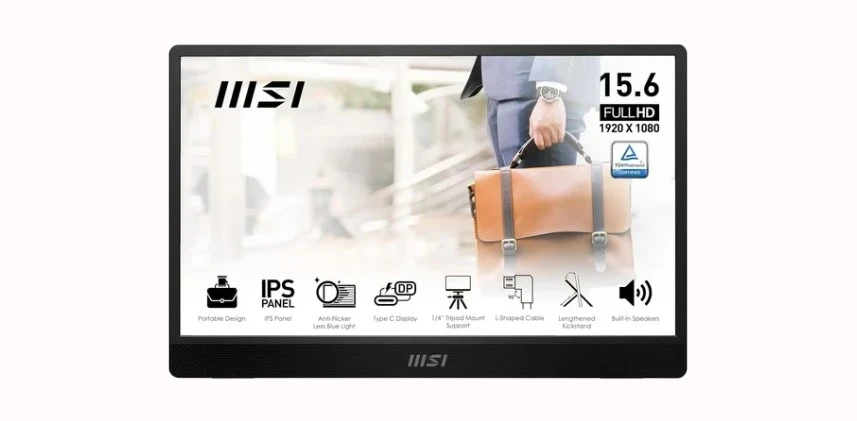
15.6" FHD IPS 60HzUSB-C + Mini-HDMIMSI EyesErgo53% NTSC Gamut
MSI Pro MP161 E2 Portable Monitor
8.5
Overall

ScreenExtendersHub is a participant in the Amazon Services LLC Associates Program. As an Amazon Associate, we earn from qualifying purchases at no extra cost to you. Editorial decisions are independent. Full disclosure โ†’

Read Before You Buy โ€“ Constraints Disclosed First

  • 53% NTSC (~73% sRGB) color gamut โ€“ inadequate for photo editing, graphic design, or color-critical work. The ARZOPA Z1RC at 123% sRGB is a meaningful step up in color accuracy.
  • Glossy panel finish โ€“ significant reflections in bright environments and offices with overhead lighting.
  • No VESA mounting โ€“ tripod only. The VESA-compatible MP165 E6 adds 75mm VESA โ€“ check current pricing on Amazon.
  • 250 nits brightness โ€“ sufficient indoor, insufficient for sunlit environments.
  • No battery, no PD passthrough โ€“ requires constant USB-C power from host device.
Constraints understood?See current availability and pricing on Amazon
Check Price on Amazon
As an Amazon Associate, we earn from qualifying purchases ยท Disclosure
Quick Specs

MSI Pro MP161 E2 at a Glance

Verified against manufacturer and Amazon product data.

15.6"
Screen Size
FHD 1920ร—1080 IPS, 16:9
250 nits
Brightness
Indoor office use โ€“ not outdoor
53% NTSC
Color Gamut
~73% sRGB โ€“ not for color work
4 ms
Response Time
GTG โ€“ good for portable
0.9 kg
Weight
1.98 lbs โ€“ sub-1kg portability
2 yr
Warranty
MSI manufacturer
Performance

Six-Axis Performance Breakdown

Six independent metrics rated out of 10 based on real-world use conditions, not just spec-sheet numbers. Expand any card for the full rationale. Methodology.

Strong  8 โ€“ 10 Acceptable  6 โ€“ 7.9 Weak  below 6
7.5
Display Quality
Adequate for docs
Details โ–พ
141 PPI at 15.6" FHD. 800:1 contrast is average IPS. 53% NTSC means ~27% of sRGB colors missing โ€“ invisible in spreadsheets, noticeable in photos. 170ยฐ viewing angles acceptable.
6.0
Brightness
Indoor only
Details โ–พ
250 nits minimum for indoor comfort. Glossy reflections compound with low brightness under fluorescents. Outdoor or cafรฉ: unreadable. ARZOPA Z1RC delivers 350 nits โ€“ a notable upgrade.
5.0
Color Accuracy
Not for design
Details โ–พ
53% NTSC (~73% sRGB) โ€“ weakest spec. Most laptops ship 95-100% sRGB. Your laptop screen has better color. Documents-and-video companion, not a design tool. ViewSonic VX1655 4K OLED is the gold standard for portable color accuracy.
9.0
Portability
Excellent
Details โ–พ
0.9 kg, 5.5mm thin. Protective case included. L-shaped cables reduce snag risk. No battery overhead. MP165 E6 saves 0.12 kg more.
8.0
Build Quality
Metal chassis
Details โ–พ
Metal Gray finish, professional. Frameless. Tripod mount practical but VESA preferred (MP165 E6 adds it). Protective case genuine. 2-year MSI warranty.
8.0
Connectivity
Dual-input
Details โ–พ
USB-C DP Alt for single-cable. Mini-HDMI for consoles/legacy. Both cables L-shaped, included. No USB-A โ€“ older desktops need adapter. 10W draw modest.
Feature Deep Dive

MSI EyesErgo & Night Vision โ€“ Interactive Demo

Drag the slider to compare standard vs Night Vision. MSI's key differentiator in budget portables.

Night Vision Before / After

Standard modeNight Vision enabled
Standard ModeNight Vision ON โœ“

Night Vision boosts dark-region gamma without blowing highlights. With EyesErgo low blue-light tuning, reduces eye strain during extended sessions. See FAQ for details.

Brightness Reality

250 Nits in Context โ€“ Interactive Visualizer

How MP161 E2 brightness performs across four lighting conditions.

Clearly Readable โœ“
250 nits

~250 nits vs ~50 lux ambient โ€“ comfortable viewing, no strain

Connectivity

Port Matrix & Signal Path Diagram

Every cable included. Understanding USB-C DP Alt Mode is critical for single-cable operation.

Port Type Signal Power Included Notes
USB-C DP Alt Mode Video + Audio Bus powered (10W) L-shaped C-to-C Single-cable โ€“ preferred
Mini-HDMI HDMI 1.4 Video + Audio Needs USB power L-shaped Mini-HDMI Requires separate power
USB-C Signal Path (Recommended)
Laptop GPU
USB-C DP Alt
C-to-C Cable
MP161 E2
Your GPU generates the display signal. Intel 12th gen+, AMD Ryzen 4000+, and Apple Silicon support DP Alt Mode natively. Older Intel may not output video over USB-C.
USB-C port must support DisplayPort Alternate Mode. Charging-only USB-C ports power the monitor but show no picture. Look for a display icon near your port.
Included L-shaped C-to-C carries video, audio, and power. Any USB-C data+video cable works as replacement โ€“ avoid charge-only cables.
Renders at 1920x1080 60Hz. 10W draw. Auto-detects input. If no signal after 5s, your USB-C likely lacks DP Alt Mode.
HDMI Fallback Path
HDMI Source
Mini-HDMI
MP161 + USB Pwr
Any HDMI device: laptops, desktops, PS5, PS4, Xbox, Nintendo Switch (docked), cameras.
Mini-HDMI carries video + audio but NOT power. Must separately connect USB power (charger, power bank, or laptop USB-A port).
With HDMI + USB power, works with virtually any device โ€“ but two cables. For docking station users, HDMI passthrough simplifies this.
Market Position

Where the MP161 E2 Sits โ€“ Price vs. Display Quality

Real prices, real specs. See exactly where your money goes.

Price vs. Display Quality Matrix

Axes scaled to actual price and measured display quality score. Hover dots for details.

Display Quality
25
50
75
100
$0
$100
$200
$300
$400
MSI Pro MP161 E2 ~$100 ยท FHD 1080p ยท 250 nits
53% NTSC ยท 60Hz ยท 4ms Budget
ARZOPA Z1RC 16" ~$160 ยท 2.5K 1600p ยท 350 nits
123% sRGB ยท 60Hz ยท matte Mid-Range
ViewSonic VX1655-4K-OLED ~$350 ยท 4K OLED ยท โˆž contrast
60W USB-C PD ยท matte ยท 3yr warranty Premium
Price (USD)
Monitor Price Resolution Color Gamut Brightness Refresh Finish Tier
MSI Pro MP161 E2
~$100 FHD 1080p 53% NTSC 250 nits 60Hz Glossy Budget
ARZOPA Z1RC 16"
~$160 2.5K 1600p 123% sRGB 350 nits 60Hz Matte Mid-Range
ViewSonic VX1655-4K-OLED
~$350 4K 2160p DCI-P3 OLED OLED โˆž 60Hz Matte Premium

Bottom line: The MSI MP161 E2 sits at the budget floor. For ~$60 more the ARZOPA Z1RC delivers meaningfully better resolution, color accuracy, brightness, and a matte finish. The ViewSonic jumps to a different class entirely โ€” OLED, 4K, and laptop charging via USB-C. Pick MSI only if sub-$100 price is the hard constraint.

Myth Busting

Five MSI MP161 E2 Myths โ€“ Debunked

Click to reveal reality. Sources linked to our glossary.

"MSI brand = premium display"
Tap to reveal โ†’
MSI is premium in gaming monitors. But MP161 E2 is budget portable โ€“ 53% NTSC and 800:1 contrast are mid-range. EyesErgo is genuine, but doesn't change the panel's physical color limits.
"4ms response = gaming"
Tap to reveal โ†’
4ms GTG prevents ghosting in video โ€“ but at 60Hz, not competitive for gaming. ARZOPA Z1FC offers 144Hz in the same category. The 4ms benefits video, not gaming.
"USB-C works with every laptop"
Tap to reveal โ†’
Only USB-C with DP Alt Mode outputs video. Many laptops have charge-only USB-C. #1 compatibility issue. Use our checker below.
"Speakers are meaningful"
Tap to reveal โ†’
Notification-level audio at best. Your laptop speakers will sound better. Consider them a headphone-forgotten fallback, nothing more.
"856 nits" (Amazon listing)
Tap to reveal โ†’
Amazon lists "856.5" โ€“ data error. MSI specs: 250 nits. No 15.6" IPS portable at this price does 856 nits. Always cross-reference. Our methodology catches these.
Variants

MP161 E2 vs. MP165 E6 โ€“ Which MSI?

MP165 E6 is the newer model on the same Amazon listing.

Reviewing
MSI Pro MP161 E2
15.6" FHD IPS ยท USB-C + Mini-HDMI
MSI Pro MP161 E2
  • Panel15.6" FHD IPS
  • Weight0.9 kg (1.98 lbs)
  • MountingTripod only
  • VESANo
  • Response4ms GTG
  • PortsUSB-C + Mini-HDMI
Check Price on Amazon
Newer
MSI Pro MP165 E6
"Overall Pick" (at time of review) ยท Lighter ยท VESA
MSI Pro MP165 E6 Portable Monitor
  • Panel15.6" FHD IPS
  • Weight0.78 kg (1.72 lbs)
  • MountingTripod + VESA 75mm
  • VESAYes (75mm)
  • Responseโ€“ (not confirmed)
  • PortsUSB-C + Mini-HDMI
Check Price on Amazon
Council verdict: If MP165 E6 is in stock, it's the better buy โ€“ lighter, VESA-mountable, and carries the Amazon "Overall Pick" (at time of review). MP161 E2 is previous-gen. Both share core panel. See all portable monitors.
Comparisons

MSI MP161 E2 vs. The Competition

Two competitors at different tiers. Full reviews in our comparison database.

VS

vs ARZOPA Z1RC 16" 2.5K

ARZOPA Z1RC 16 inch 2.5K Portable Monitor
ARZOPA wins on display: 2560x1600 vs 1920x1080, 123% sRGB vs ~73%, 350 nits vs 250, 16:10 aspect, matte finish, lighter at 1.46 lbs. At a modest premium, the upgrade for anything beyond basic documents. MSI wins on response time (4ms) and brand.
Check ARZOPA Z1RC on Amazon Winner: ARZOPA Z1RC for most users
VS

vs ViewSonic VX1655-4K-OLED

ViewSonic VX1655-4K-OLED 15.6 Inch 4K UHD Portable OLED Monitor
Different class: 4K OLED, infinite contrast, perfect blacks, 60W USB-C PD (charges laptop), matte, magnetic cover, 3-year warranty. The ViewSonic commands a significant premium. ViewSonic is for pros needing portable color accuracy.
Check ViewSonic VX1655 on Amazon Budget vs. color needs โ€“ see comparison above
Interactive Tool

MSI MP161 E2 Compatibility Checker

Check USB-C compatibility or HDMI fallback. FAQ for edge cases.

Who Should โ€“ and Should NOT โ€“ Buy

Buy the MSI MP161 E2 if youโ€ฆ

  • Need a budget second screen for documents, email, Slack, spreadsheets
  • Travel frequently and want sub-1kg portability with included case
  • Have a USB-C DP Alt Mode laptop and want single-cable simplicity
  • Value MSI warranty and EyesErgo eye-care technology
  • Use the monitor primarily in dimmed or standard indoor lighting
  • Need a secondary display for console gaming via HDMI

Do NOT buy if youโ€ฆ

  • Do any color-sensitive work โ€“ photo editing, graphic design, video grading
  • Work outdoors or in bright environments โ€“ 250 nits + glossy = unreadable
  • Need VESA mounting โ€“ get the MP165 E6 instead
  • Want competitive gaming refresh โ€“ 60Hz isn't enough
  • Expect speakers to replace headphones โ€“ they won't
  • Have slightly more budget flexibility โ€“ the ARZOPA Z1RC offers objectively better display specs
Assessment

Personal Fit Assessment Tool

Answer three questions. Get a personalized recommendation.

Documents / Email
Design / Photo
Casual Gaming
Video / Media
Dim / Home Office
Standard Office
Bright Room
Outdoor / Cafe
Under $100 strict
Up to $150
Up to $500
FAQ

Frequently Asked Questions

No. Draws 10W from host via USB-C. No internal battery. Keeps weight at 0.9 kg but requires constant power connection.
Yes โ€“ all Apple Silicon and Intel MacBooks from 2016+ support USB-C DP Alt Mode. Single-cable operation works perfectly.
Glossy. Punchier colors but reflects in bright rooms. ARZOPA Z1RC offers matte if glare concerns you.
Yes, via Mini-HDMI from Switch dock. Power MP161 E2 separately via USB. Works docked mode only โ€“ Switch can't output video over USB-C directly.
Monitor, L-shaped USB-C cable, L-shaped Mini-HDMI cable, protective case, quick start guide. No power adapter needed.
MP165 E6: lighter (0.78 kg), adds VESA 75mm, Amazon "Overall Pick" at time of review โ€“ check current availability. If available, it's the better buy. See variant comparison.
For documents: no. For photo/design: yes โ€“ ~27% of sRGB colors missing. Your laptop's screen likely has better color accuracy.
No PD passthrough. It draws 10W from your laptop. For 60W PD charging, see the ViewSonic VX1655-4K-OLED (premium tier).
MSI Pro MP161 E2 Portable Monitor
8.5
Overall

MSI Pro MP161 E2 โ€“ Your Verdict?

Budget portability king at 0.9 kg with EyesErgo technology. Best for indoor document work.

As an Amazon Associate, we earn from qualifying purchases ยท Disclosure
Scroll to Top