
Lenovo ThinkVision M15 Review15.6-inch Full HD IPS · USB-C portable monitor
The ThinkVision M15 is worth considering for documents, spreadsheets, and a second workspace beside a compatible USB-C laptop. This review weighs its portability, power pass-through, and display limitations, and explains what to check in the two Amazon listings.
Open the charging setup
Research-based review. Based on manufacturer documentation and the supplied Amazon listing details. No hands-on testing or independent measurements. Read our methodology.
ScreenExtendersHub is a participant in the Amazon Services LLC Associates Program. As an Amazon Associate, we earn from qualifying purchases at no extra cost. Editorial decisions are independent. Full disclosure →
Read Before You Buy — Constraints Disclosed First
- USB-C video output required. The M15 has no HDMI socket. Check that your laptop supports DisplayPort Alt Mode over USB-C; charging-only USB-C is insufficient.
- 250 nits typical brightness. Consider your lighting conditions, particularly near bright windows.
- 45% NTSC color gamut. Prioritise a wider-gamut display for color-critical work.
- Power and charging. Lenovo lists 8W typical / 9.5W maximum consumption and pass-through delivery up to 65W. Confirm your charger and laptop requirements.
- Listing identity. B09DVP7F5M identifies 62CAUAT1WL. The supplied B09CQ8R3SZ details list model M15 and two UPCs; its exact supplied part number needs confirmation. See the listing guide.
What Makes the ThinkVision M15 Different
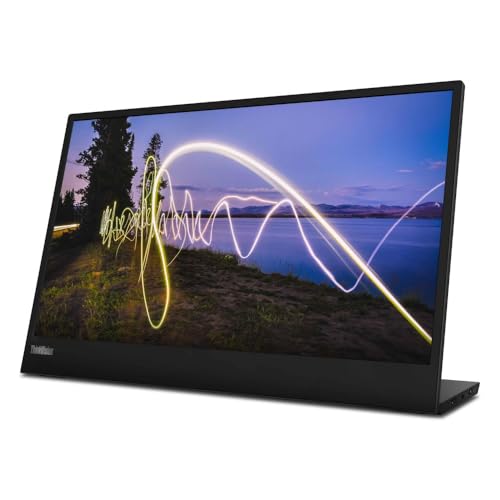
The M15 makes a clear case for a portable office setup: a 15.6-inch Full HD IPS screen, a folding stand, and USB-C ports on both sides. These are useful features when your main need is keeping a document, spreadsheet, or meeting window separate from the laptop screen.
One charger through the M15
- Confirm that the laptop port supports USB-C DisplayPort Alt Mode video and accepts USB-C charging.
- Connect a suitable USB-C PD charger to either M15 USB-C port. Check the charger, cable and laptop power requirements before connecting.
- Connect the other M15 port to the laptop using the supplied video-capable USB-C cable. This setup uses two cables: charger to monitor, and monitor to laptop.
- Check that the monitor displays a picture and that the laptop reports charging. A working picture alone does not confirm charging.
Power travels from the charger through the M15 to the laptop. Video travels from the laptop to the M15. Lenovo specifies pass-through delivery up to 65W; actual delivery varies with the connected devices and monitor configuration. It is not a guaranteed 65W supply.
If the laptop does not charge or its battery still falls under load, confirm the adapter and laptop requirements in their manuals. As a diagnostic comparison, connect the laptop to its own recommended charger and power the M15 from a compatible laptop connection. Do not assume that a higher charger label overrides the M15 pass-through limit.
Manufacturer reference: Lenovo M15 datasheet, Power Pass Through and footnote 3.
The two Amazon listings need careful reading because their fields conflict with Lenovo documentation and, in places, with each other. This review uses Lenovo specifications for the display hardware. The listing guide separates known identifiers from details that remain unconfirmed.
Full Spec Sheet
Documented M15 specifications from Lenovo PSREF. These are manufacturer values, not independent measurements.
| Specification | Value | Assessment |
|---|---|---|
| Display | 15.6" IPS, 1920×1080 (FHD), 16:9 | Standard |
| Brightness | 250 nits typical | Check lighting |
| Color Gamut | 45% NTSC | Limited gamut |
| Response Time | 6ms (extreme) / 14ms (typical) | Adequate |
| Refresh Rate | 60Hz | Standard |
| Contrast | 1000:1 typical | Standard |
| Ports | 2× USB-C (DP Alt Mode + PD) | USB-C only |
| Power | USB-C power; pass-through up to 65W | Elegant |
| Weight | 860g (1.90 lbs) | Ultra-light |
| Thickness | 6mm (head only) | Ultra-thin |
| Stand | 0–90° tilt; up to 10mm lift | Good |
| VESA | 100mm mounting, two screw holes | Mountable |
| Eye Care | TÜV Rheinland Low Blue Light | Certified |
| In Box | Monitor, USB-C cable (1m), clips, sleeve, guide | Complete |
B09CQ8R3SZ vs B09DVP7F5M
Compare the exact supplied model, seller, return terms, and warranty coverage before ordering. Compare each offer against the same laptop and workspace requirements.

Amazon Listing B09CQ8R3SZ
- Two UPCs supplied in listing
- Confirm the supplied Lenovo part number
- Confirm warranty with seller

Amazon Listing B09DVP7F5M
- Listed model: 62CAUAT1WL
- Confirm the delivered model
- Confirm warranty coverage
How the Features Fit Your Work
Click a card to see how portability, connections, display features, and stand adjustments fit your work.
Portability
860g advertised, about 6mm through the screen head, sleeve included.
Connectivity Logic
Two USB-C ports with video input and power pass-through.
Build Quality
Folding stand and protective sleeve included.
Display Quality
250 nits typical, 45% NTSC gamut, 60Hz IPS panel.
Ergonomics
0–90° tilt and up to 10mm lift.
Value Positioning
Compare the current offer with your setup needs.
Will the M15 Work With Your Laptop?
USB-C-only means compatibility is not guaranteed. See glossary for DP Alt Mode.
Compatibility Checker
3 questions · instant result
Select Your Workflow
How the M15 fits depends on what you do. Select your scenario for a personalized verdict.
Remote Worker
Home, hotels, coffee shops
Developer
IDE + terminal + browser
Analyst
Charts, spreadsheets, data
Designer
Color accuracy critical
Road Warrior
Airports, client sites
Student
Papers, research, notes
250 Nits — What Does That Actually Mean?
Consider other alternatives if needed.
Lighting Considerations
Choose your lighting conditions for practical positioning advice.What to Check Before Ordering
Use the seller listing to confirm purchase terms, and manufacturer documentation to confirm hardware specifications.
Confirm the setup
- USB-C DisplayPort Alt Mode video output on your laptop.
- A suitable video-capable cable.
- Charger and laptop power requirements.
Confirm the offer
- Exact Lenovo part number supplied.
- Seller, product condition, and return terms.
- Warranty coverage for your location.
"Monitor stays black — no signal"
Possible causes: The host port may lack video output, the cable may not support video, or the connection may have a power or display-setting issue.
Check: Confirm DisplayPort Alt Mode support in the laptop specifications, use the included cable, and check display settings and power.
Check setup"Screen too dim in my office"
The 250-nit rating may be a constraint in strong ambient light. Check brightness settings and reduce direct glare.
If brightness is still insufficient, compare a display with a higher documented brightness rating. The MSI Pro MP161 E2 is rated at 250 nits, so it does not offer a brightness increase on paper.
Check setup"Battery draining rapidly"
Powering an external monitor adds to the laptop battery load. Lenovo lists 8W typical and 9.5W maximum monitor consumption; total battery drain also depends on laptop workload.
Check: Use a suitable charger with the documented pass-through arrangement and confirm the laptop charging status.
Check setup"Flickering / intermittent signal"
Possible causes: Cable, power, host-port, or display-driver issues. Start with the included cable and check both connections.
Try another compatible host port and check available graphics-driver updates. Persistent flickering requires further diagnosis.
Check setupMyth vs. Reality
Click a card to review the setup requirements and limitations.
"Any USB-C cable will work"
What to check
Use a USB-C cable capable of carrying the required video signal. The included Lenovo cable is the starting point; connector shape alone is not enough.
"Use an HDMI adapter"
What to check
The M15 has no HDMI socket. A standard USB-C-to-HDMI adapter is not a direct substitute for a USB-C video source. Any active conversion solution needs explicit support for this monitor and its power requirements.
"Two listings = different products"
What to check
Compare the supplied Lenovo part number, seller, return terms, and warranty coverage when choosing an offer. B09DVP7F5M identifies 62CAUAT1WL.
"250 nits works outdoors"
What to check
The 250-nit typical rating makes lighting an important buying consideration. Position the screen away from direct glare, and prioritise higher brightness if you regularly work in strong ambient light.
"Replaces laptop for design"
What to check
The documented 45% NTSC gamut is limited for color-critical work. Choose coverage and calibration evidence suited to the task.
"Power Pass Through charges fast"
What to check
Pass-through supports power delivery up to 65W, with actual capacity dependent on devices and configuration. Charging speed is not guaranteed.
Should You Buy the ThinkVision M15?
Answer four questions for a personalized recommendation. Based on our buying guide framework.
Should I Buy?
4 questions · instant verdict
Who Should - and Should Not - Buy This Monitor
Buy If You…
- Have confirmed USB-C DP Alt Mode / Thunderbolt on your laptop
- Work primarily indoors with controlled lighting
- Value a folding stand, bilateral USB-C ports, and power pass-through
- Use for productivity (docs, spreadsheets, code, email) — not color-critical work
- Travel frequently and need sub-900g weight with premium portability
Skip If You…
- Need HDMI — the M15 has zero HDMI input. Consider the Acer PM161Q instead.
- Need wider color coverage for color-critical work
- Need higher brightness for strong ambient light
- Want a tri-screen laptop extender setup — the M15 is a standalone second screen
- Need built-in speakers — none are documented
Final Verdict — A Practical Second Screen for USB-C Workflows
The M15 is worth shortlisting for a compatible USB-C laptop used mainly for documents, spreadsheets, and reference material. Its 15.6-inch Full HD IPS panel, folding stand, ports on both sides, and advertised 860g weight make a coherent portable office setup.
Its main constraints are 250-nit typical brightness, 45% NTSC gamut, 60Hz refresh, and the lack of an HDMI socket. I would prioritise another display for color-critical projects or high-refresh gaming, and check lighting carefully for bright workspaces.
I would choose between the Amazon offers by checking the supplied Lenovo part number, total delivered price, return terms, and warranty coverage for my location.
Boniface Musembi evaluates portable monitors the way they are actually used — carried between desks, cafes, and client sites — judging each by how it behaves in real workflows rather than on spec sheets. His assessments draw on independent, published research and a documented review methodology.
Can I use the M15 with a MacBook?
Does it work with iPad / iPhone?
What cable do I need?
Can I charge my laptop through the M15?
Does it support daisy-chaining?
Why are there two Amazon listings?
Is it good for gaming?
How is the M15 different from the M14?
Continue Your Research
Sources: Lenovo M15 specifications; Lenovo M15 overview; MSI PRO MP161 E2 specifications; ASUS MB16ACV specifications.