
Design Your Optimal Multi-Screen Workspace
Stop guessing. Get expert guidance on screen extenders, portable monitors, and docking stations — with real compatibility analysis and failure-case disclosure.

Laptop Screen Extenders
Our latest in-depth reviews of portable dual and triple-screen solutions.
View All Laptop Extenders
QQH Laptop Screen Extender Review
Discover how the QQH Laptop Screen Extender offers a dual-screen solution for cramped workspaces. Boost productivity with its ultra-slim design and seamless connectivity.
Read Full Review
FHH Laptop Screen Extender Review
Boost productivity with the FHH Laptop Screen Extender—14" FHD display, 315° rotation, and triple-screen support. Perfect for multitaskers seeking efficiency.
Read Full Review
Sharanix Updated Laptop Screen Extender,15.6″ Portable Triple Monitor
Experience multi-tasking like never before with the Updated Laptop Screen Extender. Dive into vivid visuals, enhance efficiency, and transform your laptop setup effortlessly!
Read Full ReviewThe Multi-Screen Market Is Broken
Every manufacturer claims "universal compatibility." But when you connect that screen extender to your specific machine? Driver conflicts. Port limitations. DisplayPort Alt Mode incompatibilities.
The affiliate review industrial complex isn't helping. Rankings optimized for commission rates. Compatibility warnings buried. No one tells you when you shouldn't buy.
Hidden Incompatibilities
"Universal" that only works with specific ports.
Undisclosed Limits
Refresh caps and resolution drops in fine print.
Commission Rankings
Lists based on payouts, not suitability.
No Real Guidance
Generic recs ignoring your constraints.
Specialized Guidance Across Four Categories
Each has unique compatibility risks. We provide the frameworks you need.
Laptop Screen Extenders
High SensitivityPortable dual/triple-screen solutions that attach to your laptop. Highest compatibility risk — every review declares its evidence basis and discloses the failure cases others hide.
- Hinge stress analysis
- Power draw testing
- macOS/Windows/Linux
Portable Monitors
Moderate SensitivityStandalone displays for flexible deployment. More flexible than extenders but different trade-offs: desk space, cable management, and true portability vs. marketing claims.
- True weight analysis
- Cable dependency
- Panel quality trade-offs
Desktop Screen Extenders
Lower SensitivityPermanent multi-monitor solutions for dedicated workstations. Lowest compatibility risk but trade-offs shift toward ergonomics, panel alignment, and long-term durability.
- Ergonomic guidance
- Panel alignment
- Mount compatibility
Docking Stations
Moderate SensitivityConnectivity hubs for multiple monitors, peripherals, and charging through one cable. We provide clarity on port standards, multi-monitor limits, and OS-specific constraints.
- USB-C vs Thunderbolt
- Monitor config limits
- Power delivery check
We Explain Systems, Not Just Products
Competitors review products. We explain how workspace expansion systems actually function across workflows, operating systems, and hardware constraints — before any purchase decision.
- Compatibility intelligence with failure-case disclosure
- Trade-off clarity — we tell you who should NOT buy
- Decision frameworks, not just spec comparisons
- Zero sponsored rankings or pay-to-play placements
Built on Transparency
Portable Monitors
Standalone secondary displays evaluated for true portability and panel quality.
View All Portable MonitorsIntehill 3K Portable Monitor Review
Discover why the Intehill 3K Portable Monitor feels essential. Experience its sleek design, 3K display, and portability—perfectly balancing elegance and utility.
Read Full Review
EPORMOT 18.5 Inch Portable Monitor 120Hz FHD 1080P — USB-C Gaming Display for Laptop, PC, Xbox, PS5, Switch
Discover an 18.5" portable monitor that's sleek and practical—a must-have travel companion with 120Hz refresh rate and vivid display. Perfect for gamers and multitaskers!
Read Full Review
Yodoit Portable Monitor Review
Discover the Yodoit Portable Monitor, your ally against tiny screens. Unbox sleek design, 144Hz refresh, and wide compatibility, perfect for work, gaming, or travel.
Read Full ReviewHow We Review Products
Every evaluation follows our six-stage evaluation record. We analyze through the lens of your workflow — not commission rates.
// ScreenExtendersHub
{
  "evidence": {
    "basis": ["hands-on", "research", "mixed"],
    "declared_per_page": true
  },
  "disclosure": {
    "failures_first": true,
    "who_not_buy": true
  },
  "sponsored": 0
}
Us vs. Typical Affiliate Sites
What separates our analysis from commission-driven noise.
Frequently Asked Questions
Quick answers about multi-screen solutions.
What is a laptop screen extender?
A portable multi-monitor solution that attaches to your laptop via USB-C or USB-A, providing 1-2 additional displays. Learn more →
Will a screen extender work with my laptop?
Depends on your ports (DisplayPort Alt Mode, Thunderbolt, USB-A), OS, and power delivery. We provide compatibility matrices for every product.
Do screen extenders damage laptop hinges?
Some add 500g-1.5kg which can stress hinges over time. Risk depends on hinge durability and mounting. We flag this risk in every extender review.
What is a docking station?
A hub that expands your laptop's ports, supporting multiple monitors, peripherals, and charging through one cable. Learn more →
How do you review products?
Every review follows our six-stage evaluation record and declares its evidence basis — hands-on, research-based, or mixed — with full disclosure. When we haven't personally tested a product, we say so clearly. Failures are disclosed first, and every review includes "who should NOT buy." Our methodology →
Docking Stations
Connectivity hubs evaluated for port standards, multi-monitor limits, and power delivery.
View All Docking Stations
Dell WD19S 180W Docking Station Review
Explore the Dell WD19S 180W Docking Station's transformative power in this witty review. Discover how it seamlessly integrates tech, enhancing productivity with ease.
Read Full Review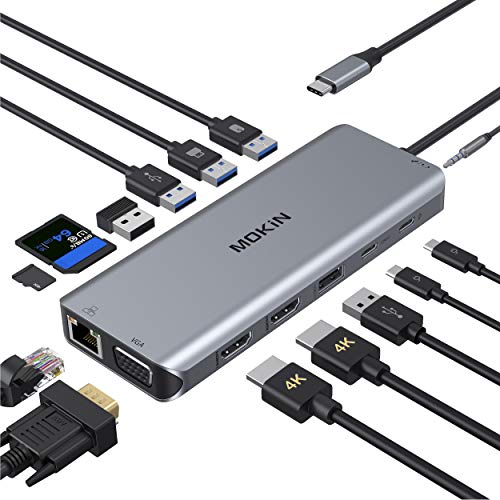
14 in 1 USB-C Docking Station Review
Tame your tangled workspace with the 14 in 1 USB-C Docking Station. Enjoy seamless connectivity and a chaos-free setup! A must-read review with a touch of wit.
Read Full Review
Anker 7-in-1 USB-C Hub Review
Enhance your productivity with the Anker 7-in-1 USB-C Hub. Dual monitors, rapid 10Gbps data transfers, and an 85W max output make it a workspace game-changer!
Read Full Review