
HP USB-C Dock G5 Review
HP USB-C Dock G5 Review: Evaluate dual 4K @ 60Hz video output, 100W power delivery, USB-A/C ports, and multi-OS MST compatibility.
HP’s enterprise dock for HP business laptops. The USB-C Dock G5 connects to an EliteBook or ProBook through a single USB-C cable and gives you triple display at 4K, 100W charging, Gigabit Ethernet, USB ports, and audio. IT departments deploy these across entire organizations because one dock model covers the EliteBook, ProBook, and Elite x2 lineup. That is the kind of product this is: not a consumer gadget you compare on Amazon, but a corporate tool that shows up at your desk on day one and works without questions.
The Amazon listing for this product is unusually sparse. The bullets say “Wired,” “Notebook,” “3 displays,” “4K,” and “QHD.” That is the entire technical description Amazon provides. No port breakdown. No data transfer speed. No OS compatibility list. The specs table below combines what Amazon confirms with what HP’s official product documentation provides for the 5TW10AA model. HP Inc. is the manufacturer. 676 grams. Limited warranty (duration not specified).

HP USB-C Dock G5
Key Specifications
| Specification | Detail |
|---|---|
| Total Ports | 9 |
| DisplayPort | 2 |
| HDMI | 1 |
| USB 3.0 | 1 (powered) |
| Super Speed USB 3.0 | 1 |
| USB-C | 1 |
| Gigabit Ethernet | 1 |
| Audio | 1 |
| Max Displays | 3 |
| Supported Resolutions | 4K, QHD |
| Power Adapter | 100W |
| Compatible Devices | HP EliteBook, ProBook, Elite x2 series (see detailed list below) |
| Weight | 676g / 1.5 lbs |
| Dimensions | 1″ x 1″ x 1″ (Amazon data, clearly incorrect — HP documentation: 4.8″ x 4.8″ x 1.8″) |
| Manufacturer | HP Inc. |
| Warranty | Limited (duration not specified) |

An Enterprise Dock on a Consumer Marketplace
The HP USB-C Dock G5 was not designed for Amazon shoppers comparing hubs. It was designed for HP’s enterprise sales channel where IT managers order hundreds at a time for standardized desk deployments. That explains why the Amazon listing has almost no useful specs. HP sells this dock through their own procurement process, and the Amazon listing is a secondary channel that was never optimized with detailed product copy.

What this means for you as a buyer: the dock is a proven enterprise product with massive deployment across corporate environments. The sparse listing does not reflect the product quality. It reflects the fact that Amazon is not HP’s primary sales channel for business hardware.
HP Elite and ProBook Compatibility
The G5 is designed for HP’s business laptop lineup. Compatible models include the Elite x2 G4, EliteBook 735 G6, EliteBook x360 1040 G6, EliteBook 830 G6, EliteBook 840 G6, EliteBook 850 G6, ProBook 445R G6, ProBook 640 G5, ProBook 650 G5, and the Mobile Thin Client MT45. Additional models may be compatible. Check HP’s compatibility documentation for your specific machine.
This is an HP dock for HP laptops. Unlike universal USB-C hubs that work with any brand, the G5 is tested and optimized for HP’s business hardware. Non-HP laptops may work through USB-C, but HP does not guarantee it and the enterprise features (manageability, firmware updates) are designed for HP machines.
Triple Display at 4K and QHD
Two DisplayPort outputs and one HDMI output drive up to three external monitors. The Amazon bullets confirm 4K and QHD support without specifying refresh rates. For most business use (documents, spreadsheets, email, video calls, presentations), 4K at any refresh rate provides sharp, clear text on external monitors. The triple-display capability turns a single HP laptop into a full desk workstation with three screens plus the laptop display.
The two DisplayPort outputs handle most modern business monitors. The HDMI output covers conference room projectors and displays. Together, they provide flexibility for mixed display equipment. For USB-C display output details, see our USB-C portable monitor guide.
100W Charging
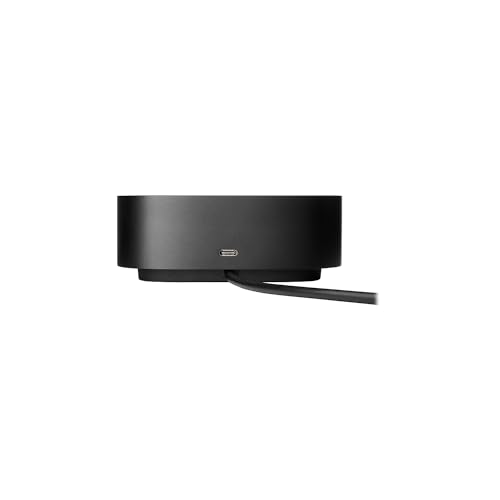
The 100W power adapter charges the laptop through the USB-C dock connection while all peripherals and displays run. HP EliteBook and ProBook models typically charge at 45-65W. At 100W, the dock charges these laptops at full speed during use with overhead to spare. Your laptop charger stays in your bag. At the desk, the dock handles power.
Amazon Data Gaps
The Amazon listing for this product is unusually bare compared to other docks on this site. Here is what is not specified in the Amazon data:
No data transfer speed listed. The port description from HP’s documentation indicates USB 3.0, but the Amazon listing does not confirm 5 Gbps or 10 Gbps.
No OS compatibility listed. HP’s documentation supports Windows. Mac and Linux status is not confirmed in the Amazon data.
No box contents listed beyond “Docking Station.” Whether a power adapter, cables, or documentation are included is not specified in the Amazon bullets.
Dimensions are listed as 1″ x 1″ x 1″ which is clearly a data entry error for a 9-port docking station. The original HP product page lists 4.8″ x 4.8″ x 1.8″.
For a dock from HP Inc. with massive enterprise deployment, the sparse Amazon listing is unusual but explainable. HP sells this through enterprise channels, not through Amazon optimization. For docking stations with more complete Amazon data, see our docking stations hub page.
What’s in the Box
| Item | Detail |
|---|---|
| HP USB-C Dock G5 | 1 |
| 100W Power Adapter | Not confirmed in Amazon listing (typically included by HP) |

Drawbacks
| Consideration | Detail |
|---|---|
| Sparse Amazon Listing | Minimal specs, no port speeds, no OS compatibility, no box contents. |
| HP-Specific | Designed for HP Elite/ProBook. Non-HP compatibility not guaranteed. |
| Dimensions Incorrect | Amazon says 1″x1″x1″. Real dimensions are approximately 4.8″x4.8″x1.8″. |
| Limited Warranty | Duration not specified. |
| No Data Transfer Speed Listed | USB 3.0 implied but not confirmed at 5 Gbps in Amazon data. |
Who This Dock Is For
HP EliteBook and ProBook owners who want the dock HP designed for their machine: Triple 4K/QHD display, 100W charging, 9 ports, Gigabit Ethernet. The G5 is HP’s standard USB-C dock for their business laptop lineup, deployed by IT departments worldwide. If your HP laptop is on the compatibility list, this dock is engineered for your machine. For an HP dock with Thunderbolt 4, see the HP Thunderbolt 4 Dock 120W G4 review.
Non-HP laptop owners or buyers who need detailed specs before purchasing: HP designed this for HP machines. The Amazon listing lacks the detail most buyers expect. For universal docks with complete Amazon data, see our docking stations hub page.
Final Verdict
The HP USB-C Dock G5 is the dock HP built for HP business laptops. Triple display, 100W charging, Gigabit Ethernet, 9 ports, and the engineering that comes from a manufacturer building the dock for their own hardware. The Amazon listing is sparse because HP sells this through enterprise channels, not through Amazon optimization. The product is proven across massive corporate deployments.
For HP business laptop owners, the G5 is the straightforward choice. It is the dock HP designed for your machine. The sparse listing and unspecified warranty duration are the practical gaps. For buyers who need detailed specs or use non-HP hardware, other docks on this site provide more complete information and broader compatibility.
Frequently Asked Questions
Why is the Amazon listing so sparse?
HP’s enterprise products are typically sold through HP’s direct sales, IT resellers, and enterprise procurement channels. The Amazon listing may not have been optimized with full specs because the primary sales channel is not Amazon. The product is proven and widely deployed. The listing is just bare.
Will this work with my non-HP laptop?
HP designed the G5 for their Elite and ProBook series. Non-HP laptops with USB-C may function for basic connectivity, but HP does not guarantee compatibility, and enterprise features may not work. For universal USB-C docks, see other options on this site.
Are the dimensions really 1″ x 1″ x 1″?
No. That is an Amazon data entry error. The actual HP USB-C Dock G5 measures approximately 4.8″ x 4.8″ x 1.8″ based on HP’s product documentation.
Is the 100W power adapter included?
The Amazon listing does not confirm box contents. HP typically includes the power adapter with enterprise dock shipments, but the Amazon listing does not explicitly state this. Confirm with the seller before purchasing if the adapter is critical to your setup.
Disclosure: As an Amazon Associate, I earn from qualifying purchases.

I evaluate docking stations the way they actually get used — against real bandwidth budgets, power-delivery ceilings, and the OS handshakes that quietly cap what a port can do — not spec-sheet promises. Every constraint that can break a multi-display setup is disclosed before any affiliate link.
Docking Station Intelligence
The standards are confusing by design. These three panels decode what manufacturers won’t explain clearly. Applicable to every docking station.
The USB-C Confusion Matrix
The USB-C connector is the single greatest source of buyer confusion in docking stations. The physical plug looks identical whether it carries USB 2.0 at 480 Mbps or Thunderbolt 5 at 120 Gbps — a 250x difference in capability hidden behind the same shape. Manufacturers exploit this by labeling everything "USB-C compatible" without specifying which protocol runs through it. Two docks can look identical on the outside and behave completely differently once you plug them in.
The hierarchy matters because it determines everything: how many monitors your dock can drive, how fast files transfer, whether your laptop charges while docked, and whether you need third-party drivers. Here is the real capability ladder, from slowest to fastest:
The practical takeaway: if your laptop has Thunderbolt 4, buy a Thunderbolt dock. If it only has generic USB-C, verify whether it supports DisplayPort Alt Mode before buying anything with multi-monitor claims. Our buying guide walks through verification steps for every major laptop brand.
Power Delivery: What the Watts Mean
Power Delivery (PD) determines whether your docking station can charge your laptop while you work, or whether you need a separate charger cluttering your desk. The math is simple but rarely explained: your laptop draws a specific wattage under load, and the dock must match or exceed it. If the dock delivers less than your laptop needs, the battery slowly drains even while plugged in — defeating the purpose of a docking station entirely.
Check the laptop manufacturer’s recommended power supply and the dock’s rated host power. Shared charging budgets vary by dock: powering peripherals does not reduce host charging on every model. USB-C charging also depends on the laptop, cable and negotiated power profile. A lower-power supply may charge slowly or allow battery drain under load; a fixed 15–20W margin is not a universal requirement.
Check your laptop’s original charger wattage — that’s your baseline. Our FAQ covers how to find this for every major brand.
Native Display vs DisplayLink: The Hidden Factor
This is the decision most buyers don’t know they’re making. When a docking station outputs video to your monitors, it uses one of two fundamentally different methods: native (the dock passes your laptop’s GPU signal directly to the monitor) or DisplayLink (the dock compresses video over USB and a software driver renders it). The difference is invisible in marketing materials but profoundly affects your daily experience.
Native output through DisplayPort Alt Mode or Thunderbolt uses the host graphics system. DisplayLink transports encoded display data over USB using compatible software. Its responsiveness and CPU/GPU load vary with the computer, software, resolution and workload; fixed latency, CPU and battery percentages are not universal specifications. Protected-video playback also depends on the display path, operating system and service. Check DisplayLink system requirements for your configuration.
DisplayLink can add displays through compatible USB connections, including USB-A, and can serve systems with limited native display outputs. Native limits depend on the exact computer and operating mode. For example, M3 MacBook Air and MacBook Pro support two external displays with the lid closed under Apple’s stated conditions. Choose the display method against your computer, software permissions and workload.
Native (Alt Mode / Thunderbolt)
DisplayLink (USB compression)
Choose a native or DisplayLink dock by checking the exact host, dock, operating system and monitor combination. Native output is often preferable for latency-sensitive workloads; DisplayLink can be useful for additional productivity displays and compatible USB-A hosts. Neither connector shape nor a generic bandwidth number proves compatibility.
COMMAND CENTERCOMMAND CENTER
Six tools that decode the confusion manufacturers create. Port protocols, power budgets, display configurations, compatibility, desk planning, and future-proofing. Full buying guide →
Port Protocol DecoderWhat does your connection type actually support? Glossary
Power Delivery CalculatorCan this dock keep your laptop charged?
Display Configuration PlannerCan your dock push enough pixels?
Laptop-to-Dock CompatibilityWill this dock work with YOUR laptop?
Desk Setup ArchitectWhat ports do you actually need?
Select everything you need to connect: