
Design Your Optimal Multi-Screen Workspace
Stop guessing. Get expert guidance on screen extenders, portable monitors, and docking stations — with real compatibility analysis and failure-case disclosure.

Laptop Screen Extenders
Our latest in-depth reviews of portable dual and triple-screen solutions.
View All Laptop Extenders
UPERFECT Portable Monitor, 15.6″ IPS HDR 1920X1080 FHD Review
Discover the delight of the UPERFECT 15.6" IPS HDR Monitor. It’s less daydream, more handy companion—ready to elevate your gaming and work on the go!
Read Full Review
FANGOR Portable Monitor Review
Discover the FANGOR Portable Monitor, a sleek 15.6" FHD marvel, perfect for travel. Explore rich colors and seamless compatibility in this delightfully portable screen.
Read Full Review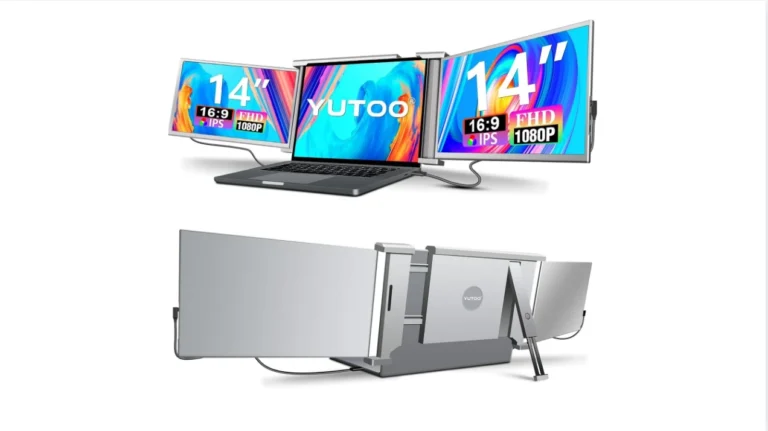
YUTOO 14″ Triple Laptop Screen Extender Review
Discover the YUTOO Laptop Screen Extender, a triple-screen marvel for multitaskers on the go. Boost productivity with this 14" portable display wonder!
Read Full ReviewThe Multi-Screen Market Is Broken
Every manufacturer claims "universal compatibility." But when you connect that screen extender to your specific machine? Driver conflicts. Port limitations. DisplayPort Alt Mode incompatibilities.
The affiliate review industrial complex isn't helping. Rankings optimized for commission rates. Compatibility warnings buried. No one tells you when you shouldn't buy.
Hidden Incompatibilities
"Universal" that only works with specific ports.
Undisclosed Limits
Refresh caps and resolution drops in fine print.
Commission Rankings
Lists based on payouts, not suitability.
No Real Guidance
Generic recs ignoring your constraints.
Specialized Guidance Across Four Categories
Each has unique compatibility risks. We provide the frameworks you need.
Laptop Screen Extenders
High SensitivityPortable dual/triple-screen solutions that attach to your laptop. Highest compatibility risk — every review declares its evidence basis and discloses the failure cases others hide.
- Hinge stress analysis
- Power draw testing
- macOS/Windows/Linux
Portable Monitors
Moderate SensitivityStandalone displays for flexible deployment. More flexible than extenders but different trade-offs: desk space, cable management, and true portability vs. marketing claims.
- True weight analysis
- Cable dependency
- Panel quality trade-offs
Desktop Screen Extenders
Lower SensitivityPermanent multi-monitor solutions for dedicated workstations. Lowest compatibility risk but trade-offs shift toward ergonomics, panel alignment, and long-term durability.
- Ergonomic guidance
- Panel alignment
- Mount compatibility
Docking Stations
Moderate SensitivityConnectivity hubs for multiple monitors, peripherals, and charging through one cable. We provide clarity on port standards, multi-monitor limits, and OS-specific constraints.
- USB-C vs Thunderbolt
- Monitor config limits
- Power delivery check
We Explain Systems, Not Just Products
Competitors review products. We explain how workspace expansion systems actually function across workflows, operating systems, and hardware constraints — before any purchase decision.
- Compatibility intelligence with failure-case disclosure
- Trade-off clarity — we tell you who should NOT buy
- Decision frameworks, not just spec comparisons
- Zero sponsored rankings or pay-to-play placements
Built on Transparency
Portable Monitors
Standalone secondary displays evaluated for true portability and panel quality.
View All Portable Monitors
Cocopar 1080P Travel Monitor Review
Discover the charm of the cocopar 1080P Travel Monitor: compact, versatile, and endearing, it's the Swiss Army knife of screens that'll transform your multitasking.
Read Full Review
Yxk Portable Monitor Review
Discover the Yxk Portable Monitor's charms, from its ultra-slim design to its dazzling 1080P display. Perfect for travelers craving extra screen space!
Read Full Review
EPORMOT 18.5 Inch Portable Monitor 120Hz FHD 1080P — USB-C Gaming Display for Laptop, PC, Xbox, PS5, Switch
Discover an 18.5" portable monitor that's sleek and practical—a must-have travel companion with 120Hz refresh rate and vivid display. Perfect for gamers and multitaskers!
Read Full ReviewHow We Review Products
Every evaluation follows our six-stage evaluation record. We analyze through the lens of your workflow — not commission rates.
// ScreenExtendersHub
{
  "evidence": {
    "basis": ["hands-on", "research", "mixed"],
    "declared_per_page": true
  },
  "disclosure": {
    "failures_first": true,
    "who_not_buy": true
  },
  "sponsored": 0
}
Us vs. Typical Affiliate Sites
What separates our analysis from commission-driven noise.
Frequently Asked Questions
Quick answers about multi-screen solutions.
What is a laptop screen extender?
A portable multi-monitor solution that attaches to your laptop via USB-C or USB-A, providing 1-2 additional displays. Learn more →
Will a screen extender work with my laptop?
Depends on your ports (DisplayPort Alt Mode, Thunderbolt, USB-A), OS, and power delivery. We provide compatibility matrices for every product.
Do screen extenders damage laptop hinges?
Some add 500g-1.5kg which can stress hinges over time. Risk depends on hinge durability and mounting. We flag this risk in every extender review.
What is a docking station?
A hub that expands your laptop's ports, supporting multiple monitors, peripherals, and charging through one cable. Learn more →
How do you review products?
Every review follows our six-stage evaluation record and declares its evidence basis — hands-on, research-based, or mixed — with full disclosure. When we haven't personally tested a product, we say so clearly. Failures are disclosed first, and every review includes "who should NOT buy." Our methodology →
Docking Stations
Connectivity hubs evaluated for port standards, multi-monitor limits, and power delivery.
View All Docking Stations
StarTech.com Hybrid USB-C/USB-A Triple 4K Dock Review
Explore the StarTech.com USB-C Docking Station—a clutter-banishing marvel for MacBook and Windows users. Unleash dual 4K displays with electrifying ease!
Read Full Review
Dell WD15 Monitor Dock Review
Discover the Dell WD15 Monitor Dock, a sleek, reliable hub for all your devices. With 4K support and dual displays, it transforms any workspace effortlessly.
Read Full Review
HP USB-C Universal Docking Station Review
Streamline your workspace with the HP USB-C Universal Docking Station. From dual 4K displays to universal compatibility, it's a tangled cable's worst nightmare!
Read Full Review