
Cevaton N3 16″ 1200P Laptop Screen Extender Review
Cevaton N3 Portable Monitor Review: Evaluate 16" 1200p 16:10 IPS display quality, 100% sRGB, 300 nits, rotating portrait stand, single USB-C setup, 1.48 lb weight, included protective case, three in-box cables, and base M-series Mac.
The Cevaton N3 is a single 16-inch screen extender for laptops: one 1920×1200 IPS panel in a thin-bezel body, with a detachable stand that rotates through 360 degrees for landscape or portrait, at 1.48 lb by Cevaton’s figure. It runs from one USB-C cable on a laptop with DisplayPort Alt Mode, or from HDMI plus a USB-A power lead on anything else, with no driver on Windows, macOS, ChromeOS, Android, Linux, DeX phones, tablets and consoles. The panel quotes 100% sRGB, 300 nits, a 1000:1 contrast ratio and a 178-degree viewing angle, with low blue light and, per Amazon’s fields, HDR-ready, 2ms and built-in speakers. A PU case and three cables are in the box; a power adapter is not. It is a 16:10 panel, which is the point: 120 more rows than a 1080P screen of the same width, and about 30 percent more area than a 14-inch extender. 1-year warranty.

Cevaton 16" Laptop Screen Extender, 1200P Portable Monitor for Laptop | Ultra-Thin Lightweight, Thin Bezels, 360° Rotating Detachable Stand, Plug & Play, Travel Monitor for PC/Mac/Wins/Switch
Display Quality: 16-Inch 1920×1200 IPS
1920×1200 on 16 inches is about 141 pixels per inch, the density of a standard laptop screen, so text and windows match the laptop beside it. The 16:10 shape is what a second screen for work should have: a full page of a document, more spreadsheet rows, more lines of code, with less scrolling than a 16:9 panel of the same width. IPS gives the wide viewing angle a side screen needs; Cevaton says 178 degrees and Amazon’s field says 180, which is the same claim rounded up. 300 nits is enough for an office and a window seat, 100% sRGB is full coverage of the web colour space, and the 1000:1 contrast ratio is the IPS norm. Amazon’s field adds a 2ms response time and HDR-ready, neither of which appears in Cevaton’s own bullets. The refresh rate is 60Hz, right for documents, video and casual games.
The finish is the one point the listing disagrees with itself on. Cevaton’s bullet says anti-glare; Amazon’s screen-finish field says glossy. On a screen this size that faces a window the difference matters, so ask Cevaton which it is if reflections concern you. Low blue light is listed for long sessions.

A Detachable 360-Degree Stand
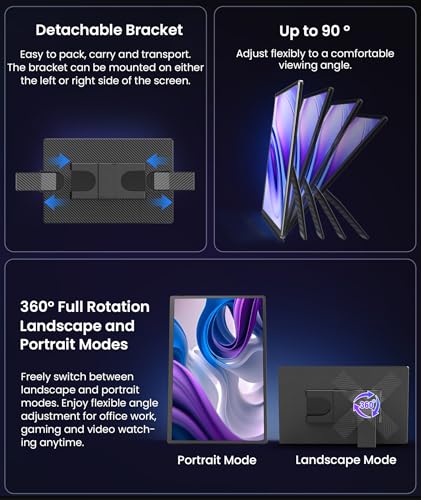
The N3 does not clip to the laptop. It stands beside it on a detachable stand that rotates the panel through 360 degrees, so the screen goes from landscape to portrait for a long document or a code file, and comes off the stand entirely for transport. That makes it a portable monitor in an extender’s clothing rather than a clip-on, which suits any laptop size and any desk, at the cost of not travelling attached to the laptop. The bezels are thin, which keeps the 16-inch panel close to the footprint of a 15.6-inch one, and the whole unit measures 14.17 by 9.25 inches and 0.59 inches deep by Amazon’s field, the depth presumably including the stand.
Portability
Cevaton quotes 1.48 lb and Amazon’s field says 1.62 lb; the difference is likely the stand or the case, and either figure is light for a 16-inch screen. The PU protective case in the box covers the panel in a bag. There is no clip, so the laptop lid carries nothing, and there is no VESA mount mentioned.
| Feature | Details |
|---|---|
| Screen Size | 16 inches, single panel |
| Resolution | 1920 x 1200 |
| Aspect Ratio | 16:10 |
| Panel Type | IPS, thin bezels |
| Refresh Rate | 60Hz |
| Response Time | 2ms (Amazon’s field) |
| Brightness | 300 nits |
| Color Gamut | 100% sRGB |
| Contrast Ratio | 1000:1 |
| Viewing Angle | 178 degrees per Cevaton (180 in Amazon’s field) |
| Screen Finish | Anti-glare per Cevaton; glossy per Amazon’s field |
| HDR | HDR-ready per Amazon’s field |
| Eye Care | Low blue light |
| Speakers | Built-in per Amazon’s field; not described by Cevaton |
| Stand | Detachable, 360-degree rotation, landscape and portrait |
| Connection | One USB-C cable (DP Alt Mode), or HDMI plus USB-A power |
| Driver | None required |
| Compatible | Windows, macOS, ChromeOS, Android, Linux, DeX, tablets, phones, consoles, Switch, PS5 |
| Weight | 1.48 lb per Cevaton (1.62 lb in Amazon’s field) |
| Dimensions | 14.17 x 9.25 x 0.59 inches per Amazon |
| In the Box | Monitor, PU case, USB-A to USB-C cable, HDMI to USB-C cable, USB-C to USB-C cable, manual |
| Power Adapter | Not included |
| Model | N3 |
| Warranty | 1 year |
Connectivity: One USB-C Cable, or HDMI Plus Power
On a laptop whose USB-C port carries video, one USB-C to USB-C cable brings picture and power, and that cable is in the box. On a laptop, desktop or console without such a port, the included HDMI to USB-C cable carries the picture into the monitor’s USB-C input and the USB-A to USB-C cable carries power from a USB port or a charger. Cevaton includes no adapter, so on HDMI you supply the power source; a phone charger does. The parts list makes clear that the monitor’s inputs are USB-C and that HDMI arrives through the adapter cable, even though Amazon’s port field counts one HDMI port; check the photos if the socket type matters to you. A base M1, M2 or M3 MacBook can drive this single screen in extended mode, since one external display is what those chips allow. For USB-C requirements, see our USB-C portable monitor guide.
Compatibility
Cevaton lists Windows, macOS, ChromeOS, Android, Linux and Samsung DeX, on laptops, tablets and phones with USB-C video, and game consoles including the Switch and PS5 over HDMI. No driver on any of them. For the older two-screen Cevaton, see the Cevaton 15.6″ Portable Monitor review.

Pros and Cons
What Stands Out
- 16-inch 1920×1200 IPS panel in a 16:10 shape
- 100% sRGB, 300 nits, 178-degree viewing angle
- Detachable stand that rotates 360 degrees for portrait use
- 1.48 lb by Cevaton’s figure, with a PU case included
- One-cable USB-C, or HDMI plus USB-A, with all three cables in the box
- No driver on Windows, macOS, ChromeOS, Android, Linux or DeX
- Works on base M-series MacBooks as a single external screen
- Low blue light; HDR-ready and speakers per Amazon’s fields
- 1-year warranty
What Could Be Better
- Finish is anti-glare per Cevaton and glossy per Amazon; unresolved
- No power adapter; HDMI use needs your own power source
- Speakers, HDR and 2ms appear only in Amazon’s fields, not in Cevaton’s bullets
- Stands beside the laptop rather than clipping to it
- No VESA mount mentioned
- 60Hz, so not a gaming panel
- Four size options on one listing at different prices, including two labelled 16 inches
Who Is This Screen Extender For?
Anyone who wants more vertical room than a 1080P second screen gives. 1920×1200 in 16:10 is the shape for documents, code and spreadsheets, and 16 inches puts it level with a large laptop screen.
MacBook Air and base MacBook Pro owners. One screen, one cable, no driver, and no collision with the single-display limit on base M-series chips.
Portrait workers. The stand rotates the panel fully, so a long document or a feed stands upright without an arm.
Travellers who want the lightest large second screen. Under 1.5 lb by Cevaton’s figure, thin bezels, and a case in the box.
This extender is not the right choice if you need a clip-on that travels attached to the laptop, a matte finish confirmed in writing, a VESA mount, or a high refresh rate for gaming.
Final Verdict
The Cevaton N3 is a well-judged single second screen. A 16-inch 1920×1200 IPS panel with 100% sRGB and 300 nits, thin bezels, a stand that rotates to portrait and comes off for the bag, three cables in the box so both connection routes work on day one, and a weight under 1.5 lb. It suits a Windows laptop, a Mac of any chip, a Chromebook or a DeX phone equally, which few extenders can say.
The listing leaves a few things loose: the finish is called anti-glare and glossy on the same page, the speakers, HDR and response time appear only in Amazon’s fields, no adapter is included, and the size picker lists two 16-inch options at different prices. Confirm the finish and the option you are buying, and this is one of the more sensible 16-inch second screens for the money.

Disclosure: As an Amazon Associate, I earn from qualifying purchases.
End of editorial review · Interactive tools below
FIELD TOOLSFIELD TOOLS
These six tools address the critical decisions every laptop screen extender buyer faces — physical fit, hinge safety, OS display limits, setup complexity, form factor selection, and travel readiness. Each tool is category-level: they work for any extender, not just the one reviewed above. Full buying guide →