Best Laptop Screen Extenders 2026: A Compatibility-First Decision Framework
Every "best of" list ranks the same way for everyone, then asks you to trust the order. This one inverts that. The "best" laptop screen extender is not a product — it’s the one whose trade-offs match your constraints: your ports, your OS, your desk-versus-bag life.
A laptop screen extender attaches to your laptop’s lid and adds one or two portable external panels, connecting through one or more USB-C, HDMI, power or adapter paths to give you more screen without a desk. That part is simple. The
hard part is that the right one is not a fixed answer. The extender that's perfect for a developer parked
at a desk is the wrong buy for a consultant living out of a carry-on, and the unit that lights up flawlessly on
a Windows ultrabook may not light a second added panel on a MacBook Air, whose chip limits how many external displays run at once.
That is why a ranked list fails the reader: it hides the one thing that decides the purchase
— your constraints — behind an editor's average. So we did the opposite. We scored every
unit on six axes — via our published reviews, manufacturer documentation and compatibility analysis — published the weights, and built an engine that re-ranks the field the moment
you tell it what matters to you. The order you see by default is our balanced view; the order that matters is
the one you generate.
This guide is for the buyer who wants to understand the trade-off before spending, not be sold
the highest-commission pick. New to the category? Our laptop screen extender buying guide covers ports, panel types and price tiers before you weigh specific models. If you only need the single fastest answer, the default winner is named in
§03. If you want to know why — and whether it's right for your laptop
— read on.
A note on counting screens
Dual-screen workspace = your laptop display + one external panel.
Triple-screen workspace = your laptop display + two external panels.
Three-external-display setup = three separate external panels, whether or not the laptop’s own screen stays active.
Throughout this guide, “panel” always means an added external screen — never the laptop’s own. A “triple” unit adds two panels.
The rubric · six axes
§ 01 — The Rubric
How we score every laptop screen extender
Six axes, each scored 0–10 from our published review, manufacturer documentation and compatibility analysis, and each weight
published below rather than buried in an editor's gut feel. Two axes are not invented here: compatibility
breadth runs on the same logic as our laptop screen extender compatibility guide,
and power sanity uses the PD wattage model.
The composite is a weighted average — an axis scored 9 under a 25% weight moves the total far more than
the same 9 under a 10% weight, which is exactly why the weights are the argument, not a footnote.
The default weighting encodes a thesis we will defend: compatibility (25) and hinge
durability (20) decide more real purchases than panel specs do. A gorgeous 2.5K screen that only lights
one of its two added panels on your Mac, or a two-panel extender whose offset mass may load your laptop’s hinge over time, is the wrong
buy at any price — so those two axes carry the most weight by default. Power sanity, portability cost and
value-at-risk each carry 15; setup friction carries 10, because a one-time driver install is an annoyance, not
a year-long cost. Disagree? That is the point — move the sliders in §02 and the
ranking re-computes around your priorities.
What a score means
The 0–10 scale is anchored, not vibes. A 9–10 clears the bar with headroom and
no caveat worth stating. A 7–8 is solid but carries one known limitation — a single-panel
unit that adds only one screen, say. A 5–6 is a real constraint you must design your setup around,
such as a triple panel's power draw. Anything below 5 is a disqualifier for most buyers on that axis.
The same anchors apply across every unit, which is what makes the composite comparable rather than impressionistic.
What each axis measures — and how it’s scored
The same anchors apply to every unit. The right-hand column states the dominant basis for each axis — documented (from spec sheets), analyzed (from first principles), or synthesized from our published review and third-party reporting. None rests on longitudinal lab testing or on a claim that we held the exact unit; where a number is an editorial inference from mass or geometry rather than a measurement, we say so.
Axis (weight)
What it measures
Low 0–4 → High 8–10
Basis
Compatibility (25)
OS, port and chip breadth the unit actually supports.
Single-OS or Alt-Mode-only with Apple-silicon gaps → broad OS plus an HDMI/Mini-HDMI fallback.
Documented + analyzed
Hinge durability (20)
How panel mass and mounting load the lid and hinge over time.
Heavy panels far from the pivot → light, stand- or shell-supported.
Analyzed · editorial inference
Power sanity (15)
Whether it powers itself without starving the laptop battery.
High draw, no pass-through → PD pass-through that also charges the laptop.
Documented + analyzed
Portability cost (15)
Weight and bulk to carry daily.
≈3.5 lb+ → ≈1.3–1.7 lb.
Documented
Value-at-risk (15)
Brand support, warranty and build for the money.
No-name, no stated warranty → established brand with a multi-year warranty.
Documented
Setup friction (10)
Drivers, cabling and plug-and-play behaviour.
Driver install or finicky cabling → plug-and-play with auto-power-on.
Documented + analyzed
Evidence status. Every unit in this edition is Editorially evaluated: each score synthesizes our published review of that exact unit, the manufacturer’s documentation, and first-principles compatibility analysis — in line with our methodology. The stronger labels are reserved for where the evidence earns them:
Scores are not frozen. A unit’s axis scores can change when new compatibility evidence emerges, the manufacturer revises the product, firmware or OS behaviour shifts, warranty or support changes, the model is discontinued, or direct testing contradicts an earlier analytical assumption. Each edition states the date it was last verified.
How the composite is built — worked in full
No black box. The composite is a weighted average: each axis score is multiplied by its weight,
the products are summed, and the total is divided by the sum of the weights. Here is the exact arithmetic for the
default winner, the Hyangin S8 Pro, under the default weighting:
HYANGIN S8 PRO 14" TRIPLE · DEFAULT WEIGHTING
Axis
Score
Weight
Contribution
Compatibility breadth
7
25
175
Power sanity
9
15
135
Hinge & mount durability
8
20
160
Portability cost
7
15
105
Setup friction
8
10
80
Value-at-risk
7
15
105
Composite
—
100
760 ÷ 100 = 7.6
Change any weight in the engine and the denominator changes with it,
so the composite always stays on the same 0–10 scale — a unit can never game the total by being
strong on an axis you've told the engine you don't care about.
Set priorities · read the shortlist
§ 02 — The Engine
The Decision Atlas Engine
Move a slider toward what matters to you and the field re-ranks instantly. There is no
single "best" — there is the best for your weighting. Every unit below is one we have evaluated and
reviewed; the axis scores are fixed (they describe the hardware), and your weights decide how much each axis
counts toward the composite. Push portability to the top if you live out of a bag; push
compatibility if you're unsure your laptop's USB-C port even carries video. Watch the order move —
and watch the two-panel extender climb or sink depending on whether you're at a desk or on a train.
Weight what matters → read your ranking
Your priorities
Drag a slider up to make that axis matter more. Weights re-normalise automatically.
Ranked for a balanced default weighting
Scores are editorial composites synthesizing our review, documentation and compatibility analysis — not raw manufacturer specs. Read the full
method on our methodology page, and see why
some axes are weighted heavier in §01 above. The cards below route to our full
review for each unit, where the affiliate link sits after the complete write-up. See our disclosure.
The standing · unit by unit
§ 03 — The Standing
The eligible field, scored
The default-weighted standing, expanded. Each card shows the axis breakdown behind the
composite, the honest trade-off, and who the unit is actually for — then routes to our full review, where the price and affiliate link live. The ranking here reflects the balanced default weights from
§01. These cards show the balanced default ranking and do not reorder when you change the engine above — the live engine results reorder for your weighting; these cards stay fixed as a reference.
Why these six — and what isn’t here
Six currently eligible models met this edition’s thresholds: a complete published review on this site, an active or recently active product listing verified during this edition’s review cycle, a documented compatibility record, and category diversity — clamp/attach singles, the lightest dual-screen add-on, and triple-screen extenders. This is not every extender we have reviewed.
Dozens of others are deliberately left out of the ranking: models discontinued or hard to source in 2026; near-identical re-brands of a unit already ranked (the FOPO / KEFEYA / InnoView / UPERFECT clone lines); units whose compatibility record is too thin to score honestly; and those simply edged out by a better-evidenced unit in the same category. Ranking is by evidence and fit for a 2026 buyer — not popularity or commission — and the field is refreshed each edition. For the wider catalogue, browse the laptop screen extenders hub.
Affiliate links
Each product image below links to that unit’s Amazon listing. As an Amazon Associate, ScreenExtendersHub earns from qualifying purchases at no extra cost to you — the ranking order is set by evidence, never by commission. See our disclosure.
1
Best all-round
Hyangin S8 Pro Triple Laptop Screen Extender 14-inch
Two added panels · creates a triple-screen workspace · approximately 1 kg · PD pass-through
7.6/10composite
Compatibility7
Power sanity9
Hinge durability8
Portability7
Setup friction8
Value-at-risk7
Now the unit to beat: a triple-screen extender that breaks the usual penalty. At roughly 1 kg it’s the rare two-panel unit you’ll actually carry, and its PD pass-through lets a 100W adapter feed the panels and top up the laptop — so it scores highest in the field on power sanity, where two-panel extenders normally crater.
It still adds two panels, so a lid-open triple-screen workspace needs a Mac that natively drives two external displays (supported M4/M5 base, or an appropriate Pro/Max) — M1/M2/M3 base models don’t do that natively, and the bundled H5-T is a marketed workaround to verify per model. Two added panels also ask more of your hinge than one. But if you want the screen count without the weight-and-drain tax, this is how it’s done — and the gap between it and the FOPO below is the whole argument for engineering over panel count.
Why these scores
Axis
Score
Why — and on what basis
Compatibility
7
Two added panels: a lid-open triple-screen workspace needs a Mac that natively drives two external displays (supported M4/M5 base, or an appropriate Pro/Max); the bundled H5-T is a marketed workaround for some M1/M2/M3 setups — verify per model. Plug-and-go on Windows and ChromeOS. Documented + analyzed
Power sanity
9
PD pass-through feeds both panels and tops up the laptop — the strongest power story in the field. Documented + analyzed
Hinge durability
8
About 1 kg of added panels, with a stand and hinge geometry documented to shift part of the load off the lid; the score is an editorial inference, not a measured result. Analyzed · editorial inference
Portability
7
~1 kg is carriable for a two-panel extender, but bulkier than a single. Documented
Setup friction
8
Plug-and-go on Windows and ChromeOS; on Mac the bundled H5-T is a marketed workaround to verify per model. Documented + analyzed
Value-at-risk
7
Feature-complete with documented accessories; mid-tier brand. Documented
The single-panel that brings its own power. ELECROW — better known for maker boards than monitors — ships the CrowView with a wall adapter, so the panel can run off mains instead of taxing the laptop battery: the one power story no other unit here offers. It’s a 14" IPS panel at 1.76 lb with 230° rotation, a Mini-HDMI input alongside USB-C, and a brighter-than-standard 400-nit screen.
The trade-offs are real and we score them: 800:1 contrast sits below the 1000:1 norm, the 20 ms response rules it out for motion or gaming, the Mini-HDMI path needs the right cable, and consoles aren’t on the support list. It lands second not by leading any one axis but by carrying no severe weakness while solving the problem most singles ignore — power.
Why these scores
Axis
Score
Why — and on what basis
Compatibility
7
USB-C / Thunderbolt plus a Mini-HDMI input, so it drives video off a non-Alt-Mode source with the right cable; Windows, macOS, ChromeOS, Linux and Android — no console support listed. Documented + analyzed
Power sanity
8
Ships with a 5V-2A wall adapter, so the panel can run off mains instead of the host battery — the field’s only self-powered single; no PD pass-through to feed the laptop. Documented + analyzed
Hinge durability
7
One light 1.76 lb panel kept close to the pivot; ELECROW is new to the extender category, so longevity is an editorial inference, not a track record. Analyzed · editorial inference
Portability
8
A 1.76 lb single panel — among the lightest in this field. Documented + analyzed
Setup friction
8
Driver-free plug-and-play on Windows, macOS, ChromeOS and Linux; the extra power brick and Mini-HDMI cable add a small step. Documented + analyzed
Value-at-risk
7
Reputable maker brand new to monitors; 1-year warranty, and the bundled adapter adds value; no long-term field record yet. Documented
The genuine featherweight: a 1.65 lb single panel that attaches with a hook-and-loop mount and a 0–180° back stand, with the broadest connection options here — full USB-C, power-only USB-C, or Mini-HDMI — plus a complete travel kit (carry bag, screen protectors, cleaning cloth, three cables) and auto-power-on.
The catch is platform: it explicitly excludes Apple-silicon MacBooks (M1/M2), Surface ARM and ARM Chromebooks, so it’s a Windows-first pick — which is exactly why its compatibility score trails the Mac-friendly units above. If you’re on Windows and weight is the deciding axis, nothing here travels lighter.
Why these scores
Axis
Score
Why — and on what basis
Compatibility
6
Broad inputs (full USB-C, power-only USB-C, Mini-HDMI) but excludes Apple-silicon M1/M2 and ARM Surface/Chromebook — Windows-first. Documented + analyzed
Power sanity
7
Single 14" panel with an included adapter; modest draw. Documented
Hinge durability
8
1.65 lb — the lightest single — with a back stand documented to offload the hinge; the score is an editorial inference. Analyzed · editorial inference
Portability
8
1.65 lb with a full travel kit. Documented
Setup friction
8
Plug-and-play with auto-power-on; the Mini-HDMI path needs the power cable. Documented + analyzed
Value-at-risk
7
Complete accessory kit; established FOPO line; warranty length not documented here. Documented
The sharpest panel story at this tier: a 15.6" single panel with 1 ms response, 100% sRGB colour, 360° rotation and an aluminium body — backed by a two-year warranty, the strongest value-at-risk score here.
The trade-off is weight: at 3.9 lb it’s heavy for a single panel — its own review flags weight-sensitive travellers — and it’s USB-C-native, so an HDMI/USB-A-only laptop needs a workaround. For colour-aware work that won’t gamble on a no-name brand, it’s the value pick.
Why these scores
Axis
Score
Why — and on what basis
Compatibility
8
Single USB-C cable; Windows, macOS (M1–M5 per the listing) and Android — but USB-C-native with no HDMI fallback. Documented + analyzed
Power sanity
7
Single panel with a 15W adapter included. Documented
Hinge durability
7
Aluminium body and 360° rotation; a 15.6" single is moderate mass — an editorial inference. Analyzed · editorial inference
Portability
5
3.9 lb — its own review flags it as heavy for a single panel. Documented
Setup friction
8
Single-cable plug-in; the USB-A fallback uses an included driver disk. Documented + analyzed
Value-at-risk
8
A documented two-year warranty and full accessory kit — the strongest value-at-risk here. Documented
Single added panel · creates a dual-screen setup · 1.3 lb
7.0/10composite
Compatibility7
Power sanity6
Hinge durability7
Portability8
Setup friction7
Value-at-risk7
A single panel that magnetically slides onto the lid at about 1.3 lb to create a dual-screen workspace — the lightest way here to add one external screen. It connects over USB-C or Mini-HDMI; note it is not a DisplayLink unit, despite what some roundups claim, so it still needs a video-capable port like the others.
The mid-pack score is about power and connection, not flaws: it pulls from the laptop’s own USB-C with no power pass-through, so on battery it shortens your runtime (the lower power-sanity score), and the magnetic slide-mount trades a little rigidity for that featherweight portability. When the brief is “a second screen at the lowest possible weight,” nothing here beats it.
Why these scores
Axis
Score
Why — and on what basis
Compatibility
7
USB-C or Mini-HDMI; not a DisplayLink unit, so it needs a video-capable port. Documented + analyzed
Power sanity
6
Pulls from the laptop’s USB-C with no pass-through, shortening battery runtime. Documented + analyzed
Hinge durability
7
A single panel on a magnetic slide-mount — light, though the slide trades a little rigidity; an editorial inference. Analyzed · editorial inference
Portability
8
~1.3 lb — the lightest add-on screen here. Documented
Setup friction
7
Plug-and-play once on a video-capable port. Documented + analyzed
Value-at-risk
7
Established brand (Mobile Pixels) with a documented warranty. Documented
Two 15.6-inch added panels · creates a triple-screen workspace · clamp-on · USB-C
5.8/10composite
Compatibility6
Power sanity5
Hinge durability6
Portability5
Setup friction7
Value-at-risk6
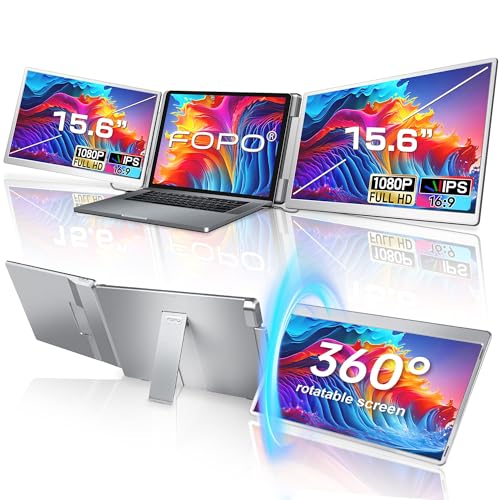
Two 15.6" panels clamp to the lid for a genuine triple-screen workspace, with 360° left-panel rotation for face-to-face sharing. Nothing else here creates a three-screen workspace.
It ranks last by design, for reasons we’ll defend rather than hide: about 3.5 lb of added panels place the most offset mass on the hinge in the field, two added panels draw more power than a single panel, and a lid-open triple-screen workspace is not natively supported on an M1/M2/M3 base MacBook. For a Windows user parked at a desk who needs the screens, push the portability and power sliders down in the engine and it climbs; leave them up and it shouldn’t be near the top.
Why these scores
Axis
Score
Why — and on what basis
Compatibility
6
Two added panels: a lid-open triple-screen workspace is not natively supported on M1/M2/M3 base Macs; needs Windows (or a Mac that natively drives two external displays) with full Alt-Mode USB-C. Documented + analyzed
Power sanity
5
Two added 15.6" panels draw the most power in the field, with no pass-through. Documented + analyzed
Hinge durability
6
~3.5 lb of added panels — the most offset mass on the hinge in this field; an editorial inference. Analyzed · editorial inference
Portability
5
~3.5 lb and the bulkiest to carry. Documented
Setup friction
7
Plug-and-play clamp; the two added panels need positioning, per the product’s design. Documented + analyzed
Value-at-risk
6
Feature-complete for the price; build “adequate” per the review. Documented
The all-rounder beats the specialists. The S8 Pro tops the table with no axis below 7 — and, unusually, it does so as a triple. The structural truth of a balanced weighting is that a unit which is strong everywhere outscores one that’s brilliant on the axis you happen to care about and poor on the three you don’t. Most two-panel extenders pay for the extra screens in weight, power and hinge; the S8 Pro’s ~1 kg frame and PD pass-through cancel enough of that tax to leave it leading a field of lighter singles — with the self-powered ELECROW the nearest of them, two-tenths back.
Triple done right versus triple with penalties. The two triple-screen extenders sit 1.8 points apart — the S8 Pro at 7.6, the FOPO S10 at 5.8 — and the gap is almost entirely weight and power. The S8 Pro’s ~1 kg frame and PD pass-through neutralise the costs that the FOPO’s ~3.5 lb and power-hungry two-panel draw incur in full. Same screen count, opposite engineering; the framework rewards the engineering, not the spec on the box.
There is no single best — and the tie proves it. The FOPO 14 and the MT-VIKI reach an identical 7.2 from opposite directions: the FOPO wins on portability (1.65 lb) and gives up compatibility (no Apple-silicon support); the MT-VIKI wins on panel quality, broad Mac support and a two-year warranty, and gives up portability (3.9 lb, heavy for a single panel). Same composite, opposite shapes — so which one is ‘best’ is decided entirely by which axis is yours. Nudge a slider and they separate at once.
This is a weighted framework, not a spec sheet. For direct, specification-by-specification comparisons outside this model, use our screen extender comparison system.
The exclusions
§ 04 — The Exclusions
Who each pick is wrong for
The conversion-honest section: the fastest way to send a qualified buyer to the right
product is to disqualify them from the wrong one. Each entry below is the single condition under which a
top-ranked pick becomes a mistake — and where to go instead.
Skip the ELECROW CrowView if…
…you need more than one extra screen — it’s a single 14" panel, not a multi-display rig — or you want a high-contrast panel for media, where its 800:1 ratio trails the field.
Better fit: the S8 Pro triple for three screens without the weight, or the FOPO S10 if you’re desk-bound.
Skip the S8 Pro Triple if…
…you never leave a desk (you’d pay a portability premium you won’t use), or you’re on an M1/M2/M3 base Mac that can’t drive two panels with the lid open.
Better fit: the FOPO S10 for a fixed Windows desk, or a single-panel MT-VIKI.
Skip the MT-VIKI if…
…your laptop’s USB-C is charging-only, or it’s an HDMI/USB-A-only machine — it’s USB-C-native with no fallback path.
Better fit: the ELECROW CrowView or FOPO 14, whose Mini-HDMI input drives video off a non-Alt-Mode port with the right cable.
Skip the Mobile Pixels Duex Plus if…
…you need a rock-solid attachment or a bright, colour-accurate panel — the slide-mount and the dim screen are the documented weak points.
Better fit: the MT-VIKI for panel quality, or the FOPO 14 for a firmer hook-and-loop mount.
Skip the FOPO 14" if…
…you’re on an Apple-silicon Mac — it excludes M1/M2 MacBooks, Surface ARM and ARM Chromebooks outright. It’s a Windows-first unit.
…you carry your laptop daily, you’re on an M1/M2/M3 base Mac (none drive two panels with the lid open), or your USB-C port is anything short of full Alt Mode. You’d shoulder the weight and drain and still not run all three screens.
Better fit: a single Alt Mode panel for portability — or, if you truly need three screens at a desk, a docking-station setup.
The two failures
§ 05 — The Failures
The two failures that void any recommendation
Hinge load and power starvation outrank every spec. A unit can win on screen,
colour and price and still be the wrong buy if it stresses your lid or drains your battery. Both carry
heavy weight in the rubric for the same reason: they're the failures that show up months after purchase,
when the return window has closed.
Failure 1 — Hinge load & weight distribution
A screen extender hangs off your laptop's lid, and that lid's hinge was engineered for the
weight of the screen alone. Add one or two panels and every open-and-close can work the hinge a
little harder. The symptoms, when they appear, arrive slowly: a lid that no longer holds its angle, a wobble at the top of the
screen, eventually a hinge that may feel loose. Two-panel extenders generally place more total mass farther from the
pivot than single-panel models, which is why they carry the highest hinge-load risk in the field — though how much depends on the laptop’s hinge design, the mounting geometry and any stand support. Before buying, weigh the unit against your
laptop's own screen mass and check how the mount distributes load. How we assess hinge load on every unit
is documented in our
testing methodology.
Why mass placement matters. The hinge feels the panel’s weight multiplied by its distance from the pivot. A triple sits the most mass furthest out — the largest lever arm, the highest hinge load — which is why the durability axis weighs it heavily.
Failure 2 — Power starvation
A USB-C extender can show a perfect picture while quietly drawing power from your laptop to
do it. If the unit has no pass-through charging, or your charger can't cover the laptop and the panel,
the battery falls under load — sometimes while the machine is plugged in and apparently "charging." The
higher the resolution and the more panels, the larger the draw, which is why the 2.5K and two-panel units score
lower on power sanity. The fix is a power budget, not a guess: a source with enough headroom, a pass-through
port, and a cable rated for it. Our PD wattage guide
walks through reading the spec sheet so you don't discover the gap after purchase.
The 60-second pre-purchase check
Both failures are avoidable with four questions answered before you buy, not after the
return window closes. One: does your laptop's USB-C port carry video (DisplayPort Alt Mode), or will you
need a DisplayLink unit? Two: what is the panel's weight, and is your laptop's hinge already prone to
sag — heavier and two-panel extenders demand a firmer hinge. Three: does the extender offer
pass-through charging, and is your charger rated to cover the laptop plus the panel at once? Four: if
you're on a Mac, what is your chip's external-display limit? Answer those and the two failure modes that void
a recommendation simply can't reach you.
Pick by scenario
§ 06 — The Scenarios
Pick by scenario
If you carry a thin ultrabook
Single-panel, USB-C/HDMI
Push portability and setup friction to the top; the featherweight FOPO 14 and the self-powered ELECROW CrowView rise — a screen without a second bag. Want a triple-screen workspace without the weight? The S8 Pro is the lightest way there.
If you live docked at a desk
Triple, weight irrelevant
Drag portability toward zero and the FOPO S10 climbs fast — at a fixed desk its 3.5 lb stops mattering and the three-screen payoff lands. The S8 Pro stays strong here too.
If you run an older / HDMI-only laptop
HDMI input required
Compatibility narrows to what can take a non-USB-C signal. The picks with a Mini-HDMI input — the FOPO 14, the Duex Plus and the ELECROW CrowView — drive a screen from an HDMI source with the right cable, where the USB-C Alt-Mode-only units need an adapter.
If you’re on an Apple-silicon base chip
Verify the display cap first
Native external-display support is capped by chip and model: M1/M2 base drive one, M3 base two but only with the lid closed (you lose the built-in screen), M4/M5 base two with the lid open. A lid-open triple-screen workspace needs a Mac that natively supports two external displays with the built-in screen active — confirm your exact model in the compatibility guide. On an M1/M2/M3 base, plan on a single panel like the ELECROW CrowView or MT-VIKI unless a workaround is verified for your setup.
Common questions
§ 07 — Common Questions
Common questions
The questions that decide a purchase — answered straight, with the caveats kept in. For questions beyond buying — setup, ports and troubleshooting — see our full FAQ.
What is the best laptop screen extender?
There isn't one answer for everyone — that's the premise of this framework. On a balanced default weighting the Hyangin S8 Pro leads our ranked field, but the best extender is the one whose trade-offs fit your laptop, ports and how often you travel. Weight your own priorities in the engine and the ranking re-computes.
Do laptop screen extenders work with a MacBook?
Most single-panel USB-C Alt Mode extenders work on Macs, but native external-display support is capped by chip and model: M1 and M2 base chips drive one external display; M3 base chips drive two but only with the lid closed; M4 and M5 base chips drive two with the lid open. A lid-open triple-screen setup (laptop plus two added panels) therefore needs a Mac that natively supports two external displays; some extenders market a software-driven or adapter-based workaround, which must be verified against your exact model and macOS version. Always confirm your exact model's external-display limit before buying — our compatibility guide covers it by chip.
Will a screen extender drain my laptop battery?
It can. A USB-C extender draws power from the laptop to run its panel, and without pass-through charging the battery can fall under load even while the laptop is plugged in. Check the power budget before buying — a higher-wattage source and a pass-through port prevent the drain. Our PD wattage guide shows how to read it.
Are triple-screen laptop extenders worth it?
Only in the right situation. Two added panels generally create more weight, power draw and hinge load than one added panel, plus compatibility caveats on Macs — which is why the two-panel FOPO S10 ranks last on our default weighting. For a Windows user parked at a desk who needs the screens it makes sense; for a daily commuter, a single panel usually wins.
What is DisplayLink and do I need it?
DisplayLink is a software-driven display path that works where USB-C DisplayPort Alt Mode isn't available — for example on data-only USB-C ports or older HDMI/USB-A laptops. It adds some latency and CPU overhead and isn't suited to gaming or colour-critical work, so you need it only if your laptop can't carry video over USB-C natively.
Can I use a laptop screen extender with a docking station?
Often yes, but check the budget first. A dock and an extender both draw on the same USB-C bandwidth and power, so running them together can exceed what a single port delivers — most acutely with a triple panel. If you're building a fixed multi-screen desk, a docking station driving standard monitors is usually more stable than stacking an extender on top of a dock.
Do laptop screen extenders work with Chromebooks?
It depends on the specific Chromebook. ChromeOS drives an external USB-C display only when the hardware includes DisplayPort Alt Mode, and support varies by model — so verify your exact Chromebook before buying. Our compatibility guide covers the ChromeOS caveats by device.
How do you score these, and are the rankings affiliate-biased?
Every score synthesizes our published review of the unit, the manufacturer documentation and first-principles compatibility analysis, scored on six published axes, and the weights are disclosed so you can re-weight them yourself. Rankings are independent of commission — the framework routes you to the right unit, including telling you when not to buy one at all. See our methodology and disclosure.
Affiliate disclosure. ScreenExtendersHub is a participant in the Amazon Services LLC Associates
Program, an affiliate advertising program designed to provide a means for sites to earn advertising
fees by advertising and linking to Amazon.com. We may earn a commission on qualifying purchases at no
extra cost to you. Editorial decisions and rankings are independent of commission. Full terms on our
disclosure page.