
Synnov Laptop Screen Extender, 14″ FHD 1080P Triple Portable Monitor Review
Unleash productivity with a 14" Portable Monitor Extender! This dual screen merges convenience and fun with effortless setup for deadlines-meeting efficiency.
The Synnov S3 is a dual-panel 14-inch triple screen extender that weighs 4.5 lbs. That weight is heavier than most competing triples in the 14-inch class (typically 3-3.5 lbs). Synnov acknowledges this directly in the bullets: “S3 model weight: 4.5 pounds, with a certain weight.” The extra weight comes from an upgraded widened adjustable angle bracket designed for better stability. If stability matters more to you than portability, this is the trade-off Synnov made.
The IPS panels have 1080P resolution, 1000:1 contrast, 300 nits, 100 color gamut (Amazon field), 180° viewing angles, matte finish, 2ms response, HDR, and built-in speakers at 60Hz. Each screen folds 180°. Not compatible with MacBook Air M1/M2/M3, MacBook Pro 2012 and earlier, or MacBook Air 2017 and earlier. Compatible with Mac (excluding those models), Windows, Android, Chrome, Switch, PS4/PS5, Dex. Fits 13-16.1 inch laptops. 1-year warranty.
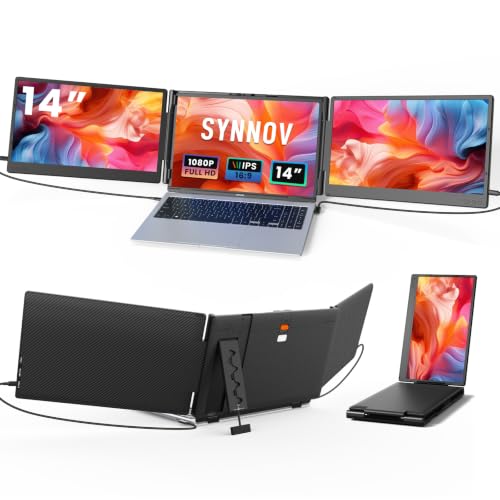
Synnov Laptop Screen Extender, 14" FHD 1080P Triple Portable Monitor for 13"-17" Laptop with Stand, Dual Monitors Built-in Speakers, Plug & Play, Monitor Extender for MacOS/Wins/Chrome/Dex
Key Specifications
| Specification | Detail |
|---|---|
| Screen Configuration | Dual 14-inch panels (triple with laptop) |
| Resolution (per screen) | 1920 x 1080 (Full HD) |
| Panel Type | IPS (confirmed in display technology) |
| Refresh Rate | 60Hz |
| Response Time | 2ms |
| Color Gamut | 100 (Amazon field) |
| Contrast Ratio | 1000:1 |
| Brightness | 300 nits |
| Viewing Angle | 180° |
| Aspect Ratio | 16:9 |
| Screen Finish | Matte |
| HDR | Yes |
| Speakers | Built-in |
| Eye Care | Blue light filter |
| Screen Rotation | 180° per screen |
| Bracket | Upgraded widened adjustable angle bracket |
| Display Modes | Extended, mirrored |
| Ports | USB-C, HDMI, USB-A |
| Connection Requires | 2x full-function USB-C, or 1x USB-C + 1x HDMI + USB-A |
| Mac NOT Compatible | MacBook Air M1/M2/M3, MacBook Pro 2012 and earlier, MacBook Air 2017 and earlier |
| OS Compatibility | Mac (select models), Windows, Android, Chrome, Dex, Switch, PS4/PS5 |
| Laptop Fit | 13″ to 16.1″ |
| Weight | 4.5 lbs |
| Voltage | 20V |
| Warranty | 1 year (12 months) |

Stability Over Portability
At 4.5 lbs, the S3 is one of the heavier triple extenders in the 14-inch class. Synnov chose to invest that weight into the bracket. The “upgraded widened adjustable angle bracket” provides a wider contact surface with the laptop, reducing wobble and the risk of the setup tipping. For desk use where the extender stays in one place, the added stability is an advantage. For daily commuting or frequent travel, the extra pound and a half matters. A carrying bag is included.

Matte, 2ms, and HDR
The matte finish across two 14-inch panels eliminates reflections in any lighting environment. 2ms response at 60Hz provides clean motion for scrolling, video, and casual gaming. HDR enhances dynamic range for supported content. Blue light filter reduces eye strain. Built-in speakers handle casual audio. Per-screen brightness and volume controls let you customize each panel independently. This combination of matte + 2ms + HDR is strong for the 14-inch triple category. For USB-C requirements, see our USB-C portable monitor guide.

Mac Compatibility Details
The exclusion list is specific: MacBook Air with M1/M2/M3 chips, MacBook Pro 2012 and earlier, MacBook Air 2017 and earlier. This means some Mac models are compatible (newer MacBook Pro with M-series Pro/Max chips, and certain Intel MacBook Pro models post-2012). The bullets recommend contacting Synnov for connection issues or compatibility questions. The laptop must have either 2 full-function USB-C ports or 1 full-function USB-C + 1 HDMI + USB-A for both screens to function.
What’s in the Box
| Item | Quantity |
|---|---|
| Triple Screen Extender | 1 |
| USB-C to USB-C Cable | 2 |
| USB-A to USB-C Cable | 2 |
| HDMI Cable | 1 |
| Carrying Bag | 1 |
| User Manual | 1 |
Drawbacks
| Consideration | Detail |
|---|---|
| 4.5 lbs | Heavier than most 14-inch triples. Desk-first, not travel-first. |
| MacBook Air M1/M2/M3 Excluded | Specific Mac models not compatible. |
| Requires 2 Full-Function USB-C | Or 1 USB-C + HDMI + USB-A. Verify your laptop has the ports. |
| 13-16.1 inch Only | Does not fit 17-inch laptops. |

Who This Extender Is For
Desk-based users who want a stable triple setup with matte panels and fast response: The widened bracket, matte finish, 2ms, HDR, and per-screen controls make this a desk workstation extender. If your triple setup stays on a desk and stability matters more than carrying weight, the S3 delivers that. The comprehensive cable kit (5 cables) and carrying bag cover both desk and occasional travel use. For a lighter triple alternative, our comparison pages cover options under 3.5 lbs.
Frequent travelers or MacBook Air M1/M2/M3 users: 4.5 lbs is heavy for daily carry. MacBook Air M-series excluded. For travel-first triples or M-series Mac compatibility, see other options on the laptop screen extenders hub page.
Final Verdict
The Synnov S3 prioritizes stability over portability. The widened adjustable bracket, 4.5 lbs of weight, matte IPS panels with 2ms response, HDR, blue light filter, built-in speakers, and per-screen controls create a desk-focused triple workstation. 300 nits, 1000:1, and 100 color gamut (Amazon field) handle standard productivity and media. The five-cable kit covers every common connection method.
The weight is the honest trade-off. At 4.5 lbs it is heavier than competing 14-inch triples. MacBook Air M1/M2/M3 is excluded. Maximum laptop size is 16.1 inches. For desk workers who want a triple setup that stays put and does not wobble, the S3 provides that confidence. For users who carry their setup daily, lighter alternatives exist.
Frequently Asked Questions
Why is it heavier than other 14-inch triples?
The upgraded widened adjustable angle bracket adds weight for better stability. Synnov chose to prioritize a secure, wobble-free setup over lighter travel weight.
Does it work with MacBook Pro M2 Pro?
The exclusion list specifically names MacBook Air M1/M2/M3. MacBook Pro with Pro/Max chips is not excluded. Contact Synnov to confirm your specific model.
Do I need two full-function USB-C ports?
For the simplest setup, yes. Two full-function USB-C ports connect both screens with one cable each. If you have only one USB-C, the second screen connects via HDMI (video) + USB-A to USB-C (power). Check your laptop’s ports before purchasing.
Disclosure: As an Amazon Associate, I earn from qualifying purchases.
End of editorial review · Interactive tools below
FIELD TOOLSFIELD TOOLS
These six tools address the critical decisions every laptop screen extender buyer faces — physical fit, hinge safety, OS display limits, setup complexity, form factor selection, and travel readiness. Each tool is category-level: they work for any extender, not just the one reviewed above. Full buying guide →