
YUTOO Triple Laptop Screen Extender Review
Single-Cable Triple Screen Extender Analysis: Dual 1080p FHD IPS panels feature ultra-thin bezels and a single-cable driver-based USB-C/USB-A connection, expanding 13.5–17.3" Windows and M1/M2/M3 Mac laptops into a portable triple-screen workstation.
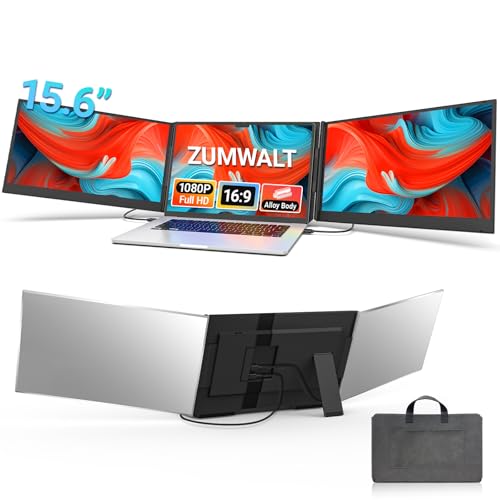
The YUTOO S400 is a dual-panel 14-inch triple screen extender that connects both screens through a single cable. Mac M1/M2/M3 and Windows are both supported. A driver on the included USB disk enables the single-cable dual-display functionality. The IPS panels have 1080P resolution, 1000:1 contrast, 300 nits, 72% NTSC, 178° viewing angles, HDR, and glossy finish at 60Hz. The left screen rotates 0-235° and the right rotates 0-180°. Anti-glare and eye care are listed in the Amazon additional features, though the screen finish field says glossy. At 3.25 lbs with a carrying bag. 1-year warranty.
Note: This YUTOO model is no longer sold on Amazon. The closest current YUTOO option is the 14″ triple extender covered in our YUTOO 14″ Triple Laptop Screen Extender review.
![YUTOO Triple Laptop Screen Extender, [M1/M2/M3/Windows] [Only 1 Cable to Connect],Laptop Monitor Extender for Mac/Windows, 1080P | FHD IPS | Ultra-Thin Bezel, Powered by Type-C/USB for 13.5~17.3"](https://m.media-amazon.com/images/I/41DELzLTzbL._SL500_.jpg)
YUTOO Triple Laptop Screen Extender, [M1/M2/M3/Windows] [Only 1 Cable to Connect],Laptop Monitor Extender for Mac/Windows, 1080P | FHD IPS | Ultra-Thin Bezel, Powered by Type-C/USB for 13.5~17.3"

Key Specifications
| Specification | Detail |
|---|---|
| Screen Configuration | Dual 14-inch panels (triple with laptop) |
| Resolution (per screen) | 1920 x 1080 (Full HD) |
| Panel Type | IPS (confirmed in display technology) |
| Refresh Rate | 60Hz |
| Response Time | 25ms |
| Color Gamut | 72% NTSC (~100% sRGB) |
| Contrast Ratio | 1000:1 |
| Brightness | 300 nits |
| Viewing Angle | 178° |
| Aspect Ratio | 16:9 |
| Screen Finish | Glossy (Amazon) / Anti-glare (additional features) |
| HDR | Yes |
| Eye Care | Yes (per additional features) |
| Left Rotation | 0-235° |
| Right Rotation | 0-180° |
| Connection | Single cable: USB-A or USB-C |
| Driver | Included on USB disk |
| Mac Compatibility | M1/M2/M3 supported |
| OS Compatibility | Windows, Mac (M1/M2/M3) |
| Laptop Fit | 13.5″ to 17.3″ |
| Weight | 3.25 lbs |
| Power | 10W at 5V |
| Warranty | 1 year |

Single Cable with Mac M1/M2/M3
The S400 claims both screens run from one USB-A or USB-C cable, including on Mac M1/M2/M3 hardware. Since base M-series chips natively support only one external display, the included USB disk driver is what enables the dual-screen output. This is similar to how the YUTOO S688 quad monitor works. The driver must be installed before the triple setup functions. For users who want a triple extender that works with M-series MacBooks without buying a separate dock or DisplayLink adapter, this is a relevant option. For a YUTOO model with different specs, see the YUTOO 14 inch 315° Rotate review.
![Buy the YUTOO Triple Laptop Screen Extender, [M1/M2/M3/Windows] [Only 1 Cable to Connect],Laptop Monitor Extender for Mac/Windows, 1080P | FHD IPS | Ultra-Thin Bezel, Powered by Type-C/USB for 13.5~17.3" on Amazon](https://screenextendershub.com/wp-content/uploads/2025/01/amazon-purchase-button-for-screenextendershub.webp)
Display Quality
IPS is confirmed in the Amazon display technology field. 72% NTSC (~100% sRGB) covers the standard web color space. 1000:1 contrast is the baseline. 300 nits handles indoor environments. 178° viewing angles maintain color consistency across both panels at different positions. HDR enhances brightness and color range for supported content. One-button brightness adjustment per the bullets.
The 25ms response time is slow for the category. For static productivity (documents, spreadsheets, email, code), it is functional. For video playback and fast scrolling, some ghosting is likely. The screen finish field says glossy, but anti-glare is listed in the additional features. These are contradictory. For USB-C requirements, see our USB-C portable monitor guide.

Asymmetric Rotation
The left screen rotates 0-235° and the right rotates 0-180°. The left screen is more flexible for sharing content, presentations, and face-to-face collaboration. The right screen has a more standard range. This asymmetry is consistent across several triple extenders in the category and worth understanding when planning your desk layout.
What’s in the Box
| Item | Included |
|---|---|
| Triple Screen Extender | 1 |
| USB-A to USB-C Cable (120cm) | 1 |
| USB-C to USB-C Cable (60cm) | 1 |
| USB-C OTG Cable | 1 |
| USB Disk (driver) | 1 |
| Portable Carrying Bag | 1 |
| Quick Guide + Manual | 1 |
Drawbacks
| Consideration | Detail |
|---|---|
| 25ms Response Time | Slow. Ghosting likely in motion content. |
| Driver Required | USB disk driver must be installed. Not pure Plug & Play. |
| Screen Finish Conflict | Glossy (screen finish field) vs anti-glare (additional features). |
| 10W Power Draw | Will affect laptop battery when unplugged. |

Who This Extender Is For
Mac M1/M2/M3 users who need a triple extender from a single cable: The driver-based approach bypasses native M-series display limitations. IPS confirmed, 72% NTSC, 300 nits, HDR, and asymmetric rotation across two 14-inch panels. The S400 and S688 share the same single-cable M-series approach from YUTOO. For a triple alternative from another brand, see the FOPO 14 inch Laptop Screen Extender review.
Users who need fast response or driver-free setup: 25ms response and required driver installation are the main trade-offs. For faster response or Plug & Play alternatives, our comparison pages cover options.
Final Verdict
The YUTOO S400 provides a dual 14-inch IPS triple extender with Mac M1/M2/M3 support through a single-cable driver-based connection. 72% NTSC, 1000:1 contrast, 300 nits, HDR, 178° viewing angles, asymmetric rotation (235° left, 180° right), and carrying bag at 3.25 lbs. The M-series Mac compatibility through the included driver is the core selling point.
The 25ms response time limits motion performance. The driver requirement means this is not a pure Plug & Play device. The screen finish shows conflicting data between glossy and anti-glare. For Mac M-series users who want triple screens without a dock, the S400 provides that capability. For users who prioritize fast response or driver-free operation, alternatives serve those needs.
Frequently Asked Questions
How does it work with Mac M1/M2/M3 on a single cable?
A driver on the included USB disk enables dual-display output through one cable. Base M-series chips natively support only one external display. The driver bypasses this limitation, similar to DisplayLink technology.
Is the screen glossy or anti-glare?
The Amazon screen finish field says glossy. The additional features field lists anti-glare. These are contradictory. Contact YUTOO to confirm the actual finish.
What is the USB-C OTG cable for?
OTG (On-The-Go) cables allow connecting USB devices to smartphones and tablets. The included OTG cable likely enables connecting the USB driver disk to devices without a standard USB-A port for driver installation.
Disclosure: As an Amazon Associate, I earn from qualifying purchases.
End of editorial review · Interactive tools below
FIELD TOOLSFIELD TOOLS
These six tools address the critical decisions every laptop screen extender buyer faces — physical fit, hinge safety, OS display limits, setup complexity, form factor selection, and travel readiness. Each tool is category-level: they work for any extender, not just the one reviewed above. Full buying guide →