
Fagomfer Laptop Screen Extender, 12’’ Triple Monitor Extender Ultra Slim 1080P review
Streamline your digital chaos with the 12" Triple Monitor Extender. Boost productivity by up to 300% and multitask effortlessly with this portable tech marvel.
Fagomfer’s S2 mini is a dual-panel 12-inch laptop screen extender with 1080P resolution, 300 nits, 72% color gamut, 1000:1 contrast, 2ms response time, 180° viewing angles, glossy finish, and 180° forward rotation per screen at 60Hz. At 2.8 lbs, it is one of the more compact dual-panel extenders. Supports laptop screens up to 15.9 inches (405mm) in width with an adjustable stand. Plug & Play via USB-C, HDMI + USB-A, or DisplayPort + USB-A with no drivers. Mac M1/M2/M3 base chips are NOT compatible (single video output only). Mac M1/M2/M3 Pro and Max chips ARE compatible (dual video output). Windows, Linux, Switch, and PS4/5 supported.
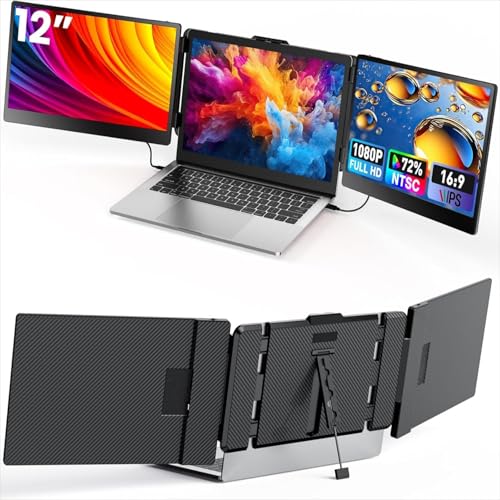
Fagomfer Laptop Screen Extender, 12’’ Triple Monitor Extender Ultra Slim 1080P FHD IPS Portable Monitor for Laptop with Stand Compatible with Mac Windows Linux PS4/5


Key Specifications
| Specification | Detail |
|---|---|
| Screen Configuration | Dual 12-inch panels |
| Resolution (per screen) | 1920 x 1080 (Full HD) |
| Panel Type | LCD (Amazon specs) / IPS (picture enhancement + bullets) |
| Refresh Rate | 60Hz |
| Response Time | 2ms |
| Color Gamut | 72 (Amazon specs, likely 72% NTSC ~100% sRGB) |
| Contrast Ratio | 1000:1 |
| Brightness | 300 nits |
| Viewing Angle | 180° |
| Aspect Ratio | 16:9 |
| Screen Finish | Glossy |
| Screen Rotation | 180° forward per screen |
| Display Modes | Mirror, extend, differential |
| Stand | Adjustable, built-in |
| Laptop Width Fit | Up to 405mm (15.9 inches) |
| Connectivity | USB-C, HDMI + USB-A, DisplayPort + USB-A |
| Mac M1/M2/M3 Base | NOT compatible (single video output) |
| Mac M1/M2/M3 Pro/Max | Compatible (dual video output) |
| OS Compatibility | Windows, Mac (Pro/Max only), Linux, Switch, PS4/5 |
| Weight | 2.8 lbs |
| Dimensions | 14″ D x 8.5″ W x 2″ H |
| Warranty | Not specified in Amazon data |
Compact 12-Inch Form Factor
12 inches per panel is smaller than the 14-15.6 inch standard in the extender category. 1920 x 1080 on 12 inches produces approximately 184 PPI, which is sharper than the same resolution on larger screens. The compact size at 2.8 lbs keeps the setup lighter and more portable than larger dual-panel alternatives. The adjustable stand supports laptop screens up to 15.9 inches in width. Each screen rotates 180° forward for sharing and collaboration. Independent brightness and contrast adjustments per screen. For another Fagomfer product, see the Fagomfer 12″ Triple Extender review.
Display Performance
300 nits provides standard indoor visibility. The Amazon color gamut field shows 72, likely 72% NTSC (~100% sRGB), covering the standard web color space. 1000:1 contrast is the standard baseline. 2ms response time provides clean motion at 60Hz. 180° viewing angles maintain color consistency. The glossy finish enhances vibrancy but reflects light across both panels. The Amazon specs list LCD for both display type and technology. IPS is listed in the picture quality enhancement field and product bullets.
Mac Chip Compatibility
The product bullets clearly differentiate Mac chip compatibility. Base M1/M2/M3 chips support only one video signal output and are NOT compatible for dual-screen functionality. M1/M2/M3 Pro and Max chips support dual video output and ARE compatible. This is a clearer Mac compatibility statement than most competing extenders provide. Verify your specific Mac chip before purchasing. For USB-C requirements, see our USB-C portable monitor guide.
Connectivity
| Connection | Function |
|---|---|
| USB-C to USB-C | Video + power (single cable) |
| USB-C to HDMI + USB-A | Video (HDMI) + power (USB-A) |
| DisplayPort + USB-A | Video (DP) + power (USB-A) |
Plug & Play with no drivers. Multiple cable types included. Laptop must support dual video signal output for both screens to function. For alternatives with broader compatibility, see our comparison pages.
Drawbacks
| Consideration | Detail |
|---|---|
| 12-Inch Panels | Smaller than the 14-15.6″ standard. Less physical screen area. |
| Mac M1/M2/M3 Base Excluded | Only Pro/Max chips support dual-screen. |
| Glossy Finish | Two glossy panels amplify reflections. |
| Panel Type Unclear | LCD in specs, IPS in bullets. |
| Dual Video Output Required | Laptop must have 2 video-capable ports. |
| Warranty Not Specified | Not listed in Amazon data. |
Is This Extender Right For You?
If you want a compact, lightweight dual-panel extender with clear Mac Pro/Max support: 12 inches at 2.8 lbs with 184 PPI (sharper than larger 1080P panels), 300 nits, 72% color gamut, 2ms, and clear Pro/Max chip compatibility. The smaller form factor fits into bags more easily than 15.6-inch alternatives.

If you need larger screens or Mac M1/M2/M3 base chip support: 12 inches is small for extended productivity. Base M-series chips are excluded. For larger dual-panel options with broader Mac support, alternatives are available.
Final Verdict
Fagomfer’s S2 mini provides a compact dual 12-inch 1080P extender with 300 nits, 72% color gamut, 2ms, 180° rotation per screen, adjustable stand, and Plug & Play USB-C/HDMI/DisplayPort connectivity at 2.8 lbs. The clear distinction between Mac base chips (excluded) and Pro/Max chips (compatible) is more transparent than most competing listings. The 12-inch form factor trades screen area for portability and sharper pixel density.
The smaller screen size limits productivity workspace. Glossy finish on two panels amplifies reflections. Panel type shows LCD in specs and IPS in bullets. Warranty is not specified. For users who prioritize compact portability, clear Mac Pro/Max support, and sharper pixel density in a dual-panel format, the S2 mini delivers that combination. For users who need larger screens or base M-series Mac compatibility, alternatives serve those needs.
Frequently Asked Questions
Does it work with MacBook M2?
Base M2 chip: No. M2 Pro or M2 Max: Yes. The product bullets specify that base M1/M2/M3 chips only support one video signal output and cannot drive both extended screens. Pro and Max variants support dual output.
Why 12 inches instead of 14 or 15.6?
The smaller form factor provides lighter weight (2.8 lbs) and higher pixel density (184 PPI vs 157 PPI at 14 inches). The trade-off is less physical screen area for each panel.
Does my laptop need special ports?
Yes. Your laptop must support dual video signal output. This means two full-featured USB-C ports, or one USB-C + one HDMI, or one DisplayPort + one USB-A configuration. Laptops with only one video-capable port cannot drive both screens.
Disclosure: As an Amazon Associate, I earn from qualifying purchases.
End of editorial review · Interactive tools below
FIELD TOOLSFIELD TOOLS
These six tools address the critical decisions every laptop screen extender buyer faces — physical fit, hinge safety, OS display limits, setup complexity, form factor selection, and travel readiness. Each tool is category-level: they work for any extender, not just the one reviewed above. Full buying guide →