
HP USB-C Essential Dock G5 Bundle Review
Tangled in cords no more! Discover seamless connectivity with the HP USB-C Dock G5 Bundle. Effortlessly declutter your desk & transform your tech life today!
Two DisplayPort 1.4, one HDMI 2.0, and up to three displays from a single USB-C cable that also charges the laptop at 100W. The HP USB-C Essential Dock G5 is HP’s entry-level enterprise dock — compact square footprint, ten ports, universal compatibility across HP and non-HP laptops. It sits below HP’s higher-tier docks in the lineup but covers the core desk setup: monitors, keyboard, mouse, Ethernet, audio, and charging through one connection. This particular listing is a Docztorm bundle that adds their USB hub accessory to the HP dock. The dock is HP. The bundle is Docztorm.
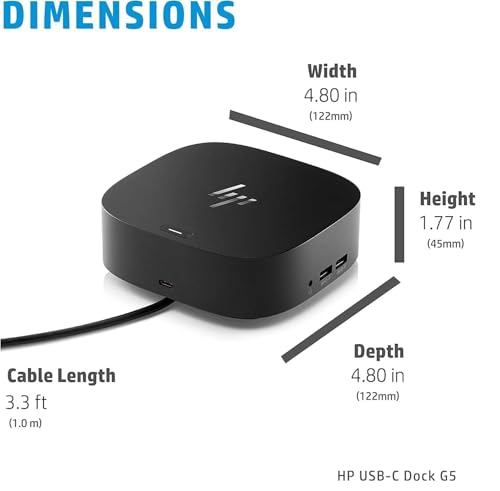
Ten ports: one USB-C SuperSpeed, two USB-A, two USB-A charging, two DisplayPort 1.4, one HDMI 2.0, one RJ-45 Gigabit Ethernet, one audio jack. 4.8 x 4.8 inch desk footprint. 1.52 kg / 3.35 lbs. Compatible with USB-C and Thunderbolt laptops from HP, Apple, Dell, Lenovo. No warranty duration listed.

HP USB-C Essential Dock G5 8 in 1 Adapter for USB-C and Thunderbolt Laptops | Notebooks and PCs - Single Cable for Charging, Networking, or Data Transfers, Black
Key Specifications
| Specification | Detail |
|---|---|
| Total Ports | 10 |
| DisplayPort 1.4 | 2 |
| HDMI 2.0 | 1 |
| USB-C SuperSpeed | 1 |
| USB-A | 2 |
| USB-A Charging | 2 |
| Gigabit Ethernet RJ-45 | 1 |
| Audio Jack | 1 |
| Max Displays | 3 simultaneously |
| Power | 100W (single cable charging + connectivity) |
| Compatible Devices | HP, Apple, Dell, Lenovo (USB-C and Thunderbolt) |
| Footprint | 4.8″ x 4.8″ |
| Weight | 1.52 kg / 3.35 lbs |
| Dimensions | 5″ x 5″ x 5″ |
| Bundle By | Docztorm (adds USB hub accessory) |
| Manufacturer | HP |
| Warranty | Not specified |

Three Displays from One Cable
Two DisplayPort 1.4 and one HDMI 2.0 provide three video outputs. All three can run simultaneously. DisplayPort 1.4 supports 4K@60Hz per port. HDMI 2.0 supports 4K@60Hz. The actual resolution and display count depend on your laptop’s GPU and USB-C/Thunderbolt bandwidth, but the dock provides three independent video paths for a triple-monitor desk setup.

For someone who runs two monitors for work and a third for video calls or reference material, the three video outputs cover that without an adapter or splitter. The mix of DisplayPort and HDMI means your monitors connect directly regardless of which input type they have.
Single Cable: Charging, Displays, Data, Network
One USB-C cable from the dock to the laptop carries everything: 100W charging, display signals, USB data, and Ethernet. Arrive at the desk, plug in one cable, and the laptop connects to monitors, keyboard, mouse, wired network, and starts charging simultaneously. Unplug that one cable and you walk away with the laptop. For hot-desking environments where different people use the same desk setup throughout the day, one cable is the difference between a 30-second dock and a 5-minute cable-sorting exercise.
Two Dedicated Charging USB-A Ports
Two of the four USB-A ports are designated for charging. That means two phones, tablets, or wireless headset cases can charge through the dock without occupying the standard USB-A data ports. Most docks have one charging port or none. Two charging ports serve the reality of a desk where a phone and a headset both need power throughout the day. The two remaining USB-A ports handle keyboard, mouse, or other peripherals.
4.8-Inch Square Footprint
The 4.8 x 4.8 inch footprint is roughly the size of a large coaster. At 3.35 lbs, it is a desk dock that stays put. The square shape differs from the elongated slab form factor that Dell and Lenovo docks use. Whether the square or slab fits better on your desk depends on where your cables route. A square dock tucks into a corner. A slab dock lines up along the back edge. Neither is better — they just occupy desk space differently.
Universal Compatibility
HP designed this dock for HP laptops but explicitly lists Apple, Dell, and Lenovo as compatible. “Universal” here means DP Alt Mode over USB-C, not DisplayLink. The dock should work with any USB-C or Thunderbolt laptop that supports DP Alt Mode and Power Delivery. No driver installation mentioned, which is consistent with a native DP Alt Mode dock. If your laptop’s USB-C port supports video output, the dock handles the rest.
Docztorm Bundle
Docztorm bundles the HP dock with their own USB hub accessory. The HP dock is the primary product. The Docztorm hub adds extra USB ports for buyers who need more than the dock provides. Docztorm is the same bundler that packages the HP USB-C Universal Docking Station (Targus-made). The dock hardware comes from HP. The bundle packaging and added hub come from Docztorm.

Drawbacks
| Consideration | Detail |
|---|---|
| 3.35 lbs | Desk dock. Not portable. |
| Warranty Not Specified | No duration listed. |
| Docztorm Bundle | Third-party bundler. Support chain may vary. |
| No Card Reader | No SD or MicroSD. |
| USB Port Speeds Not Specified | SuperSpeed USB-C listed but exact Gbps not stated for USB-A ports. |
| 5″ x 5″ x 5″ Dimensions | Cube-shaped. Taller than flat docks. |
Who This Dock Is For
Professionals who need a triple-display HP dock with 100W charging, Ethernet, audio, and universal laptop compatibility in a compact square footprint: The Essential Dock G5 covers the standard desk setup: three monitors, keyboard, mouse, wired network, audio, and laptop charging through one USB-C cable. Two dedicated charging USB-A ports handle phones and headsets. The 4.8-inch square takes less desk surface than a slab dock. Compatible with HP, Apple, Dell, and Lenovo laptops. For HP’s higher-tier universal dock (Targus-made with quad display), see the HP USB-C Universal Docking Station review.
Buyers who need a card reader, specified USB speeds, or a clear warranty: No SD/MicroSD reader. USB-A port speeds not detailed. No warranty listed. For docks with those details, see the docking stations hub page.
Final Verdict
The HP USB-C Essential Dock G5 handles the desk setup that most office workers need: three monitors, USB peripherals, wired Ethernet, audio, and 100W laptop charging from one cable. The two dedicated charging USB-A ports are a practical touch for keeping phones powered throughout the workday. The 4.8-inch square footprint keeps it tucked into a corner. HP’s universal compatibility means it docks Dell and Lenovo laptops alongside HP machines. The Docztorm bundle adds a USB hub for extra ports. The missing warranty detail and unspecified USB speeds are gaps in an otherwise straightforward enterprise dock. For a desk that needs monitors, network, and power from one cable without complexity, the Essential Dock G5 provides that from HP with HP’s name on the hardware.
Frequently Asked Questions
Does this work with MacBook?
Yes. Apple is listed as a compatible brand. The dock works with USB-C and Thunderbolt MacBooks. Display count on Mac depends on the MacBook’s chipset — base M-series Macs may be limited to fewer external displays than the dock can provide.
What is the Docztorm hub?
Docztorm is a third-party bundler that packages the HP dock with their own USB hub accessory. The HP dock is the primary product. The Docztorm hub adds extra USB ports.
Can I charge my phone through this dock?
Yes. Two of the USB-A ports are dedicated charging ports for phones, tablets, and accessories.
How does this compare to the HP USB-C Universal Dock?
The Essential Dock G5 is HP-manufactured with three video outputs and 10 ports. The Universal Dock is Targus-manufactured with four video outputs (quad 4K) and DisplayLink. The Essential is simpler and does not require a driver. The Universal drives more monitors but needs DisplayLink software.
Disclosure: As an Amazon Associate, I earn from qualifying purchases.

I evaluate docking stations the way they actually get used — against real bandwidth budgets, power-delivery ceilings, and the OS handshakes that quietly cap what a port can do — not spec-sheet promises. Every constraint that can break a multi-display setup is disclosed before any affiliate link.
Docking Station Intelligence
The standards are confusing by design. These three panels decode what manufacturers won’t explain clearly. Applicable to every docking station.
The USB-C Confusion Matrix
The USB-C connector is the single greatest source of buyer confusion in docking stations. The physical plug looks identical whether it carries USB 2.0 at 480 Mbps or Thunderbolt 5 at 120 Gbps — a 250x difference in capability hidden behind the same shape. Manufacturers exploit this by labeling everything "USB-C compatible" without specifying which protocol runs through it. Two docks can look identical on the outside and behave completely differently once you plug them in.
The hierarchy matters because it determines everything: how many monitors your dock can drive, how fast files transfer, whether your laptop charges while docked, and whether you need third-party drivers. Here is the real capability ladder, from slowest to fastest:
The practical takeaway: if your laptop has Thunderbolt 4, buy a Thunderbolt dock. If it only has generic USB-C, verify whether it supports DisplayPort Alt Mode before buying anything with multi-monitor claims. Our buying guide walks through verification steps for every major laptop brand.
Power Delivery: What the Watts Mean
Power Delivery (PD) determines whether your docking station can charge your laptop while you work, or whether you need a separate charger cluttering your desk. The math is simple but rarely explained: your laptop draws a specific wattage under load, and the dock must match or exceed it. If the dock delivers less than your laptop needs, the battery slowly drains even while plugged in — defeating the purpose of a docking station entirely.
Check the laptop manufacturer’s recommended power supply and the dock’s rated host power. Shared charging budgets vary by dock: powering peripherals does not reduce host charging on every model. USB-C charging also depends on the laptop, cable and negotiated power profile. A lower-power supply may charge slowly or allow battery drain under load; a fixed 15–20W margin is not a universal requirement.
Check your laptop’s original charger wattage — that’s your baseline. Our FAQ covers how to find this for every major brand.
Native Display vs DisplayLink: The Hidden Factor
This is the decision most buyers don’t know they’re making. When a docking station outputs video to your monitors, it uses one of two fundamentally different methods: native (the dock passes your laptop’s GPU signal directly to the monitor) or DisplayLink (the dock compresses video over USB and a software driver renders it). The difference is invisible in marketing materials but profoundly affects your daily experience.
Native output through DisplayPort Alt Mode or Thunderbolt uses the host graphics system. DisplayLink transports encoded display data over USB using compatible software. Its responsiveness and CPU/GPU load vary with the computer, software, resolution and workload; fixed latency, CPU and battery percentages are not universal specifications. Protected-video playback also depends on the display path, operating system and service. Check DisplayLink system requirements for your configuration.
DisplayLink can add displays through compatible USB connections, including USB-A, and can serve systems with limited native display outputs. Native limits depend on the exact computer and operating mode. For example, M3 MacBook Air and MacBook Pro support two external displays with the lid closed under Apple’s stated conditions. Choose the display method against your computer, software permissions and workload.
Native (Alt Mode / Thunderbolt)
DisplayLink (USB compression)
Choose a native or DisplayLink dock by checking the exact host, dock, operating system and monitor combination. Native output is often preferable for latency-sensitive workloads; DisplayLink can be useful for additional productivity displays and compatible USB-A hosts. Neither connector shape nor a generic bandwidth number proves compatibility.
COMMAND CENTERCOMMAND CENTER
Six tools that decode the confusion manufacturers create. Port protocols, power budgets, display configurations, compatibility, desk planning, and future-proofing. Full buying guide →
Port Protocol DecoderWhat does your connection type actually support? Glossary
Power Delivery CalculatorCan this dock keep your laptop charged?
Display Configuration PlannerCan your dock push enough pixels?
Laptop-to-Dock CompatibilityWill this dock work with YOUR laptop?
Desk Setup ArchitectWhat ports do you actually need?
Select everything you need to connect: