
DZVW 16″ 2.5K Portable Monitor – QHD Laptop Screen Extender
Our wry take on a 16-inch 2.5K portable monitor—thin, 16:10, 100% sRGB, USB-C/HDMI—and a stand that behaves better than family at Thanksgiving in portrait, too.
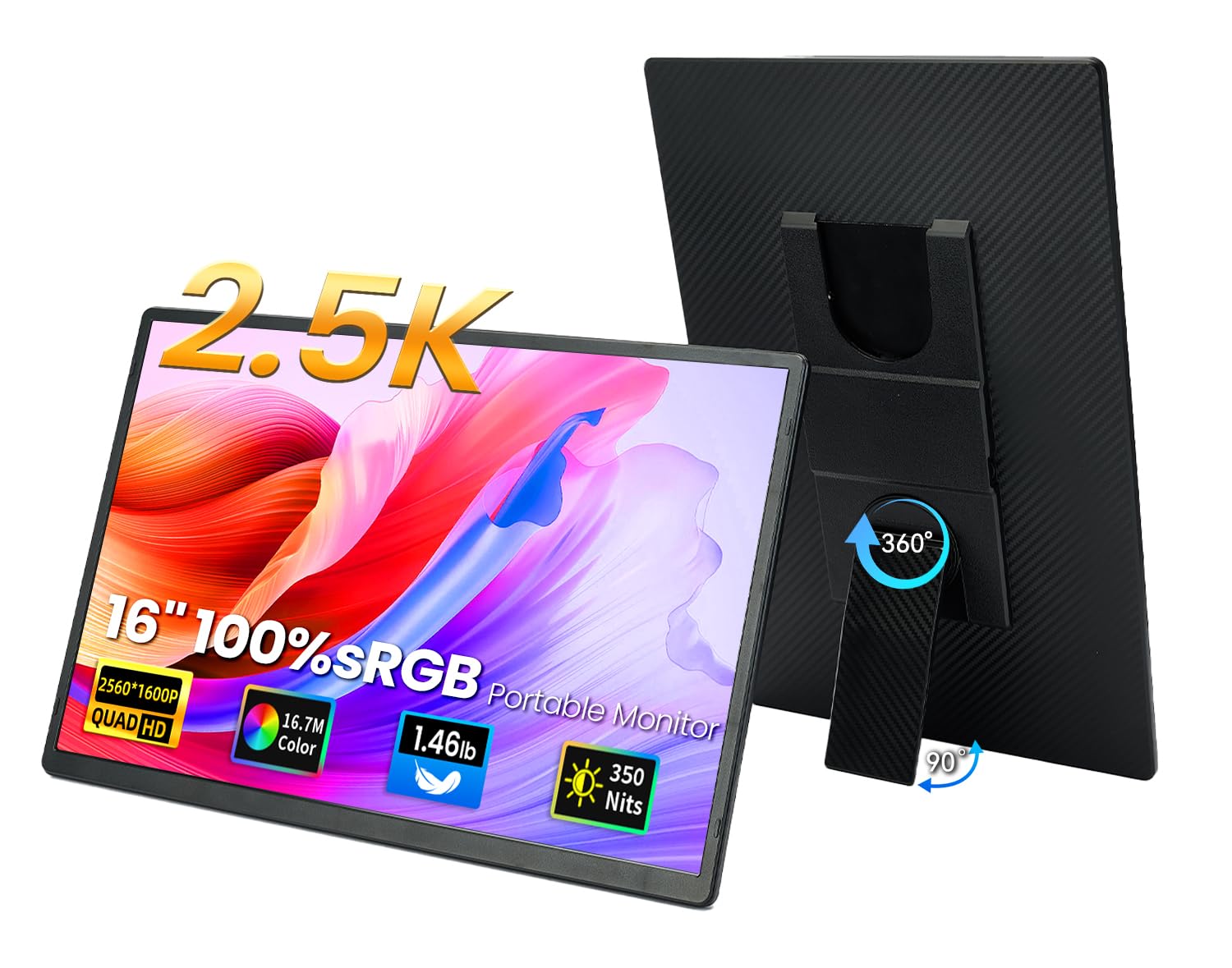
At 2560 x 1600 on a 16-inch panel, this DZVW portable monitor produces approximately 189 PPI with a 16:10 aspect ratio. That combination changes how a portable second screen works in practice: text is sharp at every scaling level, side-by-side windows each have enough space to remain readable, and the extra vertical pixels from 16:10 mean less scrolling in documents, code, and web browsers. Compared to the 141 PPI and 16:9 layout of a standard 15.6-inch 1080P portable, the difference in usable workspace is immediately noticeable.
The display backs that resolution with 100% sRGB, 350 nits brightness, 1200:1 contrast, 3ms response time, and FreeSync at 60Hz on an IPS panel. At 1.46 lbs and 0.3 inches thin with a 360° rotating stand, it connects via three Type-C ports (two full-function, one for HDMI input) with Plug & Play operation.

Why 2.5K at 16:10 Matters for Productivity
The 16:10 aspect ratio provides approximately 11% more vertical screen space than 16:9 at the same width. In a 16-inch portable monitor, this translates to more visible rows in spreadsheets, more lines of code, and less scrolling in documents and web pages. Portrait orientation (supported via the rotating stand) becomes particularly effective at this resolution, displaying full document pages without scaling compromises.
At 2560 x 1600, the pixel density (189 PPI) is 34% higher than a 15.6-inch 1080P display (141 PPI). Text rendering is visibly sharper, image detail holds up under zoom, and UI elements remain clean at scaling levels from 100% to 150%. For users who spend hours reading on screen, the improvement in text clarity reduces eye strain independently of any blue light or flicker-free technology.
For comparison with other 2.5K and 2K portable options on the site, see our comparison pages.
Key Specifications at a Glance
| Specification | Detail |
|---|---|
| Screen Size | 16 inches |
| Resolution | 2560 x 1600 (QHD Wide / 2.5K) |
| Panel Type | IPS |
| Refresh Rate | 60Hz |
| Response Time | 3ms |
| Color Gamut | 100% sRGB (16.7 million colors) |
| Contrast Ratio | 1200:1 |
| Brightness | 350 nits |
| Viewing Angle | 178° |
| Aspect Ratio | 16:10 |
| Adaptive Sync | FreeSync |
| Eye Care | Blue light reduction + flicker-free |
| Speakers | Not listed |
| Ports | 3x Type-C: 2 full-function (C2/C3), 1 HDMI input (C1 with DP) |
| Stand | Removable, 360° rotation, 90° opening, non-slip pads, left/right slot |
| Protection | PU leather panel (scratch/spill resistant, doubles as mouse pad) |
| Weight | 1.46 lbs |
| Thickness | 0.3 inches |
| Display Modes | Duplicate, extend, second screen only |
| Compatible Devices | PC, Mac, phones, Switch, PS4/PS5, Xbox |
| Warranty | 365 days |
DZVW 16" 2.5K Portable Monitor - QHD Laptop Screen Extender 100% sRGB Wide Color HDMI/USB C/USB A Travel External Display Stand Gaming Monitor for PC Windows MAC Computer Switch Phone Xbox PS4/5
Display Performance
100% sRGB with 1200:1 contrast and 350 nits brightness is an above-average combination for this price tier. 350 nits handles well-lit indoor environments, offices, and cafés near windows. The 1200:1 contrast exceeds the 1000:1 IPS standard, delivering better shadow detail and more visible separation between dark and light elements. Colors are accurate across the standard sRGB spectrum for web content, photo editing, and general creative work.
The 3ms response time with FreeSync provides clean motion during scrolling, video playback, and casual gaming. At 60Hz, each frame has 16.7ms of screen time, and 3ms is fast enough to render transitions cleanly with no visible ghosting. FreeSync eliminates tearing during frame rate fluctuations.
Blue light reduction and flicker-free operation at 60Hz are included for extended session comfort.
The Port Configuration
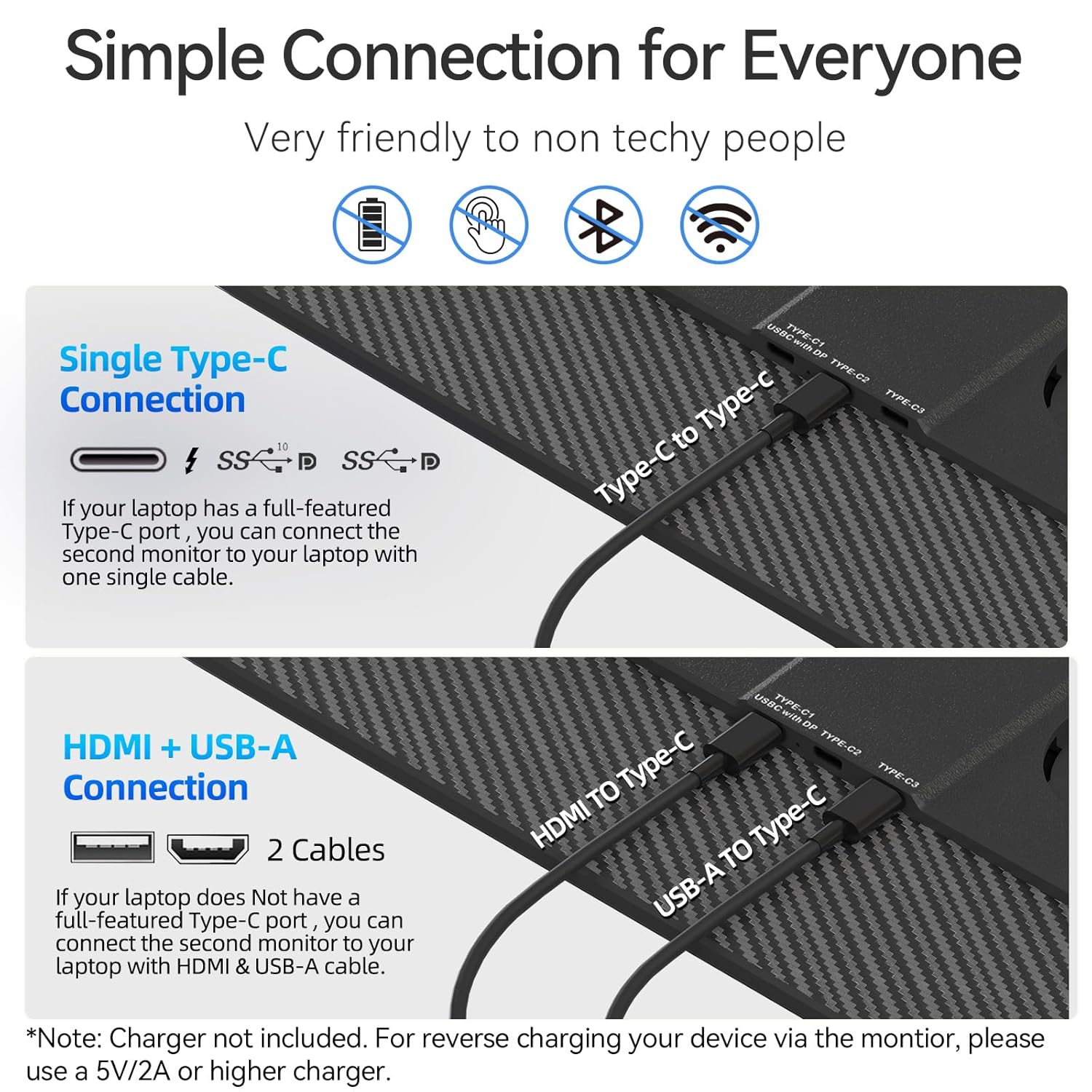
The monitor uses three Type-C ports rather than traditional HDMI and USB-C:
| Port | Label | Function |
|---|---|---|
| Type-C2 / Type-C3 | Full-function USB-C | Video + power (single cable for DP Alt Mode devices) |
| Type-C1 (with DP) | HDMI input | Video input from HDMI sources via included cable |
For laptops with full-function USB-C (DP Alt Mode), a single cable to Type-C2 or Type-C3 handles both video and power. For HDMI devices (consoles, older laptops), connect HDMI to Type-C1 and supply power through Type-C2 or Type-C3 from a wall adapter or USB port. Phones with USB-C video output connect directly to Type-C2/C3.
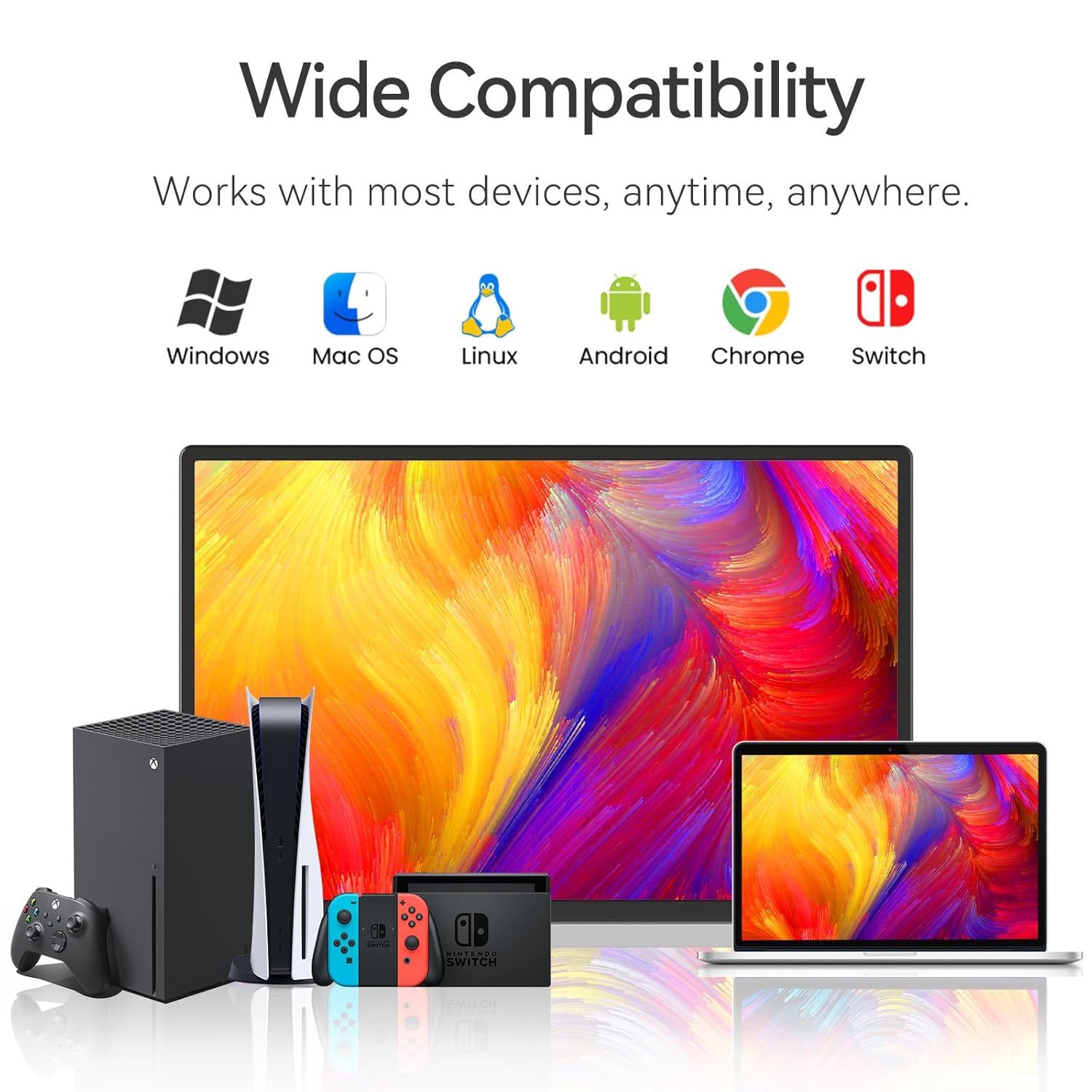
Compatible with Windows, macOS, ChromeOS, Android (Dex), Linux, and Nintendo Switch. For USB-C video requirements, see our USB-C portable monitor guide.
Stand and Design
The removable stand inserts into side slots on the backplate (left or right) and provides 360° rotation with a 90° opening angle. This supports both landscape and portrait orientation with adjustable tilt. Non-slip pads on the base keep the monitor anchored on desk surfaces.
At 1.46 lbs and 0.3 inches thin, the monitor is among the lighter 16-inch 2.5K displays available. The PU leather panel provides scratch and spill resistance during transport and doubles as a mouse pad surface. For ergonomic positioning tips with portable monitors, see our ergonomic setup guide.
Potential Drawbacks to Consider
| Consideration | Detail |
|---|---|
| 60Hz Only | Standard for productivity. Not suited for competitive gaming. |
| No HDR Listed | HDR is not confirmed in the Amazon data. |
| No Speakers Listed | The Amazon listing does not mention built-in speakers. |
| Screen Finish Not Specified | Matte or glossy not confirmed in Amazon structured data. |
| HDMI Requires Separate Power | When using HDMI via Type-C1, a second cable for power is needed. |
| Lesser-Known Brand | DZVW does not have the market presence of UPERFECT, ASUS, or Lenovo. |
| 350 Nits Outdoor Limit | Bright enough indoors and near windows, but not for direct sunlight. |
Who This Monitor Is Best For
Productivity users who want more workspace in a portable format: The 2560 x 1600 resolution at 16:10 delivers meaningfully more usable space than 1080P at 16:9. If your work involves side-by-side windows, long documents, spreadsheets, or code, the extra pixels and vertical space reduce scrolling and eliminate window overlap. At 1.46 lbs, the weight penalty over a 1080P portable is minimal.
Creatives who need sRGB accuracy in a travel display: 100% sRGB with 1200:1 contrast and 350 nits provides reliable color for web graphics, photo editing, and content creation on the go. The 16:10 ratio gives video timelines extra room for tools above or below the playback area. For more on portable displays for creative work, see our buying guide.
Travelers who prioritize light weight and clean setup: 1.46 lbs with a single-cable USB-C connection (for compatible devices) and a PU leather panel for protection. The 360° rotating stand eliminates the need for a separate case or prop.
Who Should Look Elsewhere
Competitive gamers: 60Hz limits gaming to casual use. For higher refresh rates with FreeSync, gaming-focused portables with 120Hz+ are available on our comparison pages.
Users who need built-in audio: No speakers are listed. External speakers or headphones are required for any audio.
Users who need wide-gamut color (AdobeRGB, DCI-P3): The 100% sRGB gamut is accurate for web-standard content but does not cover the wider color spaces used in print production and cinema grading.
Pros and Cons
| Pros | Cons |
|---|---|
| 2560 x 1600 (189 PPI) with 16:10 ratio | 60Hz, not suited for competitive gaming |
| 100% sRGB, 1200:1 contrast, 350 nits | No HDR listed |
| 3ms response time + FreeSync | No speakers listed |
| 1.46 lbs, 0.3″ thin | Screen finish not specified |
| 360° rotating stand with non-slip pads | HDMI requires separate power cable |
| Single-cable USB-C setup for compatible devices | Lesser-known brand (DZVW) |
| PU leather panel (scratch/spill resistant + mouse pad) | 350 nits insufficient for direct sunlight |
| 178° IPS viewing angles | |
| Blue light + flicker-free eye care | |
| 365-day warranty |
Final Verdict
DZVW’s 16-inch 2.5K portable monitor delivers one of the strongest spec sheets in the mid-range portable category: 2560 x 1600 at 16:10, 100% sRGB, 350 nits, 1200:1 contrast, 3ms with FreeSync, and 1.46 lbs with a versatile rotating stand. The resolution and aspect ratio are the core differentiators. They provide a genuine step up in usable workspace over 1080P 16:9 portables, with sharper text and more visible content at every scaling level.
The 60Hz refresh rate, absence of speakers, and unspecified screen finish are the notable gaps. DZVW is a lesser-known brand, which means less established support compared to UPERFECT, ASUS, or Lenovo. The 365-day warranty provides basic coverage. For users who prioritize resolution, color accuracy, and light weight in a portable second screen, the specs deliver strong value. For users who need higher refresh rates, speakers, or brand-name confidence, alternatives with those features are available across our comparison hub.
Frequently Asked Questions
What does 16:10 actually change in daily use?
16:10 adds approximately 11% more vertical space than 16:9 at the same width. In practice, this means more visible rows in spreadsheets, more lines of code, less scrolling in documents, and more breathing room in side-by-side window layouts. Portrait mode also benefits: documents display closer to their full page height without aggressive scaling.
How does the Type-C1 port work as an HDMI input?
Type-C1 (labeled “with DP”) accepts HDMI video input via an HDMI-to-Type-C cable (included or compatible). When using this port for HDMI video, you need to supply power separately through Type-C2 or Type-C3 from a wall adapter or USB port. This setup works for consoles, desktops, and older laptops that use HDMI for video output.
Can I use a single cable for everything?
Yes, if your device supports full-function USB-C with DisplayPort Alt Mode. Connect one USB-C cable to Type-C2 or Type-C3, and the monitor receives both video and power through that single cable. Most modern laptops and some phones support this.
Is 350 nits bright enough?
For indoor environments, yes. 350 nits handles offices, home setups, cafés, and rooms with window light comfortably. It is not sufficient for use in direct sunlight. The 1200:1 contrast ratio helps maintain visibility in moderately bright conditions by keeping the image punchy without oversaturation.
Is DZVW a reliable brand?
DZVW is a lesser-known brand without the market presence of established names like UPERFECT, ASUS, or Lenovo. The 365-day warranty provides basic coverage. Support is available by contacting the seller through the Amazon listing. The specs are strong for the price tier, but brand trust is a personal decision based on how much weight you give to vendor reputation versus display specifications.
Disclosure: As an Amazon Associate, I earn from qualifying purchases.
End of editorial review · Interactive tools below
FIELD TOOLSFIELD TOOLS
These six tools address the critical decisions every laptop screen extender buyer faces — physical fit, hinge safety, OS display limits, setup complexity, form factor selection, and travel readiness. Each tool is category-level: they work for any extender, not just the one reviewed above. Full buying guide →