
VILVA 17.3″ QHD 165Hz Portable Gaming Monitor Review
Discover the sci-fi magic of the VILVA 15.6" Triple Portable Monitor. Boost productivity with triple screens and eye comfort, folding neatly into tech bliss.
The VILVA V173F1-N is a 17.3-inch portable gaming monitor with a 2560×1440 IPS panel running at 165Hz. Those three numbers are the whole pitch. Most portable monitors stop at 15.6 inches, 1080P and 60Hz; this one is a laptop-lid-sized QHD screen that refreshes nearly three times as fast, which is the difference between a second screen for spreadsheets and a second screen you would actually play on. The panel is matte, quotes a 1000:1 contrast ratio and a 5ms response time, and supports FreeSync to keep frames from tearing when a game’s frame rate wanders.
The body is thin metal, 0.45 inches at the listed depth, with a built-in adjustable stand, and the whole unit weighs 3.45 lb. It connects over a full-featured USB-C port for single-cable video and power, or over HDMI, with no driver on laptops, desktops, Macs, phones, PS5, Xbox or Switch. VILVA gives it a 2-year warranty. Brightness, colour gamut, speakers and the box contents are not published on the listing, and this review says so where it matters rather than guessing.
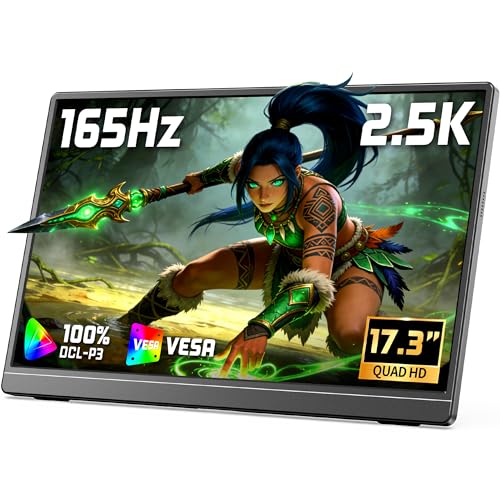
VILVA 17.3" QHD 165Hz USB-C HDMI Gaming Monitor | 17.3" QHD 165Hz IPS, slim metal+stand, USB-C/HDMI, for PC/PS5/Xbox/Switch, gaming.
Key Specifications
| Specification | Detail |
|---|---|
| Screen Size | 17.3 inches |
| Resolution | 2560 x 1440 (QHD, 2.5K) |
| Panel Type | IPS |
| Refresh Rate | 165Hz |
| Response Time | 5ms |
| Adaptive Sync | FreeSync |
| Contrast Ratio | 1000:1 |
| Brightness | Not stated |
| Color Gamut | Not stated |
| HDR | Not stated |
| Viewing Angle | Not stated |
| Aspect Ratio | 16:9 |
| Screen Finish | Matte |
| Bezels | Ultra-narrow |
| Speakers | Not stated |
| Body | Slim metal |
| Stand | Built-in, adjustable |
| Ports | Full-featured USB-C, HDMI (HDMI size and USB-C port count not stated) |
| Connection | Single USB-C cable for video and power, or HDMI; no driver |
| Compatible Devices | Laptop, PC, Mac, smartphone, PS5, Xbox, Switch |
| Weight | 3.45 lb |
| Dimensions | 15.7 x 9.52 x 0.45 inches |
| Power Adapter | Not stated |
| Model | V173F1-N |
| Warranty | 2 years |

QHD at 165Hz: What Changes on a 17-Inch Screen
2560×1440 on a 17.3-inch panel works out to about 170 pixels per inch, sharper than a 15.6-inch 1080P portable and sharper than most 27-inch desktop monitors at the same resolution. Text is crisp at 100 percent scaling, a full-width game HUD has room to breathe, and two documents side by side are readable without squinting. The 16:9 QHD shape is also the resolution most gaming laptops and mid-range graphics cards are happiest driving at high frame rates, which is why this pairing exists.

165Hz is the number that makes it a gaming monitor rather than a big work screen. At 60Hz the screen redraws 60 times a second; at 165Hz it redraws 165 times, so motion is smoother, the cursor and camera feel more direct, and fast games look less like a slideshow. FreeSync matches the panel’s refresh to the frame rate the graphics card is actually producing, so a game running at 90 or 120 frames per second does not tear or stutter. The 5ms response time is slower than the 1ms figures on desktop gaming panels; for competitive shooters it is a step behind, for everything else it is fine. The matte finish keeps room lights and windows out of dark scenes.
Two honest gaps. VILVA does not publish a brightness figure or a colour gamut for this panel, so there is no basis for calling it bright or wide-gamut, and no basis for calling it dim either. If either number matters to you, ask the seller before buying. For more on what the numbers on a portable monitor mean, see our USB-C portable monitor guide.
Metal Body and Built-in Stand
The body is metal, which VILVA credits for both toughness and heat dissipation, and a 165Hz panel does run warmer than a 60Hz one, so the second point is not just marketing. At 15.7 by 9.52 inches and 0.45 inches deep it is close to the footprint of a 17-inch laptop lid, and at 3.45 lb it weighs about what a thin 15-inch laptop weighs. That is portable in the sense of moving between rooms, hotel desks and a friend’s house with a console; it is not something you slip into a jacket. The ultra-narrow bezels keep the outer size down for the screen area you get.

The stand is built in and adjustable, so there is no folding cover to lose and no separate bracket to carry. VILVA does not give the tilt range, and does not mention VESA mounting.
Connectivity: USB-C Single Cable or HDMI
The USB-C port is full-featured, meaning it takes video, data and power over one cable from a laptop whose own USB-C port carries video (DisplayPort Alt Mode). That is the tidy setup: one cable, no adapter, no driver. The HDMI port is for desktops, consoles and laptops without a video-capable USB-C port. VILVA does not say whether the HDMI socket is full-size or mini, or how many USB-C ports the monitor has, so check the product photos before buying cables.
Two things to check on the source device. First, reaching the full 165Hz at 1440p needs enough bandwidth from the port you use; a laptop’s USB-C port depends on its DisplayPort version and an HDMI link depends on the HDMI version, and VILVA states neither, so confirm what your machine can output. Second, consoles will not use the full refresh rate: the PS5 and Xbox Series X top out at 120Hz, so on those the monitor is a sharp 1440p screen at up to 120Hz rather than a 165Hz one.
Power over a single USB-C cable depends on the laptop port supplying enough of it, and a 17.3-inch 165Hz panel asks for more than a 14-inch 60Hz one. VILVA does not state the power draw, whether an adapter is in the box, or how the monitor takes extra power when a laptop port cannot feed it. If you plan to run it from a phone or a low-power laptop, ask the seller first.
What’s in the Box
The listing does not itemise the box contents. Expect the monitor and at least one cable, and confirm with VILVA whether an HDMI cable and a power adapter are included.
Drawbacks
| Consideration | Detail |
|---|---|
| Brightness Not Stated | No nit figure is published. |
| Color Gamut Not Stated | No sRGB or DCI-P3 coverage is published. |
| 5ms Response | Adequate for most games, behind 1ms desktop gaming panels. |
| Speakers Not Stated | Plan on headphones or the laptop’s speakers until confirmed. |
| Port Details Not Stated | HDMI size, USB-C port count and HDMI version are not given. |
| Power Adapter Not Stated | Whether one is included, and the power draw, are not given. |
| 3.45 lb | Laptop weight, not tablet weight. |
| 1000:1 Contrast | Standard IPS baseline. |

Who This Monitor Is For
Gaming laptop owners who want a bigger, faster screen than the laptop’s own: One USB-C cable, 17.3 inches, 1440p and 165Hz with FreeSync. For a laptop that renders games above 60 frames per second, this is the screen that shows the difference. For the smaller VILVA panels, see the VILVA 15.6 inch Portable Monitor review.
Console players who move around: A PS5, Xbox or Switch plugged in over HDMI gets a sharp 1440p picture on a screen that packs flat, up to the 120Hz the consoles allow.
Remote workers who want a large second screen: 17.3 inches at QHD holds two windows comfortably, and the stand is built in. The 165Hz is a bonus here rather than the point.
Buyers who need a stated brightness, wide colour, speakers or a light travel screen: None of those are confirmed on this listing, and 3.45 lb is laptop weight. For 15.6-inch options with complete specs, see the portable monitors hub page.
Final Verdict
The VILVA V173F1-N brings a combination that portable monitors rarely offer: 17.3 inches, 2560×1440 and 165Hz with FreeSync, in a slim metal body with the stand built in and a 2-year warranty. For a gaming laptop or a console, it is a proper second screen rather than a compromise, and single-cable USB-C keeps the desk simple.
What holds it back is what VILVA has not said. Brightness, colour gamut, speakers, port details, power draw and box contents are all missing from the listing, and the 5ms response is a step behind desktop gaming panels. If the size, resolution and refresh rate are what you are buying it for, it delivers those on paper better than almost any portable in its price range. If you need the missing numbers, ask before you buy.
Frequently Asked Questions
Will I get 165Hz over one USB-C cable?
Only if the laptop’s USB-C port carries video with enough bandwidth for 1440p at 165Hz. VILVA does not state the DisplayPort version the monitor uses, so check your laptop’s port specification. If it falls short, the monitor runs at a lower refresh rate rather than not at all.
Does it work with a PS5 or Xbox?
Yes, over HDMI. Both consoles output 1440p, and both top out at 120Hz, so you will not see the full 165Hz from a console.
Does it have speakers?
VILVA does not say. Assume you will use headphones or the source device’s speakers until the seller confirms.
Is a power adapter included?
Not stated on the listing. Over USB-C the monitor draws power from the laptop; for HDMI sources it will need power from somewhere, so ask VILVA what is in the box.
Disclosure: As an Amazon Associate, I earn from qualifying purchases.
End of editorial review · Interactive tools below
FIELD TOOLSFIELD TOOLS
These six tools address the critical decisions every laptop screen extender buyer faces — physical fit, hinge safety, OS display limits, setup complexity, form factor selection, and travel readiness. Each tool is category-level: they work for any extender, not just the one reviewed above. Full buying guide →