
Oiiwak Al Alloy Body Laptop Screen Extender Review
Explore how the Oiiwak Al Alloy Body Laptop Screen Extender can transform your laptop into a triple-screen powerhouse, making multitasking a breeze.
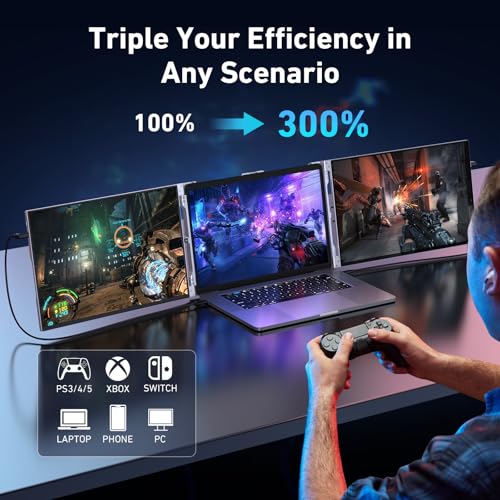
Oiiwak’s OK14 is a dual-panel 14-inch laptop screen extender with an aluminum alloy body and 1920 x 1200 (16:10) IPS panels. Each screen delivers 1500:1 contrast, 100% sRGB with ΔE<2 color accuracy per the listing, 178° viewing angles, HDR, 5ms response time, and blue light filter at 60Hz. The detachable design allows disassembly for transport at 3.3 lbs total. Screens rotate 0 to 270°. Connectivity includes Thunderbolt 3, USB-C, Mini-HDMI, and USB-A (via included adapters). Plug & Play with no drivers. Not compatible with MacBook Air M1/M2/M3, Chromebooks, or Microsoft Surface. 1-year warranty with 30-day return.

Oiiwak Triple Laptop Screen Extender, 14'' FHD 1200P 16:10 IPS Al Alloy Ultra-Thin Dual/Triple Monitor Display, HDMI/USB-C Plug-Play Portable Monitor for 13-16" Laptop(Mac, Win, Android)


Key Specifications at a Glance
| Specification | Detail |
|---|---|
| Screen Configuration | Dual 14-inch panels (detachable) |
| Resolution (per screen) | 1920 x 1200 (16:10) |
| Panel Type | IPS (LED backlit) |
| Refresh Rate | 60Hz |
| Response Time | 5ms |
| Color Gamut | 100% sRGB, ΔE<2 (product bullets), 16.7 million colors |
| Contrast Ratio | 1500:1 |
| Brightness | 418 lm (Amazon specs) / 400 nits (product bullets) |
| Viewing Angle | 178° |
| Aspect Ratio | 16:10 |
| Screen Finish | Glossy (Amazon specs) / Anti-glare (additional features) |
| HDR | Yes |
| Blue Light Filter | Yes |
| Bezels | 4mm, 92% screen-to-body ratio |
| Body | Aluminum alloy |
| Rotation | 0° to 270° |
| Display Modes | Extended, duplicate, second screen |
| Connectivity | Thunderbolt 3, USB 3.1 Type-C, Mini-HDMI |
| Laptop Fit | 13″ to 16″ |
| OS Compatibility | Windows, Mac (except Air M1/M2/M3), Android, Chrome, Linux, DeX, Switch, PS4/5, Xbox |
| Not Compatible | MacBook Air M1/M2/M3, Chromebooks, Microsoft Surface |
| Weight | 3.3 lbs |
| Dimensions | 13″ D x 7.87″ W x 1.47″ H |
| Power | 5W, 5V DC |
| Warranty | 1 year + 30-day return |

Display Performance
Each panel runs at 1920 x 1200 on 14 inches (approximately 162 PPI) in a 16:10 aspect ratio. The extra 120 vertical pixels compared to 1080P provide more visible rows in spreadsheets, more lines of code, and less scrolling in documents across both screens.

The 1500:1 contrast ratio exceeds the 1000:1 IPS standard, providing better shadow detail and highlight separation. The product bullets claim 100% sRGB coverage with ΔE<2 color accuracy and 16.7 million colors. ΔE<2 indicates colors that appear visually accurate to the source without perceptible deviation. 400 nits brightness (bullets) or 418 lm (Amazon specs) provides strong indoor visibility and usability in mixed lighting. The bullets specifically mention visibility in bright outdoor conditions.
The screen finish shows a conflict: Amazon specs say glossy, while the additional features list anti-glare. HDR, blue light filter, and 4mm bezels with 92% screen-to-body ratio are confirmed. For understanding how these specs compare, see our buying guide.
Aluminum Alloy Build
The body is aluminum alloy, which provides durability and heat dissipation during extended use. The detachable design allows separating the panels for transport. At 3.3 lbs total, it is moderate weight for a dual-panel extender with a metal body. The 5W power consumption at 5V DC is low, reducing battery drain from the laptop. For more portable monitor options, visit ScreenExtendersHub.
Connectivity
| Port | Count | Function |
|---|---|---|
| Thunderbolt 3 / USB 3.1 Type-C | 2 | Video + power |
| Mini-HDMI | 2 | Video input |
| USB-A to USB-C (adapter) | 2 | For laptops without USB-C |
Plug & Play with no drivers. The included connection kit covers USB-C, Mini-HDMI, and USB-A configurations. Compatible with Windows, Mac (except MacBook Air M1/M2/M3), Android, Chrome, Linux, DeX, Switch, PS4/5, and Xbox. For USB-C video requirements, see our USB-C portable monitor guide.

What’s in the Box
| Item | Quantity |
|---|---|
| 14″ Dual Monitor Unit (detachable) | 1 |
| USB-C to USB-C Cable | 2 |
| HDMI to Mini-HDMI Cable | 2 |
| USB-A to USB-C Adapter | 2 |
| Leather Smart Cover | 1 |
Six cables/adapters covering all standard connection configurations. The leather smart cover provides transport protection. For related accessories, see our blog.
Potential Drawbacks to Consider
| Consideration | Detail |
|---|---|
| MacBook Air M1/M2/M3 Excluded | Explicitly not compatible. Also excludes Chromebooks and Microsoft Surface. |
| Screen Finish Conflict | Amazon specs say glossy. Additional features say anti-glare. |
| Brightness Unit | Amazon specs list 418 lm (lumens). Bullets say 400 nits. Different measurement units. |
| 5ms Response Time | Adequate for productivity but slower than 1-2ms competitors. |
| 13-16″ Laptop Fit | Narrower range than competitors that fit up to 17.3″. |
| Glossy Finish (if confirmed) | Two glossy panels amplify reflections in bright environments. |
Who This Monitor Is Best For
Users who need color accuracy on a dual-panel extender: 100% sRGB with ΔE<2 per the listing, 1500:1 contrast, 400 nits, HDR, and 16:10 resolution provide a strong display spec set for creative and productivity work. The aluminum body adds durability for travel. For brand-name comparisons, see the MSI Pro MP161 review.
Users who need flexible rotation: 270° rotation covers private work, outward presentations, and collaborative angles. The detachable design adds carry flexibility.
Users who want a complete connection kit: Six cables/adapters (2x USB-C, 2x Mini-HDMI, 2x USB-A adapters) plus a leather smart cover. No additional purchases needed for most setups.
Who Should Look Elsewhere
MacBook Air M1/M2/M3 users: Explicitly excluded. Also not compatible with Chromebooks or Microsoft Surface.
Users who need laptops larger than 16″: The 13-16″ fit range excludes 17.3″ laptops that some competitors accommodate.
Users who need confirmed screen finish: The Amazon data shows both glossy and anti-glare. Our comparison pages feature monitors with consistent screen finish data.
Pros and Cons
| Pros | Cons |
|---|---|
| 1920 x 1200 (16:10) IPS per panel | MacBook Air M1/M2/M3, Chromebooks, Surface excluded |
| 100% sRGB, ΔE<2 (per listing), 16.7M colors | Screen finish conflict (glossy vs anti-glare) |
| 1500:1 contrast, above standard | Brightness listed as 418 lm and 400 nits (different units) |
| 400 nits / 418 lm brightness, HDR | 5ms response time |
| Aluminum alloy body, detachable | 13-16″ laptop fit (narrower than 13-17.3″ competitors) |
| 270° rotation | |
| 5W power, minimal battery drain | |
| Plug & Play, no drivers | |
| 6 cables/adapters + leather smart cover included | |
| Blue light filter, 4mm bezels, 92% screen ratio | |
| 1-year warranty + 30-day return |
Final Verdict
Oiiwak’s OK14 combines 1920 x 1200 (16:10) IPS panels, aluminum alloy construction, 100% sRGB with ΔE<2 color accuracy per the listing, 1500:1 contrast, 400 nits brightness, HDR, 270° rotation, and a complete six-cable connection kit in a 3.3 lb detachable dual-panel extender. The display specs are strong for the dual-panel extender category, and the aluminum body adds durability that plastic alternatives cannot match. The 5W power consumption is notably low.
The MacBook Air M1/M2/M3, Chromebook, and Surface exclusions limit the audience. The screen finish conflict (glossy vs anti-glare in different listing fields) and brightness unit difference (lm vs nits) are data inconsistencies. For users whose laptops are compatible (Windows, Mac Pro/non-Air, Android, Linux, Chrome, DeX, Switch, PS4/5, Xbox) and who want strong color accuracy, 16:10 resolution, and aluminum build in a dual-panel format, the OK14 delivers a well-specified package. For MacBook Air users or those who need laptops larger than 16″, alternatives with broader compatibility are available across our comparison hub.
Frequently Asked Questions
Why is MacBook Air M1/M2/M3 excluded?
The manufacturer explicitly lists MacBook Air M1/M2/M3 as not compatible. This likely relates to Apple Silicon’s native external display limitations on Air models. MacBook Pro models and non-Air Macs may be compatible. Check with Oiiwak before purchasing if you are unsure about your specific Mac model.
What does ΔE<2 mean?
The Amazon listing states ΔE<2 color accuracy. ΔE measures the difference between displayed color and the target color. A value below 2 means the difference is generally not perceptible to the human eye. This is the manufacturer's stated specification.
Is it glossy or anti-glare?
The Amazon screen finish field says glossy. The additional features field lists anti-glare. These are different characteristics. Contact Oiiwak to confirm which applies to the current production units.
Can I use it with a Nintendo Switch?
Yes. Switch is listed as a compatible device. Connect via Mini-HDMI with a separate power source.
Disclosure: As an Amazon Associate, I earn from qualifying purchases.
End of editorial review · Interactive tools below
FIELD TOOLSFIELD TOOLS
These six tools address the critical decisions every laptop screen extender buyer faces — physical fit, hinge safety, OS display limits, setup complexity, form factor selection, and travel readiness. Each tool is category-level: they work for any extender, not just the one reviewed above. Full buying guide →