
VEVOR Portable Laptop Screen Extender Review
VEVOR DR145 review: single 14-inch IPS clip-on screen extender, 300 nits, speakers, 210-degree swivel, USB-C or HDMI, no driver, 2.6 lb. Resolution unsettled.
VEVOR is better known for workshop and commercial equipment than for monitors, which is part of the appeal of its DR145: a 14-inch screen extender from a brand with a support operation behind it. This is the single-screen version. One 14-inch IPS panel clips to either side of a laptop from 13 to 17 inches, swivels through 210 degrees, and runs from one USB-C cable or from HDMI plus a USB power lead, with no driver on Windows, macOS, Android and Harmony OS, or from a Switch, PS5 or Xbox. VEVOR quotes 300 nits, 72% NTSC, a 1000:1 contrast ratio, 60Hz, a 2ms response time, built-in speakers, blue light protection and a weight of 2.6 lb. The listing says 1920×1200 in its bullets and native-resolution field and “FHD 1080P” in its title, the same muddle VEVOR’s earlier dual-panel model had, and no warranty is stated beyond Amazon’s returns.

VEVOR Portable Laptop Screen Extender, 14" FHD 1080P IPS Dual Extended Monitor for 13"-17" Laptop, Swivel Portable Monitor USB-C/USB-A/Mini HDMI Port, Compatible with Mac/Wins/Android/Switch/PS5


Key Specifications
| Specification | Detail |
|---|---|
| Screen Configuration | Single 14-inch panel, clips to the left or right of the laptop |
| Resolution | 1920 x 1200 in the bullets and native-resolution field; title and resolution field say FHD 1080P |
| Aspect Ratio | Listed as 16:9, which matches 1080P rather than 1920 x 1200 |
| Panel Type | IPS |
| Refresh Rate | 60Hz |
| Response Time | 2ms |
| Color Gamut | 72% NTSC |
| Contrast Ratio | 1000:1 |
| Brightness | 300 nits |
| Viewing Angle | 160 degrees (Amazon’s field) |
| Screen Finish | Glossy (Amazon’s field; the bullets do not say) |
| Speakers | Built-in |
| Blue Light Protection | Yes |
| Controls | Multifunction panel button: brightness, contrast, sharpness and more |
| Rotation | Up to 210° |
| Display Modes | Extended, mirror |
| Connectivity | USB-C, USB-A, mini HDMI; one USB-C cable, or HDMI plus USB |
| Driver | Not required |
| Laptop Fit | 13″ to 17″ |
| OS Compatibility | Windows, macOS, Android, Harmony OS; Switch, PS5, Xbox |
| Weight | 2.6 lb |
| Dimensions | Not usable: Amazon lists 28.9 x 0.8 x 0.8 inches |
| In the Box | Not stated |
| Model | DR145 |
| Warranty | Not stated; Amazon’s 30-day return policy only |

Display and Build
Start with the resolution, because VEVOR has not settled it. The bullets and the native-resolution field say 1920×1200, a 16:10 panel with 120 more rows than 1080P, which is the better shape for documents and code. The title and the resolution field say FHD 1080P, and the aspect ratio field says 16:9, which matches 1080P. Both cannot be true of one panel. The pixel pitch of 0.16mm listed by Amazon fits a 14-inch 1920×1200 panel slightly better than a 1080P one, but that is inference, not confirmation; ask VEVOR which it is if the extra rows matter to you.

The rest of the panel is the standard recipe for a good 14-inch extender: IPS, 300 nits for any indoor room, 72% NTSC, which is roughly the sRGB space, a 1000:1 contrast ratio, and a 2ms response time that keeps scrolling clean at 60Hz. Amazon’s viewing-angle field says 160 degrees rather than the 178 most IPS panels quote, which on a side screen angled toward you makes little practical difference but is worth knowing. The finish is listed as glossy in Amazon’s field and not mentioned in VEVOR’s bullets; VEVOR’s earlier dual-panel model was matte, so do not assume. Built-in speakers cover calls and casual video, blue light protection is listed, and brightness, contrast and sharpness are set from a button on the panel.
The screen clips directly to the laptop lid on whichever side you choose and swivels through 210 degrees: toward you for work, flat for transport, or past 180 degrees to face someone across the table. At 2.6 lb it is light for a clip-on extender, and VEVOR sells it on exactly that: a second screen that travels attached to the laptop. Amazon’s dimension field lists the unit as 28.9 inches wide and 0.8 inches deep, which cannot describe a 14-inch panel and should be ignored. For more on portable monitor specs, see our buying guide.
Connectivity
| Port | Function |
|---|---|
| USB-C | Video and power over one cable from a full-featured USB-C port |
| USB-A | Power when using HDMI, or from a laptop without USB-C video |
| Mini HDMI | Video from consoles, desktops and laptops without USB-C video, with USB for power |
Plug and play with no driver. VEVOR’s rule is one cable per screen: a single USB-C cable from a laptop whose port carries video, or an HDMI cable plus a USB lead for power from anything else. That covers Windows, macOS, Android and Harmony OS laptops and phones with USB-C video, and the Switch, PS5 and Xbox over HDMI. Because this is one external screen rather than two, a base M1, M2 or M3 MacBook can run it in extended mode; the single-display limit on those chips only bites with two-screen extenders. The listing does not say which cables come in the box, so check the product photos before assuming an HDMI cable is included. For USB-C requirements, see our USB-C portable monitor guide. For more extender options, browse our laptop screen extenders category.
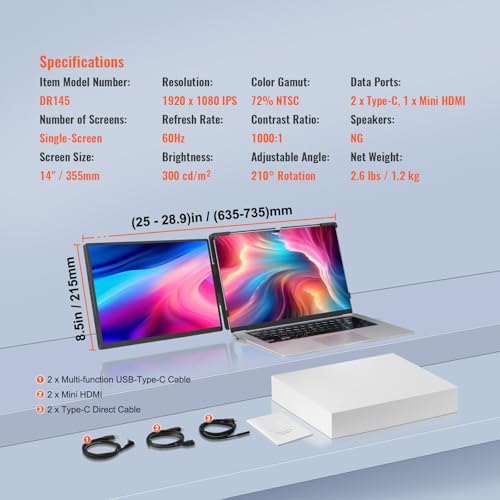
What’s in the Box
Not itemised on the listing. VEVOR’s connection rule implies at least a USB-C cable; whether an HDMI cable and a USB-A lead are included is not stated.
Drawbacks
| Consideration | Detail |
|---|---|
| Resolution Conflict | 1920 x 1200 in the bullets, FHD 1080P and 16:9 elsewhere on the same listing. |
| One Screen Only | This is the single-panel version; the dual-panel style is listed as unavailable. |
| Finish Unclear | Glossy in Amazon’s field; not stated by VEVOR. |
| 160° Viewing Angle | Narrower than the usual IPS 178°, per Amazon’s field. |
| Warranty Not Stated | Amazon’s 30-day return policy is the only cover listed. |
| Box Contents Not Stated | Cables not itemised. |
| Dimension Field Unusable | 28.9 x 0.8 x 0.8 inches cannot be the product. |
| Price | High for a single 14-inch extender; compare before buying. |

Is This Extender Right For You?
If you want one extra screen that travels clipped to the laptop, from a brand with a support desk: A 14-inch IPS panel at 300 nits with speakers, 210-degree swivel, one-cable USB-C, console support over HDMI, and 2.6 lb. It suits video calls, a second document, or a reference window on the road. For other brand-name portable monitors, see the Acer PM161Q review.
If you use a MacBook Air or a base MacBook Pro: One external screen is what those chips allow, so a single-panel extender like this one works where two-panel extenders fall back to mirroring.
If you need two extra screens, a confirmed 1920 x 1200 panel, or a stated warranty: This is one screen with an unresolved resolution and no warranty on the listing. For two-panel extenders with confirmed 1920 x 1200, see the FOPO 15.6″ Triple Extender review, and for the rest of the field, our comparison hub.
Final Verdict
The VEVOR DR145 is a straightforward single-screen extender: a 14-inch IPS panel with sensible numbers, speakers, a 210-degree swivel, a clip that fits laptops from 13 to 17 inches, one-cable USB-C or HDMI plus USB, and 2.6 lb to carry. It is the kind of second screen most laptop users actually need, and its single-panel design sidesteps the Mac display limit that trips up the two-screen models.
The listing lets it down. VEVOR cannot decide whether the panel is 1920×1200 or 1080P, the finish and the box contents are unstated, the viewing-angle field is below the IPS norm, no warranty is given, and the price sits above single-panel rivals. If the brand and the clip-on convenience are what you want, ask VEVOR the resolution question and buy with the return window in mind. If price or certainty matters more, a 14-inch extender with a settled spec sheet will serve just as well for less.
Frequently Asked Questions
Is the resolution 1080P or 1200P?
The listing says both. VEVOR’s bullets and the native-resolution field say 1920 x 1200; the title, the resolution field and the 16:9 aspect ratio say 1080P. Ask VEVOR before buying if the difference matters to you.
Does it have speakers?
Yes. Built-in speakers are stated in VEVOR’s bullets.
Does it need a driver?
No. It is plug and play over USB-C, or over HDMI with a USB lead for power.
Will it extend on a base M1 or M2 MacBook?
Yes. Those chips support one external display, and this extender is one screen, so extended mode works. It is the two-screen extenders that mirror on those Macs.
Disclosure: As an Amazon Associate, I earn from qualifying purchases.
End of editorial review · Interactive tools below
FIELD TOOLSFIELD TOOLS
These six tools address the critical decisions every laptop screen extender buyer faces — physical fit, hinge safety, OS display limits, setup complexity, form factor selection, and travel readiness. Each tool is category-level: they work for any extender, not just the one reviewed above. Full buying guide →