
KEFEYA Laptop Screen Extender Portable Monitor, 14″ FHD IPS Review
KEFEYA Z1 Screen Extender Review: Evaluate 14" 1200p 16:10 IPS display quality, 300 nits brightness, single USB-C power, and driverless Mac setup. We test the aluminum shell build, 210° and 360° dual-axis hinge rotation, HDMI fallback connectivity, included cables, and who this dual-display.
KEFEYA’s Z1 is a single-panel 14-inch laptop screen extender with 1920 x 1200 (16:10) IPS resolution and an aluminum shell. The panel delivers 300 nits, 1000:1 contrast, 3ms response time, 72% NTSC color gamut, 178° viewing angles, and a glossy finish at 60Hz. The bracket base supports 210° + 360° angle adjustment. Plug & Play with no driver via USB-C, USB-A, or HDMI to Mini-HDMI. Compatible with Mac M-series chips including M1/M2/M3 and Pro/Max variants, plus Windows, Linux, Chrome, Switch, PS4/5, and Xbox. The product bullets state compatibility with all laptop sizes, unlike competitors that limit to 13-17 inches.
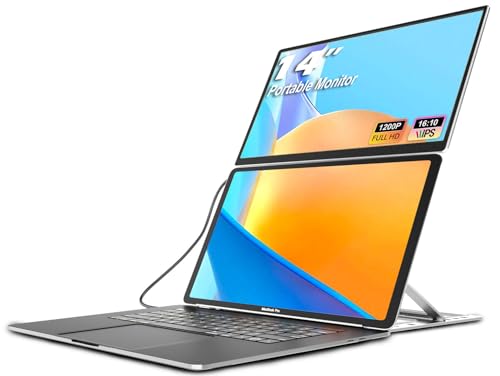
KEFEYA Laptop Screen Extender Portable Monitor, 14" FHD IPS 1200P Travel Dual Second Monitor for Laptop


Key Specifications at a Glance
| Specification | Detail |
|---|---|
| Screen Size | 14 inches |
| Resolution | 1920 x 1200 (16:10) |
| Panel Type | IPS (LCD) |
| Refresh Rate | 60Hz |
| Response Time | 3ms |
| Color Gamut | 72% NTSC (product bullets) |
| Contrast Ratio | 1000:1 |
| Brightness | 300 nits |
| Viewing Angle | 178° |
| Aspect Ratio | 16:10 |
| Screen Finish | Glossy |
| Body | Aluminum shell |
| Rotation | 210° + 360° (bracket base design) |
| Display Modes | Extend, mirror, landscape, portrait |
| On-Screen Controls | Independent on/off, brightness, volume, font size |
| Connectivity | USB-C, USB-A, HDMI to Mini-HDMI |
| Driver | Not required (Plug & Play) |
| Laptop Fit | “All size laptops” (product bullets) |
| OS Compatibility | Windows, macOS (M1/M2/M3 + Pro/Max), Linux, Chrome, Switch, PS4/5, Xbox |
| Weight | Not specified |
| Dimensions | 11″ D x 15″ W x 2″ H |
| Warranty | Not specified in Amazon data |

Display Performance
1920 x 1200 on 14 inches produces approximately 162 PPI in a 16:10 aspect ratio. The extra 120 vertical pixels compared to 1080P provide more visible content in documents, code, and spreadsheets. The IPS panel is confirmed in the Amazon display technology field. 300 nits provides comfortable indoor visibility. 72% NTSC (~100% sRGB) covers the standard web color space. The 3ms response time provides clean motion during scrolling and video at 60Hz.

The glossy finish enhances perceived color vibrancy but reflects ambient light. Independent on-screen controls for brightness, volume, and font size allow adjusting the extender panel separately from the laptop display. For more on display specs, see our buying guide.
Aluminum Shell and Rotation
The body is aluminum rather than plastic, providing durability and heat dissipation per the product bullets. The bracket base design supports 210° + 360° angle adjustment. The 360° component allows the upper screen to rotate fully for sharing, presentation, or collaborative viewing. The 210° component covers the hinge range for positioning relative to the laptop. This combined rotation range is wider than the 180-270° offered by many competing extenders.
Mac M-Series Compatibility
The product bullets list compatibility with Mac M1, M2, M3, M1 Pro/Max, M2 Pro/Max, and M3 Pro/Max. This is broader Mac support than many competing extenders that specify only base M1/M2/M3. Pro and Max chip variants natively support more external displays than base models. No driver is required. For USB-C video requirements, see our USB-C portable monitor guide.

Connectivity
| Connection | Cables Needed |
|---|---|
| USB-C (full function) | 1x USB-C to USB-C (video + power) |
| HDMI + USB-A | 1x HDMI to Mini-HDMI (video) + 1x USB-A to USB-C (power) |
Plug & Play with no driver. All three cables are included in the box. Browse more extenders in our portable monitors category.
What’s in the Box
| Item | Quantity |
|---|---|
| 14″ Monitor Screen | 1 |
| USB-C to USB-C Cable | 1 |
| USB-A to USB-C Cable | 1 |
| HDMI to Mini-HDMI Cable | 1 |
| Bag | 1 |
Three cables cover both USB-C single-cable and HDMI + USB-A dual-cable configurations. The bag provides transport protection. For related accessories, see our docking stations page.
Potential Drawbacks to Consider
| Consideration | Detail |
|---|---|
| Weight Not Specified | Portability cannot be compared against competitors. |
| Warranty Not Specified | Amazon data does not include warranty information. |
| Glossy Finish | Reflects ambient light. |
| “All Laptop Sizes” | Bullets claim compatibility with all sizes but do not specify the mounting mechanism’s range. Verify fit for very small or very large laptops. |
| 1000:1 Contrast | Standard baseline. |
| 60Hz | Productivity-focused. |
| Single Panel | One screen, not dual. Combined with the laptop, this creates a dual-screen setup, not triple. |
Who This Monitor Is Best For
Mac users with M-series Pro/Max chips: The listing explicitly covers M1/M2/M3 Pro and Max variants in addition to base chips. Pro/Max chips natively support more external displays. No driver required. This is broader M-series coverage than many competitors list.
Users who want 16:10 resolution with aluminum build: 1920 x 1200 provides extra vertical space. The aluminum shell adds durability and heat dissipation over plastic alternatives. 300 nits, 3ms, and IPS provide solid baseline display quality.
Users who need wide rotation for sharing: 210° + 360° combined rotation covers presentation, collaboration, and personal viewing configurations. For more about the brand, see our blog.

Who Should Look Elsewhere
Users who need dual panels from one unit: This is a single-screen extender. For dual-panel setups, see the comparison hub.
Users who need verified weight and warranty: Both are missing from the Amazon data.
Users who prefer matte finish: The screen is glossy.
Pros and Cons
| Pros | Cons |
|---|---|
| 1920 x 1200 (16:10) IPS, confirmed | Weight not specified |
| 300 nits, 3ms, 72% NTSC, 178° | Warranty not specified |
| Aluminum shell | Glossy finish |
| 210° + 360° rotation (wider than most competitors) | “All laptop sizes” claim lacks specified range |
| Mac M1/M2/M3 + Pro/Max compatible, no driver | Single panel only |
| Independent on-screen controls (brightness, volume, font) | 1000:1 contrast, standard |
| 3 cables + bag included | 60Hz, productivity only |
| Plug & Play, USB-C / USB-A / Mini-HDMI |
Final Verdict
KEFEYA’s Z1 provides a 14-inch 1920 x 1200 IPS panel in an aluminum shell with 300 nits, 3ms response, 72% NTSC, and 210° + 360° combined rotation. The Mac M-series compatibility explicitly covers Pro and Max variants alongside base chips, which is broader than most competitors list. Plug & Play with no driver via three included cables (USB-C, USB-A, Mini-HDMI) keeps setup simple.
Weight and warranty are not specified in the Amazon data. The glossy finish reflects ambient light. The “all laptop sizes” compatibility claim lacks a defined range. For users who want 16:10 resolution, aluminum build, wide rotation, and broad Mac M-series coverage in a single-panel extender, the Z1 delivers those features. For users who need dual panels, matte finish, or verified weight and warranty, alternatives with more complete data are available across our comparison hub.
Frequently Asked Questions
Is this a single screen or dual?
Single. The box contains one 14-inch monitor. Combined with your laptop’s built-in display, this creates a dual-screen workspace.
Does it work with MacBook Pro M2 Max?
Yes. The product bullets explicitly list M1/M2/M3 Pro and Max variants as compatible. No driver required.
What does the 210° + 360° rotation mean?
The bracket base supports 210° hinge adjustment for positioning relative to the laptop plus 360° screen rotation for sharing, presentation, and collaborative angles.
Does it fit my laptop size?
The bullets state “applicable for all size laptops” but do not specify a mounting range. Verify the physical mounting mechanism fits your specific laptop before purchasing.
Disclosure: As an Amazon Associate, I earn from qualifying purchases.
End of editorial review · Interactive tools below
FIELD TOOLSFIELD TOOLS
These six tools address the critical decisions every laptop screen extender buyer faces — physical fit, hinge safety, OS display limits, setup complexity, form factor selection, and travel readiness. Each tool is category-level: they work for any extender, not just the one reviewed above. Full buying guide →