
Oiiwak Al Alloy Body Laptop Screen Extender Review
The Oiiwak OK14 adds two 14-inch 1200P screens to a laptop. Explore its detachable aluminum design, 16:10 workspace, compatibility requirements and advertised display features before choosing a setup.
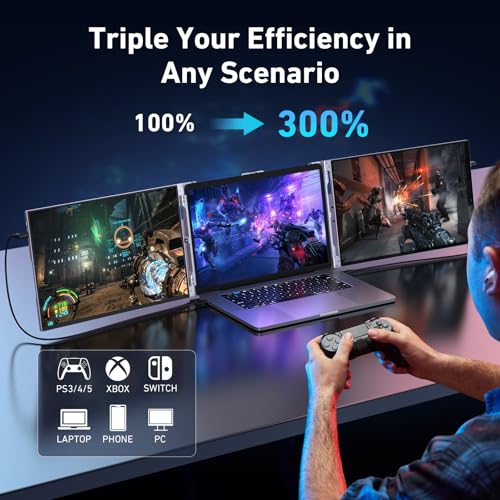
The Oiiwak OK14 adds two 14-inch IPS screens to your laptop, creating a three-screen workspace for documents, code, spreadsheets, and reference material. Its 1920 x 1200 resolution gives each panel a 16:10 format, while the detachable aluminum body and 0–270° rotation make positioning and packing central parts of its appeal. This research-based review covers OK14, ASIN B0CH87S19L; specifications are drawn from the product listing.

Oiiwak Triple Laptop Screen Extender, 14'' FHD 1200P 16:10 IPS Al Alloy Ultra-Thin Dual/Triple Monitor Display, HDMI/USB-C Plug-Play Portable Monitor for 13-16" Laptop(Mac, Win, Android)
Key Specifications at a Glance
| Specification | Detail |
|---|---|
| Screen Configuration | Dual 14-inch panels (detachable) |
| Resolution (per screen) | 1920 x 1200 (16:10) |
| Panel Type | IPS (LED backlit) |
| Refresh Rate | 60Hz |
| Color Gamut | 100% sRGB and Delta E below 2, as advertised |
| Contrast Ratio | 1500:1 |
| Brightness | 400 nits, advertised in product bullets |
| Viewing Angle | 178° |
| Aspect Ratio | 16:10 |
| Screen Finish | Glossy in finish field; anti-glare in features. Confirm surface treatment. |
| HDR | Advertised HDR support |
| Blue Light Filter | Yes |
| Bezels | 4mm, 92% screen-to-body ratio |
| Body | Aluminum alloy |
| Rotation | 0° to 270° |
| Display Modes | Extended, duplicate, second screen |
| Connectivity | USB-C and Mini-HDMI |
| Laptop Fit | 13″ to 16″ |
| OS Compatibility | Check exact laptop model and required video connections |
| Not Compatible | MacBook Air M1/M2/M3, Chromebooks, Microsoft Surface |
| Weight | 3.3 lbs |
| Dimensions | 13″ D x 7.87″ W x 1.47″ H |
| Warranty | 1-year warranty and 30-day free return advertised; confirm current seller terms |

Display Performance
Each 1920 x 1200 panel provides approximately 162 pixels per inch. The extra 120 vertical pixels compared with 1920 x 1080 can show more document content or spreadsheet rows at equivalent scaling. For buyers working mainly with text, that additional height is a useful reason to consider the OK14.

Oiiwak advertises 1500:1 contrast, 100% sRGB coverage, and Delta E below 2. Those color claims may interest creative users, while the stated 400-nit brightness is relevant to brighter workspaces. Treat these as advertised ratings when comparing products, and use calibration evidence if accurate color decisions are central to your work.
The 4mm bezels and advertised 92% screen-to-body ratio keep the frame visually compact around each panel. HDR and a blue light filter are included in the advertised feature set. The finish description combines glossy and anti-glare wording, so check the actual surface if reflections are a purchase priority. Our buying guide covers the main display-selection factors.
Aluminum Alloy Build
The aluminum body and detachable panels are the OK14’s main design attractions. Separating the screens offers more packing options, while the listed 3.3 lb weight is something to budget for alongside a laptop and cables. I would consider that trade-off for regular multi-screen work, but choose a lighter single display when keeping travel weight down matters more.
Connectivity
| Port | Count | Function |
|---|---|---|
| USB-C | 2 | Video + power |
| Mini-HDMI | 2 | Video input |
| USB-A-to-USB-C accessory | 2 | Use according to the installation instructions |
Plan the video and power connections for both panels before ordering. The connection kit includes USB-C and HDMI-to-Mini-HDMI cables, giving you different setup routes depending on the laptop’s outputs. Match the exact arrangement to the installation instructions, particularly when using the USB-A accessories. Browse our laptop screen extender guides and reviews for other formats.

What’s in the Box
| Item | Quantity |
|---|---|
| 14″ Dual Monitor Unit (detachable) | 1 |
| USB-C to USB-C Cable | 2 |
| HDMI to Mini-HDMI Cable | 2 |
| USB-A-to-USB-C accessory | 2 |
| Leather Smart Cover | 1 |
The package brings together the dual monitor unit, two USB-C cables, two HDMI-to-Mini-HDMI cables, two USB-A-to-USB-C accessories, and a leather smart cover. That is a useful starting kit for arranging two added screens. Check the accessories against your chosen laptop connections before setting up.
Potential Drawbacks to Consider
| Consideration | Detail |
|---|---|
| MacBook Air M1/M2/M3 Excluded | Explicitly not compatible. Also excludes Chromebooks and Microsoft Surface. |
| Screen Finish Conflict | Amazon specs say glossy. Additional features say anti-glare. |
| 13-16″ Laptop Fit | Confirm lid dimensions against the stated 13–16-inch mounting range. |
| Glossy Finish (if confirmed) | Confirm the surface finish and assess lighting before buying. |
Who This Monitor Is Best For
Users working across several documents or applications: The two 16:10 panels can hold reference material and messages while the laptop remains your main working screen. The benefit is keeping information visible rather than repeatedly switching windows. See the MSI PRO MP161 E2 review if a separate single-screen format would suit you better.
Users who change viewing arrangements: The 0–270° rotation offers options for solo work and turning a screen toward a colleague. The detachable design also gives you flexibility in how you pack the assembly.
Buyers wanting an integrated travel workspace: Two added panels and the supplied connection kit offer a different proposition from carrying separate monitors. Allow time to arrange the screens, stand, and cables comfortably rather than choosing on screen count alone.
Who Should Look Elsewhere
MacBook Air M1/M2/M3, Chromebook, and Surface users: The listing excludes these devices. Choose a supported alternative and check the exact laptop model when assessing any multi-screen extender.
Users with laptops outside the stated 13–16-inch range: Look for a mounting format suited to your laptop. Even within that range, compare lid dimensions and mounting requirements before buying.
Buyers whose priority is calibrated creative work: Put color testing and calibration ahead of extra screen count when comparing options. Browse our portable monitor guides and reviews for alternative display formats.
Pros and Cons
| Pros | Cons |
|---|---|
| 1920 x 1200 (16:10) IPS per panel | MacBook Air M1/M2/M3, Chromebooks, Surface excluded |
| 100% sRGB and Delta E below 2 advertised | Screen finish conflict (glossy vs anti-glare) |
| 1500:1 contrast advertised | Listed 3.3 lb weight adds to travel load |
| 400 nits claimed in bullets; HDR advertised | Screen positioning and cable management take planning |
| Aluminum alloy body, detachable | Stated 13–16-inch fit needs dimension checks |
| 270° rotation | |
| Detachable panels for flexible packing | |
| USB-C and Mini-HDMI connection options | |
| 6 cables/adapters + leather smart cover included | |
| Blue light filter, 4mm bezels, 92% screen ratio | |
| 1-year warranty and 30-day return advertised; confirm terms |
Final Verdict
The Oiiwak OK14 makes a practical case for buyers who want two added 16:10 screens in a detachable assembly. Its resolution, rotation, and included accessories fit workflows built around documents, code, and reference material. The aluminum construction is also a clear design distinction.
I would shortlist it once laptop fit and the two-panel connection arrangement are checked. The main trade-offs are the listed 3.3 lb weight, mounting requirements, cable management, and device exclusions. For a compatible laptop and work that benefits from three visible screens, those compromises may be worthwhile; for occasional second-screen use, a simpler portable monitor may be the better choice.
Frequently Asked Questions
Which laptops are excluded?
The listing excludes MacBook Air M1/M2/M3, Chromebooks, and Microsoft Surface devices. Check the exact model and intended two-panel setup before purchasing for another laptop.
What does Delta E below 2 mean?
Delta E expresses the difference between a measured color and a reference color. Oiiwak advertises a value below 2. For color-critical work, compare calibration evidence as well as the advertised rating.
What should I check about the finish?
The listing uses both glossy and anti-glare descriptions. Ask the seller about the surface of the selected unit if reflections matter in your workspace.
How many screens does the OK14 add?
Two external panels. Together with the laptop display, they create a three-screen workspace. Each panel has a 1920 x 1200 resolution and 16:10 aspect ratio.
Disclosure: As an Amazon Associate, I earn from qualifying purchases.
End of editorial review · Interactive tools below
FIELD TOOLSFIELD TOOLS
These six tools address the critical decisions every laptop screen extender buyer faces — physical fit, hinge safety, OS display limits, setup complexity, form factor selection, and travel readiness. Each tool is category-level: they work for any extender, not just the one reviewed above. Full buying guide →