
Mobile Pixels Duex Plus DS Review
Discover the joy of dual-screen bliss with the Mobile Pixels Duex Plus DS. Lightweight and versatile, it's your portable escape from cramped laptop chaos.
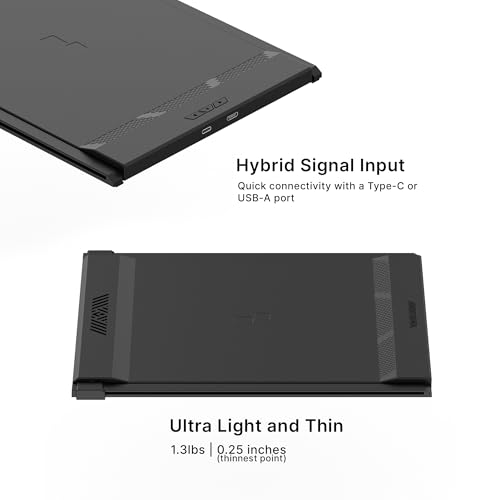
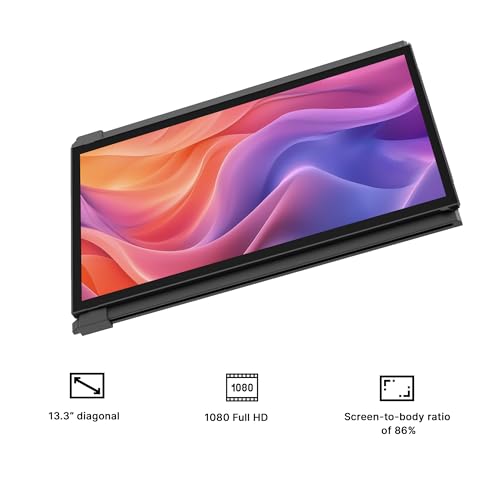
At 1.3 lbs and 0.25 inches thin, the Mobile Pixels Duex Plus DS is a slide-out laptop screen extender that adds a 13.3-inch 1080P IPS display without a separate stand, kickstand cover, or cables draped across the desk. The panel delivers 300 nits, 1000:1 contrast, 2ms response time, FreeSync, matte finish, and 178° viewing angles at 60Hz. Power consumption is just 6.5W. USB-C and Mini-HDMI connectivity, compatibility across Windows/macOS/Linux/ChromeOS/Android/Switch/DeX, and a PC-ABS plastic body with aluminum alloy frame round out the package. Mobile Pixels is an established brand whose Duex Pro predecessor won an Edison Award.

Portable Monitor for Laptops, New Mobile Pixels Duex Plus DS 13.3" Full HD IPS Dual Laptop Monitor, USB C/HDMI Plug and Play Laptop Screen Extender,Windows/Mac/Android/Switch Compatible
Why Weight Matters in a Slide-Out Extender
Unlike standalone portable monitors that sit beside the laptop, the Duex Plus DS attaches directly to the laptop lid and slides out to the left or right. The monitor’s full weight hangs off the side of the laptop when deployed. At 1.3 lbs and 0.25 inches, the Duex Plus DS adds minimal strain to the laptop hinge and minimal bulk when folded behind the lid during transport. Heavier slide-out extenders can pull the laptop off balance or stress thinner ultrabook lids. The low 6.5W power consumption also means less battery drain compared to extenders that draw 15-22W.

Four metal adhesive plates are included for semi-permanent mounting to the laptop lid. The monitor slides out when needed and tucks flat behind the lid when not in use. No separate stand, cover, or kickstand is required for basic operation, though a kickstand mode is available. For more on how different extender form factors compare, browse our laptop screen extenders category.

Key Specifications
| Specification | Detail |
|---|---|
| Screen Size | 13.3 inches |
| Resolution | 1920 x 1080 (Full HD) |
| Panel Type | IPS (LCD) |
| Refresh Rate | 60Hz |
| Response Time | 2ms |
| Contrast Ratio | 1000:1 |
| Brightness | 300 nits |
| Viewing Angle | 178° |
| Aspect Ratio | 16:9 |
| Screen Finish | Matte |
| Adaptive Sync | FreeSync |
| Eye Care | Yes |
| Color Gamut | Not specified |
| Ports | USB-C (USB 3.0), Mini-HDMI |
| Power Consumption | 6.5W |
| Body | PC-ABS plastic + aluminum alloy frame |
| Weight | 1.3 lbs |
| Thickness | 0.25 inches (thinnest point) |
| Dimensions | 12.25″ W x 8.46″ H x 0.25″ D |
| Display Modes | Landscape, portrait, presentation, kickstand, eye care |
| Attachment | Metal adhesive plates (4 included) |
| Compatible Devices | Windows, macOS, Linux, ChromeOS, Android, Switch, Samsung DeX |
| Manufacturer | Mobile Pixels |
| Warranty | 2 years (warranty description field) |
Display Performance
1920 x 1080 on 13.3 inches produces approximately 166 PPI, sharper than 15.6-inch 1080P panels (141 PPI). The IPS panel delivers 300 nits, 1000:1 contrast, 2ms response time, FreeSync, matte finish, and 178° viewing angles. 300 nits provides comfortable indoor brightness. The matte finish reduces glare when the screen is deployed at an angle beside the laptop. FreeSync eliminates tearing during variable frame rate content.
Color gamut is not specified in the Amazon data. For color-dependent creative work, this is a gap. For general productivity and media, the confirmed 300 nits and 1000:1 with IPS provide solid visual quality.
Connectivity
| Port | Function |
|---|---|
| USB-C (USB 3.0) | Video + power |
| Mini-HDMI | Video input |
Plug & Play. The included USB-C cable has a USB-A adapter for devices without USB-C. A Mini-HDMI to HDMI cable is included for console and desktop connections. Compatible with Windows, macOS, Linux, ChromeOS, Android, Switch, and Samsung DeX. For USB-C video requirements, see our USB-C portable monitor guide.
What’s in the Box
| Item | Quantity |
|---|---|
| Duex Plus DS Monitor Extender | 1 |
| USB-C Cable with USB-A Adapter | 1 |
| Mini-HDMI to HDMI Cable | 1 |
| Metal Adhesive Plates (for laptop mounting) | 4 |
| Instruction Manual | 1 |
Potential Drawbacks to Consider
| Consideration | Detail |
|---|---|
| Adhesive Mounting | Metal plates adhere to the laptop lid. This is semi-permanent and may leave residue or marks on removal. |
| Color Gamut Not Specified | Color range cannot be compared against competitors. |
| 13.3 Inches | Smaller than 14-15.6″ extenders. Less screen real estate per panel. |
| Warranty Conflict | Warranty Description says “TWO YEAR WARRANTY.” Additional details say “1 Year Manufacturer Warranty.” Verify with seller. |
| 1000:1 Contrast | Standard IPS baseline. |
| 60Hz | Productivity-focused. Not for competitive gaming. |
Who This Monitor Is Best For
Users who prioritize low weight in a slide-out extender: 1.3 lbs and 0.25 inches adds minimal weight and thickness to any laptop. The slide-out design means no separate stand or bag needed for the monitor itself. At 6.5W, it draws low power, preserving laptop battery. For brand-name alternatives at different sizes, see the Acer PM161Q review.
Users who frequently switch between modes: Landscape, portrait, presentation, kickstand, and eye care modes cover varied use cases from the same device. The presentation mode (screen facing away from you) is useful for client-facing work and meetings.
Users across multiple OS platforms: Windows, macOS, Linux, ChromeOS, Android, Switch, and Samsung DeX are all listed as compatible. If you work across multiple devices and operating systems, the Duex Plus DS connects to all of them.
Users who use docking stations at a desk: The Duex Plus DS can supplement a docking station setup when mobile, then fold flat when the laptop connects to a desktop dock.
Who Should Look Elsewhere
Users who need larger screen space: 13.3 inches provides less workspace than 14-15.6″ extenders. For multi-window layouts, larger panels serve better.
Users who dislike adhesive mounting: The metal plates adhere to the laptop lid. If you prefer clip-on or freestanding designs, other extenders avoid adhesive mounting.
Users who need verified color gamut: Color gamut is not specified. For creative work where color accuracy matters, monitors with confirmed sRGB coverage provide more confidence. Our buying guide covers color gamut considerations.
Pros and Cons
| Pros | Cons |
|---|---|
| 1.3 lbs, 0.25″ thin | Adhesive mounting may leave residue |
| 300 nits, 1000:1, 2ms, FreeSync, matte, 178° | Color gamut not specified |
| 6.5W power consumption, minimal battery drain | 13.3″ smaller than competing 14-15.6″ extenders |
| 5 display modes (landscape, portrait, presentation, kickstand, eye care) | Warranty conflict: 2 years vs 1 year in different listing fields |
| Wide OS compatibility (Win/Mac/Linux/Chrome/Android/Switch/DeX) | 1000:1 contrast, standard baseline |
| PC-ABS plastic + aluminum alloy frame | 60Hz, productivity only |
| Edison Award-winning predecessor (Duex Pro) | |
| USB-C + Mini-HDMI + USB-A adapter included |
Final Verdict
The Mobile Pixels Duex Plus DS is built around one principle: add a second screen to your laptop with minimal weight, thickness, and power draw. At 1.3 lbs, 0.25 inches, and 6.5W, the specs reflect that focus. The slide-out design eliminates the need for a separate stand, and the five display modes (landscape, portrait, presentation, kickstand, eye care) provide flexibility beyond basic extend/mirror. The 300 nits, 2ms, FreeSync, matte IPS panel delivers solid display quality, and Windows/macOS/Linux/ChromeOS/Android/Switch/DeX compatibility covers a wide range of devices.
The trade-offs are the 13.3-inch screen size (less workspace than 14-15.6″ alternatives), adhesive mounting (semi-permanent), and unspecified color gamut. The warranty listing shows both “TWO YEAR WARRANTY” and “1 Year Manufacturer Warranty” in different fields. Mobile Pixels is an established brand with Edison Award recognition, which adds confidence beyond what lesser-known extender brands provide. For users who prioritize low weight, minimal power draw, and wide OS compatibility in a slide-out form factor, the Duex Plus DS delivers on those priorities. Our comparison hub can help match your weight and feature priorities to the right extender.
Frequently Asked Questions
How does the slide-out attachment work?
Four metal adhesive plates attach semi-permanently to the back of your laptop lid. The monitor slides left or right along these plates to deploy, and slides back flat behind the lid to stow. No separate stand or kickstand cover is needed for basic use.
Will the adhesive damage my laptop?
The metal plates use adhesive to bond to the laptop lid. Removal may leave residue or marks depending on the laptop’s surface material. Test on a small area if you are concerned about your specific laptop finish.
What is the 2-year vs 1-year warranty situation?
The Amazon listing shows “TWO YEAR WARRANTY” in the warranty description field and “1 Year Manufacturer Warranty” in the additional details field. Contact Mobile Pixels or the seller to confirm which warranty applies to your purchase.
Does it work with Linux and ChromeOS?
Yes. The Amazon compatible devices list includes Windows, macOS, Linux, ChromeOS, Android, Switch, and Samsung DeX.
Disclosure: As an Amazon Associate, I earn from qualifying purchases.
End of editorial review · Interactive tools below
FIELD TOOLSFIELD TOOLS
These six tools address the critical decisions every laptop screen extender buyer faces — physical fit, hinge safety, OS display limits, setup complexity, form factor selection, and travel readiness. Each tool is category-level: they work for any extender, not just the one reviewed above. Full buying guide →