
FOPO 15.6″ Laptop Screen Extender Monitor Portable review
FOPO S888 review: explore its three external 15.6-inch Full HD IPS screens, quad-screen workspace, laptop-fit guidance, separate top-screen power requirements and compatibility details to confirm before buying.
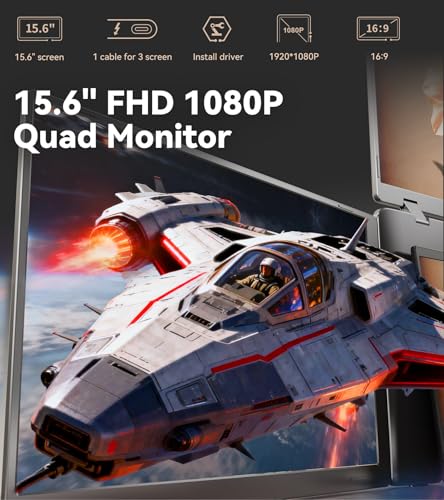
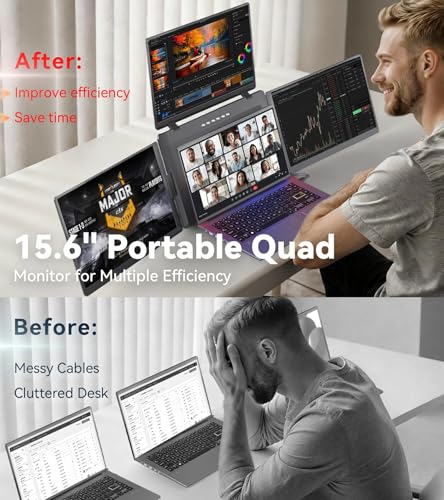
The FOPO S888 adds three 15.6-inch screens to your laptop, giving you a four-screen workspace for documents, dashboards, reference material, and communication apps. Its appeal is the amount of workspace in one assembly: two side screens and a top screen, with flexible rotation and a metal support stand.
The connection design uses one cable to connect the three added screens, plus a separate power cable for the top screen. That distinction matters when planning your desk: the setup reduces connection clutter, but you still need a place for the power cable. This is a research-based review of the 15.6-inch S888, ASIN B0GHY4XN6J.

FOPO 15.6" Screen Extender, Quad Monitor | FHD 1080P Portable Monitor, Laptop Screen Extender for Laptop, Auto Rotation, Supports Laptops for 12"- 17.3"
Key Specifications at a Glance
| Specification | Detail |
|---|---|
| Model / ASIN | FOPO S888 / B0GHY4XN6J |
| Screen configuration | Three added screens; four including the laptop display |
| Screen size | 15.6 inches |
| Resolution / panel | 1920 x 1080 Full HD IPS, as advertised |
| Screen surface | Matte |
| Brightness controls | Adjustable brightness |
| Eye-care feature | Low blue light mode |
| Side-screen rotation | 0–360° |
| Top-screen movement | Horizontal flip up to 300° |
| Support | Metal stand |
| Connection arrangement | One connection cable for three screens; separate top-screen power cable |
| Laptop fit | 13.6–17.3 inches in detailed compatibility bullet; heading also mentions 12 inches |
| System compatibility | Windows 10+; macOS on 2019+ models, including M1/M2/M3/M4, as advertised |
| Listed item weight | 9.13 lb / approximately 4.14 kg |
| Listed dimensions | 15 inches long × 9 inches wide |
| Material / color | ABS / Black |
| Warranty description | 1 year |
Display Performance
Three added Full HD IPS screens give the S888 a clear productivity role. You could keep your main task on the laptop, reference documents on one side, a dashboard on the other, and messages on the top screen. That arrangement is most useful when your work benefits from several windows remaining visible.
The matte surfaces, adjustable brightness, and low blue light mode provide options for managing the screens in your workspace. Position the panels to avoid direct glare and adjust brightness to suit the room. A four-screen layout also takes more attention to arrange than a single portable monitor, so decide what each panel will hold before choosing this format.
See today’s price on AmazonOpens Amazon in a new tabSingle-Cable Connectivity
FOPO describes the connection as “one-line control for three screens.” The three are the added panels; your laptop display makes the fourth. A separate power cable serves the top screen. Think of it as a simplified multi-screen connection rather than a setup with only one cable overall.
Before ordering, match the S888 connection instructions to your exact laptop and the independent display arrangement you intend to use. FOPO advertises Windows 10+ and macOS on 2019 and later models, including M1/M2/M3/M4. Model-specific compatibility matters more than the operating-system name alone. Explore our laptop screen extender guides and reviews for other setup formats.
Power Requirements and Laptop Charging
The top screen requires its own power cable, so include that connection in your desk layout. Keep your laptop charging arrangement in mind as well: running a multi-screen workspace should not leave the computer dependent on an unsuitable power setup.
Check the S888 installation instructions before connecting the screens. Leave room for the power lead and route cables so they do not pull on the screens as you adjust their position.
Connectivity
| Connection | Role | Practical consideration |
|---|---|---|
| Main connection cable | Connects the three added screens | Match the installation instructions to your laptop |
| Separate top-screen power cable | Powers the upper screen | Allow space for the power lead |
| Laptop display | Fourth screen in the workspace | Choose extended or mirrored use to suit the task |
What’s in the Box
| Item | Listing detail |
|---|---|
| FOPO S888 | One extender assembly with three added screens |
| USB-C cable | Named in the included-components field |
The listing’s “Number of Items: 1” refers to one product assembly, not one added panel. Check the selected offer’s package contents against the installation arrangement you need.
Potential Drawbacks to Consider
| Consideration | Buying implication |
|---|---|
| Four-screen footprint | Make room for side panels, the upper screen, stand, and cable routing |
| Listed 9.13 lb weight | Allow for the additional load when planning travel |
| Top-screen power lead | The complete setup uses an additional power connection |
| Laptop mounting fit | Use the detailed 13.6–17.3-inch range and check lid dimensions; the heading also mentions 12 inches |
| Setup complexity | Three added screens need a supported connection arrangement and sensible window placement |
Who This Monitor Is Best For
People working across several windows: The S888 is worth considering for research, spreadsheets, dashboards, and communication tasks where switching windows interrupts the workflow. Each added screen can have a defined role.
Users with a regular workspace: The stand and rotating panels give you options for arranging the assembly around your laptop. The format makes more sense when you have space to position it comfortably.
Buyers seeking three added panels in one assembly: This is a different proposition from a standalone second screen. If you only need one extra display, browse our portable monitor reviews before committing to the larger setup.

Who Should Look Elsewhere
Travelers prioritising a light bag: At a listed 9.13 lb, the S888 adds a substantial load alongside a laptop. A smaller setup may better suit frequent travel.
Users on narrow desks or small tables: Three added panels need space beside and above the laptop. Think through the working footprint and viewing positions before purchasing.
People who need only a second screen: The extra panels and power connection may add complexity without a corresponding benefit. Choose the number of displays around your actual work.
Pros and Cons
| Pros | Cons |
|---|---|
| Three added screens in one assembly | Larger working footprint |
| Full HD IPS panels | More screens to position and organise |
| Matte screen surfaces | Lighting and panel placement still matter |
| Side rotation up to 360° and top flip up to 300° | Requires room around and above the laptop |
| Metal support stand | Listed 9.13 lb weight adds travel load |
| Simplified main connection arrangement | Separate power cable for the top screen |
| Adjustable brightness and low blue light mode | Laptop fit and display configuration require checking |
Final Verdict
The FOPO S888 makes the strongest case for someone who regularly needs several windows visible at once. Three added 15.6-inch panels, flexible rotation, and a support stand give it a useful role as a four-screen laptop workspace.
I would shortlist it for a suitably sized laptop and a desk with room for the assembly. I would choose a smaller setup for frequent light travel, narrow tables, or work that needs only one extra screen. The important decision is whether the extra workspace justifies the weight, power lead, and setup effort in your daily routine.
See today’s price on AmazonOpens Amazon in a new tabFrequently Asked Questions
How many screens does the S888 add?
Three external panels. Together with the laptop display, that creates four screens.
Does the whole setup use only one cable?
FOPO advertises one connection cable for the three added screens, with a separate power cable required for the top screen.
How do the screens move?
The left and right screens rotate from 0 to 360°, and the top screen flips horizontally up to 300°.
Which laptops does it fit?
The detailed bullet gives 13.6–17.3 inches, while the heading mentions 12–17.3 inches. Confirm mounting fit with FOPO for your exact laptop, particularly below 13.6 inches.
What is the listed weight?
Amazon lists 9.13 lb, approximately 4.14 kg. Factor that into your transport plans alongside the laptop and accessories.
Disclosure: As an Amazon Associate, I earn from qualifying purchases.
End of editorial review · Interactive tools below
FIELD TOOLSFIELD TOOLS
These six tools address the critical decisions every laptop screen extender buyer faces — physical fit, hinge safety, OS display limits, setup complexity, form factor selection, and travel readiness. Each tool is category-level: they work for any extender, not just the one reviewed above. Full buying guide →