
Kakuka 14.1″ Laptop Screen Extender Review
kakuka S1 14.1" Screen Extender Review: FHD 1080p IPS panel features built-in speakers, an integrated adjustable kickstand, and driverless plug-and-play USB-C/HDMI/USB-A connectivity for 13–17" Windows, Mac, Android, and Chrome laptops.
The Kakuka S1 is a 14.1-inch single-panel laptop screen extender with a foldable 0-180° kickstand and stretchable frame that fits 13-17 inch laptops without clamps or brackets. The IPS panel has 1080P resolution, 300 nits, 74% NTSC (~103% sRGB), 1000:1 contrast, 3ms response time, 180° viewing angles, glossy finish, and built-in speakers at 60Hz. Three cables included (USB-C, HDMI, USB-A) for Plug & Play across Windows, Mac, Android, Chrome, Linux, DeX, Xbox, and Switch. At 2.1 lbs with a carrying bag. 1-year warranty.

kakuka 14.1" Laptop Screen Extender, 1080P FHD S1 Portable Monitor for Laptop, Speakers & Kickstand, HDMI/USB-A/Type-C Plug and Play for 13”-17” Laptops, Windows/Mac/Android/Chrome/Switch

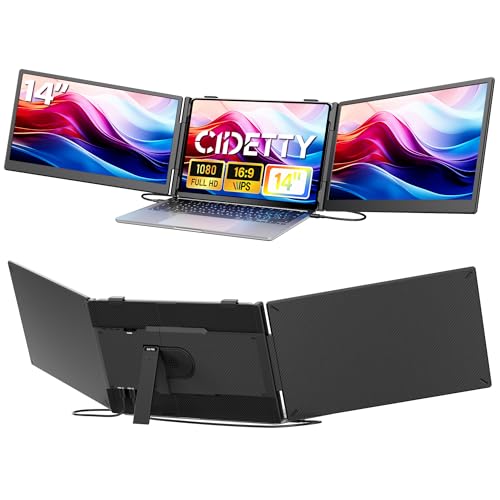
Key Specifications
| Specification | Detail |
|---|---|
| Screen Size | 14.1 inches |
| Resolution | 1920 x 1080 (Full HD) |
| Aspect Ratio | 16:10 (Amazon) |
| Panel Type | IPS (confirmed in display technology) |
| Refresh Rate | 60Hz |
| Response Time | 3ms |
| Color Gamut | 74% NTSC (~103% sRGB) |
| Contrast Ratio | 1000:1 |
| Brightness | 300 (Amazon, no unit specified) |
| Viewing Angle | 180° |
| Screen Finish | Glossy |
| Speakers | Built-in |
| Flicker-Free | Yes |
| Anti-Blue Light | Yes |
| Kickstand | 0-180° adjustable, foldable |
| Frame | Stretchable |
| Display Modes | Mirrored, extended, second screen |
| Ports | USB-C, USB-A, HDMI |
| Laptop Fit | 13″ to 17″ (max 15.6″ wide) |
| OS Compatibility | Windows, Mac, Android, Chrome, Linux, DeX, Xbox, Switch |
| Weight | 2.1 lbs |
| Manufacturer | Shenzhen Baijiayoupu Technology Co., Ltd. |
| Warranty | 1 year |

Baijiayoupu Family Product
Kakuka is manufactured by Shenzhen Baijiayoupu Technology Co., Ltd., the same company behind Teamgee, KEFEYA, Cenerius, and Laptomo. The S1 shares the same core spec range (14-inch class, 1080P, 300 nits, 74% NTSC, 1000:1) as several sibling products. The main differences between Baijiayoupu brands come down to design details, stand types, rotation ranges, and compatibility specifics. For a Baijiayoupu product from another brand, see the Cenerius 14 inch Laptop Screen Extender review.

Display and Kickstand
IPS is confirmed in the Amazon display technology field. 74% NTSC (~103% sRGB) covers slightly beyond the standard web color space. 1000:1 contrast is the baseline. 3ms response provides clean motion at 60Hz. 180° viewing angles maintain color consistency. The anti-blue light feature reduces eye strain. Glossy finish enhances color vibrancy but reflects ambient light. Built-in speakers handle calls and casual media. Brightness shows as “300” in the Amazon data without a unit (bullets say 300 nits).
The 0-180° kickstand folds flat for transport and adjusts to any angle within that range for desk use. The stretchable frame accommodates different laptop sizes without needing a separate clip or bracket. For USB-C requirements, see our USB-C portable monitor guide.

Connection Options
Three cable types are included: USB-C to USB-C, HDMI to USB-C, and USB-A to USB-C. For laptops with full-featured USB-C, a single cable handles both video and power. For laptops without full-featured USB-C, the USB-A + HDMI combination works. Plug & Play with no drivers. The bullets note the laptop should not exceed 15.6 inches in width for proper fit.
Drawbacks
| Consideration | Detail |
|---|---|
| Aspect Ratio Conflict | 16:10 (Amazon) with 1080P resolution listed |
| Brightness Unit Missing | “300” without nits/lm specified in Amazon data. |
| Glossy Finish | Reflects ambient light. |
| 1000:1 Contrast | Standard baseline. |
| Laptop Width Limit | Max 15.6 inches wide. |

Who This Monitor Is For
Users who want a lightweight extender with IPS, kickstand, and speakers from a multi-brand manufacturer: 2.1 lbs, 0-180° kickstand, IPS confirmed, 74% NTSC, 3ms, built-in speakers, and Plug & Play across Windows/Mac/Android/Chrome/Linux. Three cables and carrying bag included. The Baijiayoupu manufacturing scale means proven production behind the Kakuka brand. For another Kakuka model, see the Kakuka Laptop Screen Extender review.
Users who need larger laptop fit: Laptops wider than 15.6 inches will not fit. For alternatives, our comparison pages cover options.
Final Verdict
The Kakuka S1 is a straightforward portable extender from the Baijiayoupu family with confirmed IPS, 74% NTSC, 3ms response, built-in speakers, and a foldable 0-180° kickstand at 2.1 lbs. The stretchable frame and Plug & Play triple-cable setup make it genuinely easy to set up and use. Broad OS compatibility (Windows, Mac, Android, Chrome, Linux, DeX) and console support (Xbox, Switch) cover most use cases.
Brightness has no unit in the Amazon data. Glossy finish reflects light. For users who want a light, practical extender with good color coverage and fast response from a manufacturer with five established brands, the Kakuka S1 covers that ground at a competitive weight. For users who prefer matte finish, alternatives are available.
Frequently Asked Questions
Is this 16:10 or 16:9?
The Amazon aspect ratio field says 16:10. The resolution listed is 1920 x 1080. Contact Kakuka to confirm the actual aspect ratio and native resolution.
Does it work with Mac M1/M2/M3?
The listing does not mention any Mac chip restrictions. Mac is listed as compatible. However, Kakuka is manufactured by Baijiayoupu, whose other brands (KEFEYA, Cenerius) typically exclude base M-series chips. Contact Kakuka to verify your specific Mac model.
What is the maximum laptop width?
15.6 inches wide. Measure your laptop width before purchasing to ensure proper fit.
Disclosure: As an Amazon Associate, I earn from qualifying purchases.
End of editorial review · Interactive tools below
FIELD TOOLSFIELD TOOLS
These six tools address the critical decisions every laptop screen extender buyer faces — physical fit, hinge safety, OS display limits, setup complexity, form factor selection, and travel readiness. Each tool is category-level: they work for any extender, not just the one reviewed above. Full buying guide →