
Cenerius 14″ Laptop Screen Extender Review
Cenerius 14” Screen Extender Review: Evaluate 14-inch 1080p IPS panel performance, 300 nits brightness, 100% sRGB color gamut, USB-C DP Alt Mode, and laptop frame load stability.
Cenerius’s S1 is a 14-inch 1080P laptop screen extender with 300 nits, 1000:1 contrast, 2ms response time, 178° viewing angles, glossy finish, eye care, stereo speaker, and adjustable kickstand with 180° rotation at 60Hz. USB-C, HDMI, and USB-A connectivity with Plug & Play. Compatible with Windows, Mac (M1, M2, M1 Pro/Max, M2 Pro/Max), Android, Chrome, Linux, PS4, and Switch. Fits 13 to 17 inch laptops. At 2.33 lbs with a storage bag included. Manufactured by Shenzhen Baijiayoupu Technology Co., Ltd. (same manufacturer as Teamgee and KEFEYA). 1-year warranty.
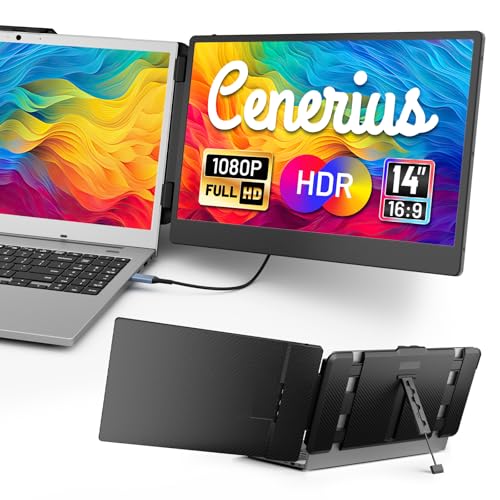
Cenerius 14" Laptop Screen Extender, FHD 1080P IPS Portable Monitor for Laptop, Dual Screen Monitor Extender Compatible with 13"-17" Laptops, HDMI/USB-A/USB-C Plug-Play for Windows, Mac, Android
Key Specifications at a Glance
| Specification | Detail |
|---|---|
| Screen Size | 14 inches |
| Resolution | 1920 x 1080 (Full HD) |
| Panel Type | LCD (Amazon specs) / IPS (product bullets) |
| Refresh Rate | 60Hz |
| Response Time | 2ms |
| Color Gamut | Not specified |
| Contrast Ratio | 1000:1 |
| Brightness | 300 nits |
| Viewing Angle | 178° |
| Aspect Ratio | 16:9 |
| Screen Finish | Glossy |
| Eye Care | Yes |
| Speakers | Stereo |
| Stand | Adjustable kickstand, 180° rotation |
| Display Modes | Extended, duplicate, vertical |
| Ports | 1x HDMI, 1x USB-C, 1x USB-A |
| Laptop Fit | 13″ to 17″ |
| OS Compatibility | Windows, Mac (M1/M2/M1 Pro/Max/M2 Pro/Max), Android, Chrome, Linux, PS4, Switch |
| Weight | 2.33 lbs |
| Manufacturer | Shenzhen Baijiayoupu Technology Co., Ltd. |
| Warranty | 1 year |

Display Performance
1920 x 1080 on 14 inches produces approximately 157 PPI. The 300 nits brightness is the standard baseline for comfortable indoor visibility. 1000:1 contrast is the IPS standard. 178° viewing angles maintain color consistency at off-center positions. The 2ms response time provides clean motion during scrolling and video at 60Hz. Independent brightness and contrast controls allow matching the extender to the laptop display. Stereo speakers handle calls and casual media. Eye care technology reduces strain during extended use.

The Amazon specs list LCD for both display type and technology. The product bullets describe the panel as “IPS.” Color gamut is not specified. The glossy finish enhances vibrancy but reflects light. For a larger setup with two added displays in a free-standing frame, see the KEFEYA P7 15.6-inch triple laptop screen extender review.
Mac Pro/Max Compatibility
The product bullets explicitly list M1, M2, M1 Pro/Max, and M2 Pro/Max as compatible. Pro and Max chip variants natively support more external displays than base M-series chips. This makes the S1 a broader Mac option than extenders that only list base M1/M2/M3. Android, Chrome, Linux, PS4, and Switch are also listed.
Connectivity
| Connection | Cables Needed |
|---|---|
| USB-C (full-function) | 1x USB-C (video + audio + power) |
| HDMI + USB-A | 1x HDMI (video + audio) + 1x USB-A to USB-C (power) |

Same Manufacturer as Teamgee and KEFEYA
The Amazon data shows the manufacturer as Shenzhen Baijiayoupu Technology Co., Ltd. This is the same company behind Teamgee and KEFEYA branded products. This may indicate shared components, similar build quality, or related product lines across these brands. For another product from this manufacturer, see the Cenerius 14.2″ Extender review.
Potential Drawbacks to Consider
| Consideration | Detail |
|---|---|
| Panel Type Unclear | LCD in Amazon specs, IPS in bullets. |
| Color Gamut Not Specified | Cannot assess color range. |
| Glossy Finish | Reflects ambient light. |
| 1000:1 Contrast | Standard baseline. |
| 60Hz | Productivity-focused. |
| Single Panel | One screen. Creates dual-screen with laptop. |
Who This Monitor Is Best For
Mac M1/M2 Pro and Max users who want a portable extender: The explicit listing of M1 Pro/Max and M2 Pro/Max alongside base chips provides broader Mac coverage. 300 nits, 2ms, stereo speakers, and 180° rotation in a 2.33 lb package with storage bag delivers a practical travel setup.
Users who want budget specs with brand-family backing: Same manufacturer as Teamgee and KEFEYA. 1-year warranty and after-sales support.

Who Should Look Elsewhere
Users who need verified IPS and color gamut: Panel type conflicts between specs and bullets. Color gamut is missing.
Users who need matte finish: The screen is glossy.
Pros and Cons
| Pros | Cons |
|---|---|
| 300 nits, 2ms, 178° viewing angles | Panel type unclear (LCD vs IPS) |
| Mac M1/M2 + Pro/Max compatible | Color gamut not specified |
| Stereo speakers, eye care | Glossy finish |
| Adjustable kickstand, 180° rotation | 1000:1 contrast, standard |
| 2.33 lbs, storage bag included | 60Hz, productivity only |
| 3 cables included (USB-C, HDMI, USB-A) | Single panel |
| Wide compatibility (Windows/Mac/Android/Chrome/Linux/consoles) | |
| 1-year warranty |
Final Verdict
Cenerius’s S1 provides a 14-inch 1080P extender with 300 nits, 2ms, stereo speakers, eye care, adjustable kickstand with 180° rotation, and broad Mac Pro/Max compatibility at 2.33 lbs. Three cables and a storage bag are included. The same manufacturer (Shenzhen Baijiayoupu) produces Teamgee and KEFEYA products.
Color gamut is not specified. The panel type shows LCD in Amazon specs and IPS in bullets. The glossy finish reflects light. For users who want a lightweight, budget 14-inch portable with Mac Pro/Max support, stereo audio, and all cables included, the S1 covers those basics. For users who need verified IPS, color gamut data, or matte finish, alternatives with more complete listings are available across our comparison pages.
Frequently Asked Questions
Is Cenerius the same company as Teamgee?
Both list Shenzhen Baijiayoupu Technology Co., Ltd. as the manufacturer. They are different brand names from the same parent company.
Does it work with MacBook M2 Pro?
Yes. The product bullets explicitly list M1, M2, M1 Pro/Max, and M2 Pro/Max as compatible.
What if my USB-C port only charges?
Use the HDMI cable for video and audio, plus the USB-A to USB-C cable for power. Both cables are included.
Disclosure: As an Amazon Associate, I earn from qualifying purchases.
End of editorial review · Interactive tools below
FIELD TOOLSFIELD TOOLS
These six tools address the critical decisions every laptop screen extender buyer faces — physical fit, hinge safety, OS display limits, setup complexity, form factor selection, and travel readiness. Each tool is category-level: they work for any extender, not just the one reviewed above. Full buying guide →