
KEFEYA P7 15.6″ Triple Laptop Screen Extender Review
KEFEYA P7 15.6" Triple Monitor Analysis: Dual 1080p IPS displays in a free-standing 3.9 lb aluminum frame fit 12–17.3" laptops without clamping. Delivers 100% sRGB and 180° hinges, though base M1–M3 Macs require an external hub.
KEFEYA’s P7 is a triple screen extender that does not touch the laptop. Two 15.6-inch 1080P IPS panels sit in an aluminium alloy frame that stands on three rubber feet, the laptop goes in front of it, and nothing clamps to a lid, which is how KEFEYA can fit laptops from 12 to 17.3 inches with the same unit. Each panel is 0.16 inches thin, the whole body is 0.87 inches, and KEFEYA quotes 3.9 lb with a soft leather carry bag in the box. The screens tilt through 180 degrees and the stand adjusts through 90, the panels cover 100% sRGB at 1000:1 with HDR and a 178-degree viewing angle, and speakers are built in. Every cable, and a 5V/3A power adapter, comes in the box. The one condition is the same as on every two-screen extender: the laptop must be able to output two video signals, and a base M1, M2 or M3 MacBook cannot without a hub. 1-year warranty.
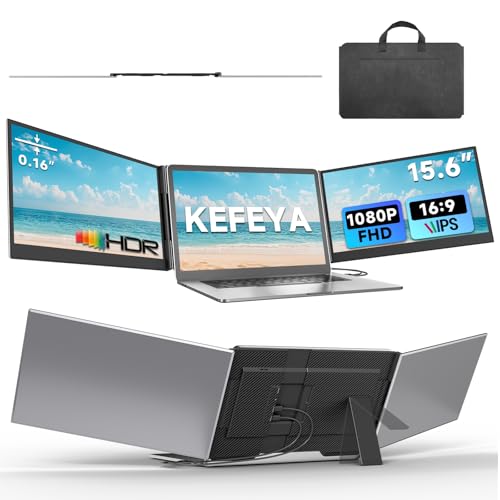
KEFEYA Laptop Screen Extender 15.6", 1080P FHD IPS Ultra-Slim Triple Portable Monitor for Laptop 12-17.3", Eyes Care HDR Travel Monitor, USB-C/HDMI Plug-Play Monitor Extender for macOS/Win and Phone
Key Specifications at a Glance
| Specification | Detail |
|---|---|
| Screen Configuration | Dual 15.6-inch panels in a free-standing aluminium frame (triple with the laptop) |
| Resolution (per screen) | 1920 x 1080 |
| Aspect Ratio | 16:9 |
| Panel Type | IPS |
| Refresh Rate | 60Hz |
| Response Time | 1ms (Amazon’s field) |
| Color Gamut | 100% sRGB |
| Contrast Ratio | 1000:1 |
| Brightness | 280 nits (Amazon’s field; KEFEYA’s bullets give none) |
| Viewing Angle | 178° |
| HDR | Yes, tier not stated |
| Adaptive Sync | FreeSync |
| Screen Finish | Anti-glare per KEFEYA; glossy per Amazon’s field |
| Eye Care | Low blue light |
| Speakers | Built-in |
| Controls | Power button on each screen: brightness, volume, reset, language |
| Screen Tilt | 0 to 180° |
| Stand Adjustment | 0 to 90° |
| Attachment | None; free-standing on three anti-slip rubber pads |
| Laptop Fit | 12″ to 17.3″ |
| Connections | Two full-featured USB-C, or USB-C plus HDMI plus power, or two HDMI plus power |
| Driver | None required |
| Compatible | macOS, Windows, ChromeOS, PS4, PS5, Xbox, Switch |
| Base M1/M2/M3 MacBooks | Need KEFEYA’s H6 hub, not included |
| Body | Aviation-grade aluminium alloy; panels 0.16″ thin, body 0.87″ |
| Weight | 3.9 lb per KEFEYA (4 lb in Amazon’s field) |
| Dimensions | 15 x 9.39 x 0.87 inches |
| Power | 5V/3A adapter included; charges the laptop only from your own 65W+ PD adapter over USB-C |
| Model | P7 |
| Warranty | 1 year |

A Free-Standing Aluminium Frame
Most triple extenders grip the laptop lid with a clamp or a stretching bracket, which means a fit range, a lid that carries the weight, and a laptop that has to be thin enough or thick enough to suit. The P7 avoids all of that. The two screens live in an aluminium alloy frame that stands on its own three rubber feet, and the laptop simply sits in front of it. That is why the fit range runs from a 12-inch ultrabook to a 17.3-inch gaming laptop, why a desktop or a tablet can use it just as well, and why the laptop lid can be opened and closed without disturbing anything. The price of the design is that the unit does not fold onto the laptop and travel as one piece; it goes in its own soft leather bag, which KEFEYA includes.
The aluminium does two jobs. It keeps the frame rigid at 0.87 inches thick with panels of only 0.16 inches, and it sheds the heat that two backlit screens produce. KEFEYA says the finish resists fingerprints and scratches. Each screen tilts from flat to 180 degrees on its own hinge, so the panels can angle in toward you, lie flat for transport, or turn outward to face someone across the table, and the stand tilts through 90 degrees to set the height and angle of the whole rig. KEFEYA quotes 3.9 lb and Amazon’s field says 4 lb; either way it is a desk piece rather than a bag piece, and light for two 15.6-inch screens in metal.
Display: Two 1080P IPS Panels with 100% sRGB
Each panel is 15.6 inches at 1920×1080, which is the size and density of a standard laptop screen, so the three displays match each other in scale and text size. IPS gives the 178-degree viewing angle that side screens need, since they are always turned a few degrees toward you. KEFEYA quotes 100% sRGB, full coverage of the web colour space, and a 1000:1 contrast ratio; HDR and FreeSync are listed, the latter useful when a console or gaming laptop is the source. Amazon’s field puts brightness at 280 nits, a little under the 300 most extenders quote and fine indoors, and the 1ms response time in the same field is unusually low for IPS and is repeated here as listed.

One thing the listing disagrees with itself about is the finish. KEFEYA’s bullets say anti-glare; Amazon’s screen-finish field says glossy. On two large side screens that face a window the difference matters, so ask KEFEYA which it is if reflections are a concern. Low blue light is listed for long sessions, and each screen has its own power button that doubles as the menu control for brightness, volume, reset and language, so the left and right panels can be set differently. Speakers are built in, without a stated output.

Connections: Two Video Feeds, Three Ways
Each screen needs its own video signal, and KEFEYA lays out three ways to supply them. Two full-featured USB-C cables from a laptop with two video-capable USB-C ports, which also carries power. One USB-C plus one HDMI, with the power adapter feeding the frame. Or two HDMI cables plus the power adapter, for desktops and laptops with HDMI and no USB-C video. All of those cables come in the box, and so does the 5V/3A adapter, which is more than most extenders include. KEFEYA’s warning is the one that matters: the source device must have two ports that can output video, or the second screen will mirror or stay dark.
Power runs both ways. If your own PD adapter of 65W or more is plugged into the extender’s full-featured USB-C, the extender can charge the laptop through the same cable; the HDMI ports carry no power. And if a screen flickers, cuts in and out or stays dim, KEFEYA’s advice is to power the frame from the 5V/3A adapter or stronger rather than from the laptop alone. For USB-C requirements, see our KEFEYA Laptop Screen Extender, 14″ Portable Monitor review .
Mac: Pro, Max, M4 and M5 Plug In; Base M1, M2 and M3 Need a Hub
KEFEYA is precise about Macs, which is welcome. MacBooks with M1, M2 or M3 Pro or Max chips, and the M4 and M5 series, are plug and play, because those chips drive two external displays. A base M1, M2 or M3 MacBook drives only one, and for those KEFEYA says you must use its H6 hub, which is sold separately and not in this box. Windows, ChromeOS, PS4, PS5, Xbox and Switch are listed as compatible; on a console you would use HDMI and get one screen per console output.
What’s in the Box
| Item | Quantity |
|---|---|
| 15.6″ Triple Laptop Screen Extender | 1 |
| Full-function USB-C to USB-C cable | 2 |
| HDMI to USB-C cable | 2 |
| Power adapter, 5V/3A | 1 |
| USB-A to USB-C cable | 1 |
| Soft leather handbag | 1 |
| Gift box and user manual | 1 each |
That is the complete kit for all three connection routes. The bullets call the HDMI leads “HDMI cables” and the parts list calls them “HDMI to USB-C cables”; the parts list is the more specific of the two, and it means the extender’s inputs are USB-C and the HDMI plug is on the laptop end.
Potential Drawbacks to Consider
| Consideration | Detail |
|---|---|
| Needs Two Video Outputs | One video-capable port gives one screen. |
| Base M1/M2/M3 Macs Need a Hub | KEFEYA’s H6 hub, sold separately. |
| Finish Unclear | Anti-glare per KEFEYA, glossy per Amazon’s field. |
| 280 Nits | Amazon’s figure; a little under the usual 300. |
| Desk Piece | Free-standing, so it travels in its bag rather than on the laptop. |
| 60Hz | Productivity refresh rate. |
| Three Sizes on One Listing | 14.2″, 15.5″ and 15.6″ options at different prices; check which you are buying. |
| 1-Year Warranty | Shorter than some rivals. |

Who This Monitor Is Best For
Anyone who wants a triple-screen desk without clamping anything to the laptop: Two full-size 1080P IPS panels in an aluminium frame that stands on its own, fits any laptop from 12 to 17.3 inches, and comes with every cable and the adapter. For a 14-inch KEFEYA that attaches to the laptop, see the KEFEYA 14″ Laptop Screen Extender review.
MacBook Pro and Max owners, and M4 or M5 MacBook Air owners: Plug and play on two USB-C cables, with no hub and no driver.
People who present or share a screen across a table: The 180-degree hinges turn a panel to face the other side while the laptop stays with you.
Base M1, M2 or M3 MacBook owners without the H6 hub, travellers who want the screens to move attached to the laptop, or anyone who needs the finish and brightness settled: This is the wrong pick, or one to ask KEFEYA about first. For clip-on extenders and fuller spec sheets, our comparison pages cover the field.
Final Verdict
The KEFEYA P7 is a well-thought-out desk extender. Two 15.6-inch 1080P IPS panels with 100% sRGB, HDR and FreeSync, hinges that swing through 180 degrees, an aluminium frame that stands on its own feet and takes any laptop, and a box that holds all three cable sets plus the power adapter and a carry bag. It is light for what it is, and it asks nothing of the laptop lid.
Its conditions are the honest ones for a two-screen extender: two video outputs on the source, a hub for base M-series Macs, and a desk rather than a lap. The listing leaves the finish in doubt and gives brightness only through Amazon’s field. For a Windows laptop, a Pro or Max MacBook, or an M4 or M5 Air on a desk where three screens would earn their space, the P7 is a strong choice at its price.
Frequently Asked Questions
Will it work with my MacBook Air M2?
Not on its own. KEFEYA states that base M1, M2 and M3 MacBooks must use its H6 hub, which is not included. M1, M2 and M3 Pro and Max, and the M4 and M5 series, are plug and play.
Does it attach to the laptop?
No. The frame stands on three rubber pads and the laptop sits in front of it. That is why it fits laptops from 12 to 17.3 inches.
Can it run from one cable?
No. Each screen needs its own video feed: two USB-C cables, one USB-C plus one HDMI with the adapter, or two HDMI with the adapter. All are in the box.
Can it charge my laptop?
Yes, if your own PD adapter of 65W or more is connected to the extender’s full-featured USB-C port; the charge passes to the laptop over the USB-C cable. The included 5V/3A adapter powers the screens, not the laptop, and HDMI carries no power.
Is the screen matte or glossy?
KEFEYA’s bullets say anti-glare and Amazon’s specification field says glossy. Ask KEFEYA to confirm before buying if reflections matter to you.
Disclosure: As an Amazon Associate, I earn from qualifying purchases.
End of editorial review · Interactive tools below
FIELD TOOLSFIELD TOOLS
These six tools address the critical decisions every laptop screen extender buyer faces — physical fit, hinge safety, OS display limits, setup complexity, form factor selection, and travel readiness. Each tool is category-level: they work for any extender, not just the one reviewed above. Full buying guide →