
FOPO 14″ Laptop Screen Extender Review
FOPO S688 14" Triple Screen Extender Analysis: Dual 1200p FHD IPS displays feature a 360° rotating desktop-stand design and single-cable USB-C or dual USB-A connection, expanding 13–17" Windows and macOS laptops into a triple-screen workstation.
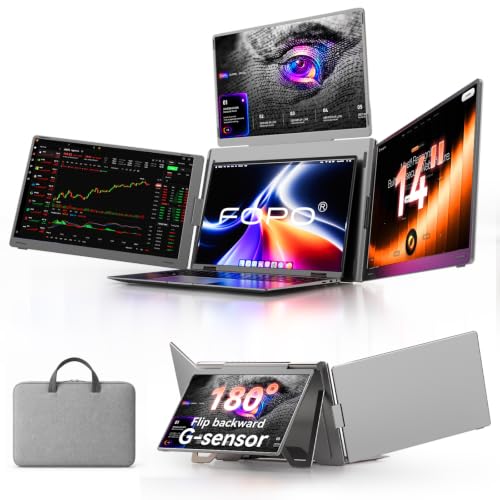
The FOPO 14-inch laptop screen extender is a single-panel portable monitor with a back stand, not a triple or dual-panel setup. It attaches to 14-17 inch laptops and connects via full-function USB-C, power-only USB-C, or Mini-HDMI. The 14-inch IPS panel has 72% color gamut, 178° viewing angles, HDR, 60Hz, and a 16:9 aspect ratio with narrow bezels. The adjustable back stand rotates 0-180° for screen sharing. At 1.65 lbs, it is light enough for daily carry. Not compatible with MacBook M1/M2, Microsoft Surface (ARM chip), or Chromebook (ARM chip). The package is unusually complete: power adapter, carry bag, cleaning cloth, screen protectors, hook-and-loop fastener, protective caps, and three cable types.
![FOPO 14" Laptop Screen Extender Triple Monitor Laptop Extender [1 Cable for Dual Monitors ] 1200P FHD 360° Rotation Screen Portable Monitor for 13-17" Laptops with USB-C /2 USB-A (MacOS, Wins)](https://m.media-amazon.com/images/I/51jUwm0wjLL._SL500_.jpg)
FOPO 14" Laptop Screen Extender Triple Monitor Laptop Extender [1 Cable for Dual Monitors ] 1200P FHD 360° Rotation Screen Portable Monitor for 13-17" Laptops with USB-C /2 USB-A (MacOS, Wins)

Key Specifications
| Specification | Detail |
|---|---|
| Screen Size | 14 inches (single panel) |
| Resolution | 1920 x 1080 (Full HD) |
| Panel Type | IPS (per bullets, “FHD LCD IPS panel”) |
| Refresh Rate | 60Hz |
| Response Time | Not specified |
| Color Gamut | 72% (likely NTSC, ~100% sRGB) |
| Contrast Ratio | Not specified |
| Brightness | Not specified |
| Viewing Angle | 178° |
| Aspect Ratio | 16:9 |
| Screen Finish | Glossy |
| HDR | Yes |
| Stand | Adjustable back stand, 0-180° rotation |
| Ports | Full-function USB-C, power-only USB-C, Mini-HDMI |
| Mac M1/M2 | NOT compatible |
| Surface (ARM) | NOT compatible |
| Chromebook (ARM) | NOT compatible |
| OS Compatibility | Windows, Mac (excluding M1/M2), Android, Switch, Xbox |
| Laptop Fit | 14″ to 17″ |
| Weight | 1.65 lbs |
| Manufacturer | FOPO (Shenzhen E-Tech Digital Technology Co., Ltd.) |
| Warranty | Not specified in Amazon data |

What Comes in the Box
The accessory kit is more complete than most competitors in this price range. Beyond the standard cables and manual, FOPO includes a power adapter, hook-and-loop fastener for attachment, cleaning cloth, screen protectors, and six protective caps. That level of packaging suggests a manufacturer thinking about the entire ownership experience, not just the initial connection. The three cable types (USB-C to USB-C, Mini-HDMI to HDMI, USB-C to USB-A) cover the most common laptop port configurations.
![Buy the FOPO 14" Laptop Screen Extender Triple Monitor Laptop Extender [1 Cable for Dual Monitors ] 1200P FHD 360° Rotation Screen Portable Monitor for 13-17" Laptops with USB-C /2 USB-A (MacOS, Wins) on Amazon](https://screenextendershub.com/wp-content/uploads/2025/01/amazon-purchase-button-for-screenextendershub.webp)
| Item | Included |
|---|---|
| 14″ Monitor | 1 |
| USB-C to USB-C Cable | 1 |
| Mini-HDMI to HDMI Cable | 1 |
| USB-C to USB-A Cable | 1 |
| Power Adapter | 1 |
| Carry Bag | 1 |
| Hook-and-Loop Fastener | 1 |
| Cleaning Cloth | 1 |
| Screen Protectors | Included |
| Protective Caps | 6 |
| User Manual | 1 |
Display Quality
The bullets describe the panel as “FHD LCD IPS” with 72% color gamut, HDR, 178° viewing angles, and narrow bezels. 72% color gamut (likely NTSC, ~100% sRGB) covers the standard web color space. 178° IPS viewing angles keep the image consistent from off-center positions. HDR enhances brightness and color range for supported content. The glossy finish makes colors appear more vivid but picks up reflections.
Brightness, contrast ratio, and response time are not specified in the Amazon data. For a complete display comparison, see our comparison pages. For USB-C requirements, see our USB-C portable monitor guide.

Compatibility Exclusions
Three categories are explicitly excluded: MacBook M1 and M2 (M3 not mentioned), Microsoft Surface with ARM chips, and Chromebook with ARM chips. The M1/M2 exclusion is consistent with native macOS display limitations on base M-series chips. The ARM-based Surface and Chromebook exclusions are less common in the category and worth noting if you use those devices. The listing does not mention M3 compatibility in either direction. Contact FOPO to clarify M3 status. For a FOPO model with different compatibility, see the FOPO 14 inch Laptop Screen Extender review.
The 0-180° Back Stand
The adjustable stand rotates 0-180° for screen sharing with colleagues sitting across from you. The bullets recommend placing the monitor on a table rather than on a lap, which suggests the stand is designed for desk stability rather than freeform positioning. The sturdy stand design is described as preventing screen movement and accidental falls. When connected and powered, the monitor turns on automatically.
Drawbacks
| Consideration | Detail |
|---|---|
| Mac M1/M2 Excluded | M3 status unclear. |
| Surface ARM Excluded | Less common exclusion in the category. |
| Chromebook ARM Excluded | ARM-based models not supported. |
| Brightness Not Specified | Cannot assess visibility. |
| Contrast Not Specified | Cannot assess image depth. |
| Response Time Not Specified | Motion clarity unknown. |
| Glossy Finish | Reflects ambient light. |

Who This Monitor Is For
Professionals who present to clients and need a lightweight side screen: The 0-180° stand, 1.65 lb weight, comprehensive accessory kit (including screen protectors and cleaning cloth), and auto-power-on make this practical for client-facing work. The bullets specifically mention sales professionals, financial managers, and lawyers. The hook-and-loop fastener provides a non-permanent attachment option. For a larger FOPO model, see the FOPO 15.6 inch Portable Monitor review.
Mac M1/M2 users, Surface ARM, or Chromebook ARM users: All three are excluded. Look elsewhere.
Final Verdict
The FOPO 14-inch laptop screen extender is a single-panel portable monitor positioned for professional use. The 72% color gamut, 178° IPS viewing angles, HDR, and 0-180° adjustable stand cover standard productivity and presentation needs. At 1.65 lbs with the most complete accessory kit in the category (power adapter, screen protectors, cleaning cloth, protective caps, hook-and-loop fastener, three cables, carry bag), the packaging reflects attention to the full user experience.
Brightness, contrast, and response time are not specified. Mac M1/M2, ARM-based Surface, and ARM-based Chromebook are excluded. M3 compatibility is not addressed. For Windows and compatible Mac users who need a lightweight, well-accessorized side screen for client work and presentations, the FOPO covers that use case thoroughly. For users who need verified display performance data or compatibility with excluded devices, alternatives with more complete listings are available.
Frequently Asked Questions
Does it work with MacBook M3?
The listing excludes M1 and M2 but does not mention M3. Contact FOPO to confirm M3 compatibility before purchasing.
Why is a hook-and-loop fastener included?
It provides a non-permanent way to attach the monitor to the side of your laptop. Unlike magnetic or clip-on attachments, hook-and-loop can be removed without residue and reapplied as needed.
Does it turn on automatically?
Yes. The bullets state that when connected and powered, the monitor automatically turns on and is ready for immediate use.
Disclosure: As an Amazon Associate, I earn from qualifying purchases.
End of editorial review · Interactive tools below
FIELD TOOLSFIELD TOOLS
These six tools address the critical decisions every laptop screen extender buyer faces — physical fit, hinge safety, OS display limits, setup complexity, form factor selection, and travel readiness. Each tool is category-level: they work for any extender, not just the one reviewed above. Full buying guide →