ASUS ZenScreen 15.6” 1080P Portable USB Monitor (MB166C)
Updated October 17, 2026
Discover the ASUS ZenScreen, a portable 15.6" monitor that's sleek, user-friendly, and a digital nomad's dream. Say goodbye to tech headaches and hello to productivity!
ASUS’s ZenScreen MB166C is the 15.6-inch sibling in the ZenScreen portable monitor lineup. It delivers 1080P on a matte anti-glare IPS panel with FreeSync, 178° viewing angles, and 5ms response time at 60Hz. Like other ZenScreen models, it includes an embedded tripod socket, a foldable protective sleeve, TÜV Rheinland-certified eye care, auto-rotation via DisplayWidget software (Windows only), and 3-month Adobe Creative Cloud access. ASUS backs it with a 3-year warranty. At 1.72 lbs and 0.46 inches thin, it is a USB-C-only display designed for ASUS’s laptop ecosystem and general USB-C productivity.
Several Amazon spec fields contain values that do not correspond to standard display measurements (contrast ratio listed as 100,000,000:1, brightness as 856.5 with no unit). These are noted in the specs table as listed.
-12%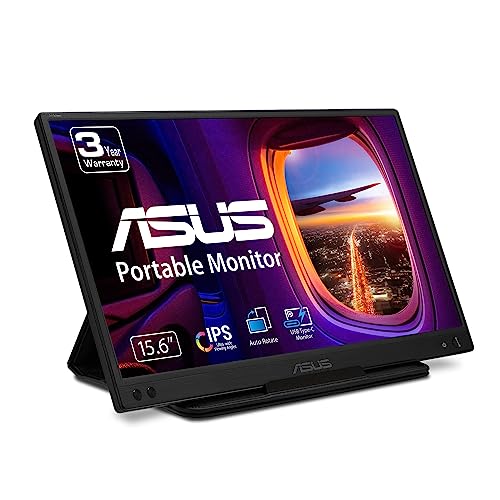
ASUS
ASUS ZenScreen 15.6” 1080P Portable USB Monitor (MB166C) - Full HD, IPS, USB Type-C, USB-Powered, Eye Care, Flicker Free, Blue Light Filter, Tripod Mountable, Anti-Glare Surface, Protective Sleeve
$14899$169.00
You save $20.01 (12%)
Only 1 left in stock - order soon.
Check Price on Amazon As an Amazon Associate, we earn from qualifying purchases. Prices and availability are accurate as of the last sync and may change.
Key Specifications at a Glance
| Specification |
Detail |
| Screen Size |
15.6 inches |
| Resolution |
1920 x 1080 (Full HD) |
| Panel Type |
IPS (LED/LCD) |
| Refresh Rate |
60Hz |
| Response Time |
5ms |
| Color Gamut |
Not specified |
| Contrast Ratio |
100,000,000:1 (as listed on Amazon) |
| Brightness |
856.5 (no unit specified on Amazon) |
| Viewing Angle |
178° |
| Aspect Ratio |
16:9 |
| Screen Finish |
Matte (anti-glare) |
| Adaptive Sync |
FreeSync |
| Eye Care |
TÜV Rheinland-certified flicker-free + low blue light |
| Picture Enhancement |
SPLENDID Technology |
| Auto-Rotation |
Yes, via DisplayWidget software (Windows only, drivers required) |
| Ports |
USB Type-C (DP Alt Mode) |
| HDMI |
Not available |
| Speakers |
Not listed |
| Tripod Socket |
Embedded (rear) |
| Sleeve |
Foldable protective sleeve (doubles as stand) |
| Mounting |
Tripod |
| Weight |
1.72 lbs |
| Dimensions |
14.18″ W x 8.88″ D x 0.46″ H |
| Power Consumption |
5W |
| Bonus |
3-month Adobe Creative Cloud access (valid until 8/31/2026) |
| Warranty |
3 years |
ASUS ZenScreen Ecosystem Features
The MB166C shares the ZenScreen ecosystem features found across ASUS’s portable monitor lineup:
Auto-rotation (Windows only): DisplayWidget software detects the monitor’s orientation and switches between landscape and portrait automatically. This requires a software download and only works on Windows. macOS users can still rotate the display manually through system settings. The Windows-only limitation is important to factor in if you use a Mac.
Embedded tripod socket: A standard tripod thread on the rear allows mounting on mini tripods, camera tripods, or any compatible mount. This positions the monitor at any height and angle a tripod supports, providing flexibility beyond what kickstands or sleeve-stands offer.
Foldable protective sleeve: The included sleeve protects the screen during transport and folds into a stand for desk use. It provides a clean, no-extra-parts setup without needing a separate kickstand.
TÜV Rheinland certification: Third-party verified flicker-free and low blue light eye care. Independent testing confirms the claims rather than relying solely on manufacturer statements.
SPLENDID Technology: ASUS’s display enhancement suite with preset modes for different use cases (reading, gaming, scenic, etc.).
Adobe Creative Cloud (3 months): Complimentary access included (valid until 8/31/2026).
3-year warranty: Among the longest coverage periods in the portable monitor category. For more on how warranty length factors into purchase decisions, see our buying guide.
Display Performance
1920 x 1080 on 15.6 inches produces 141 PPI, the standard for this size class. The IPS panel delivers 178° viewing angles for consistent color at wide positions. The matte anti-glare finish eliminates reflections in varied lighting environments.
The 5ms response time is mid-range. For productivity, web browsing, and casual media, 5ms is functional. For fast content, some ghosting may be visible. FreeSync eliminates tearing during frame rate fluctuations.
Color gamut is not specified. Without a confirmed sRGB percentage, color accuracy for creative work cannot be assessed. For general productivity and media, the IPS panel provides adequate color.
The brightness and contrast ratio fields on the Amazon listing contain values (856.5 and 100,000,000:1) that do not correspond to standard display measurements. Without usable brightness and contrast data, performance in different lighting conditions cannot be compared against competitors.
At 5W power consumption, the monitor draws very little from your laptop’s USB-C output, minimizing the impact on laptop battery life.
Connectivity: USB-C Only
| Port |
Function |
| USB Type-C (DP Alt Mode) |
Video + power (single cable) |
USB-C only with no HDMI port. Designed for laptops with USB-C video output (DP Alt Mode). Gaming consoles cannot connect directly. For USB-C compatibility requirements, see our USB-C portable monitor guide.
What’s in the Box
| Item |
Quantity |
| ZenScreen MB166C Monitor |
1 |
| USB-C Cable |
1 |
| ZenScreen Protective Sleeve |
1 |
| Quick Start Guide |
1 |
| Warranty Card |
1 |
Potential Drawbacks to Consider
| Consideration |
Detail |
| Brightness/Contrast Data Unusable |
Amazon lists brightness as 856.5 (no unit) and contrast as 100,000,000:1. Neither corresponds to standard display specs. |
| Color Gamut Not Specified |
No sRGB or NTSC percentage listed. |
| Auto-Rotation Windows Only |
DisplayWidget software requires Windows. macOS users must rotate manually. |
| No HDMI Port |
USB-C only. No console connectivity. |
| No Speakers |
Not listed in Amazon data. |
| 5ms Response Time |
Mid-range. Some ghosting in fast content. |
| 60Hz |
Standard for productivity. Not suited for competitive gaming. |
| Brand Premium |
ASUS carries a price premium for specs that budget monitors may match. |
Who This Monitor Is Best For
Windows laptop users who want auto-rotation and brand trust: The DisplayWidget auto-rotation is a genuine convenience for users who switch between landscape and portrait. Combined with the tripod socket, ASUS brand, 3-year warranty, and TÜV-certified eye care, the MB166C delivers a polished, well-supported experience for Windows-based workflows.
Professionals who need flexible mounting: The embedded tripod socket allows positioning the monitor at any height and angle a tripod supports. For presentations, standing desk setups, or creative work where monitor position varies, the tripod mount adds versatility that most portable monitors cannot match.
Creatives who benefit from the Adobe bundle: The 3-month Adobe Creative Cloud access adds real software value. For designers, photographers, and video editors who already use or want to try Adobe tools, the bundle reduces the initial subscription cost.
Who Should Look Elsewhere
macOS users who want auto-rotation: DisplayWidget is Windows only. Mac users lose the auto-rotation feature and must rely on manual display settings for orientation changes.
Console gamers: No HDMI port. USB-C only.
Users who need verified brightness and contrast: The Amazon listing’s brightness and contrast values do not correspond to standard display measurements. Without usable data, performance in bright environments cannot be compared. Our comparison pages feature monitors with verified brightness specs.
Pros and Cons
| Pros |
Cons |
| ASUS brand with 3-year warranty |
Brightness and contrast data unusable on listing |
| Auto-rotation via DisplayWidget (Windows) |
Color gamut not specified |
| Embedded tripod socket for versatile mounting |
Auto-rotation Windows only |
| TÜV Rheinland-certified eye care |
No HDMI, USB-C only |
| Matte anti-glare IPS panel |
No speakers listed |
| FreeSync adaptive sync |
5ms response, mid-range |
| Foldable protective sleeve (doubles as stand) |
60Hz, not suited for gaming |
| 3-month Adobe Creative Cloud |
Brand premium |
| 1.72 lbs, 5W power consumption |
|
Final Verdict
ASUS’s ZenScreen MB166C delivers the same ecosystem of features found across the ZenScreen lineup: auto-rotation, tripod mounting, TÜV-certified eye care, SPLENDID Technology, Adobe Creative Cloud access, and a 3-year warranty. For Windows laptop users who value ASUS’s brand trust, the MB166C provides a well-designed, portable second screen with thoughtful accessories and long-term warranty coverage.
The unusable brightness and contrast data on the Amazon listing, combined with no color gamut specification, make it difficult to evaluate the MB166C’s display quality against competitors on pure specs. The USB-C-only connectivity and Windows-only auto-rotation further narrow the target audience. These are not flaws in the product itself, but limitations in the listing data and design choices that affect who the monitor best serves.
For ASUS ecosystem users on Windows who prioritize brand reliability, 3-year warranty, and mounting versatility over display spec comparisons, the MB166C is a proven choice. For users who need verified display specs, HDMI connectivity, or macOS auto-rotation, alternatives with more complete listings are available across our comparison hub.
Frequently Asked Questions
Does auto-rotation work on Mac?
No. The auto-rotation feature uses DisplayWidget software, which is only available for Windows. macOS users can still change display orientation manually through System Preferences/Settings, but the automatic detection does not function on Mac.
How does the MB166C compare to the MB166CR?
Both are ASUS ZenScreen models with the same brand ecosystem features (tripod socket, TÜV eye care, SPLENDID, Adobe Creative Cloud, 3-year warranty). The MB166CR adds a 360° detachable kickstand and lists 1ms response time and 800:1 contrast. The MB166C uses a foldable sleeve as its stand and lists 5ms response time. Both are USB-C only at 60Hz. See our ASUS ZenScreen MB14AC 14” Portable Monitor Review
for additional ZenScreen coverage.
Why are the brightness and contrast numbers unusual?
The Amazon listing shows brightness as 856.5 (no unit) and contrast as 100,000,000:1. These do not correspond to standard display specifications (brightness is typically measured in nits/cd/m², and IPS contrast ratios range from 800:1 to 1500:1). Contact ASUS for the actual brightness and contrast values if these specs are important to your purchase decision.
Can I connect a PS5 or Xbox?
No. The MB166C is USB-C only with no HDMI port. Gaming consoles that require HDMI cannot connect directly.
What is the foldable sleeve?
The included ZenScreen sleeve protects the monitor during transport and folds into a stand for desk use. It supports both landscape and portrait viewing angles. When combined with auto-rotation on Windows, the sleeve-stand provides a quick setup with automatic orientation adjustment.
Disclosure: As an Amazon Associate, I earn from qualifying purchases.
