
Portable Monitor Kwumsy S2 Review
Discover how the Kwumsy S2 Portable Monitor transforms your laptop into a multi-screen powerhouse. Light, compatible, and hilariously hassle-free—your new work ally.
The Kwumsy S2 (manufactured by SMISEACOW) is a dual-panel 14-inch laptop screen extender with 1080P resolution, 300 nits, 1000:1 contrast, 2.5ms response time, 178° viewing angles, glossy finish, FreeSync, built-in speakers, and 180° forward rotation per screen at 60Hz. An adjustable stand provides stability. Plug & Play via USB-C, USB-A, or HDMI with no drivers. Supports laptop screens up to 405mm (15.9 inches) in width. Fits in the included carry bag at 3.57 lbs. Compatible with Windows, Mac OS, and Linux. NOT compatible with Mac M1/M2 chips for dual-screen use (single screen only on those chips).
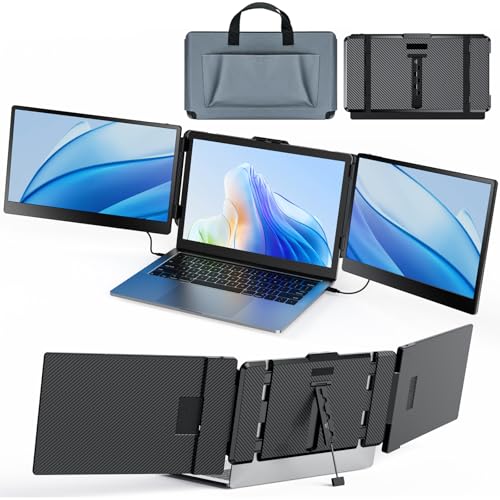
SMISEACOW Laptop Screen Extender Kwumsy S2 Triple Monitor Extender Ultra Slim 14" 1080P FHD IPS Portable Monitor for Laptop with Stand Compatible with Mac Windows Linux PS4/5
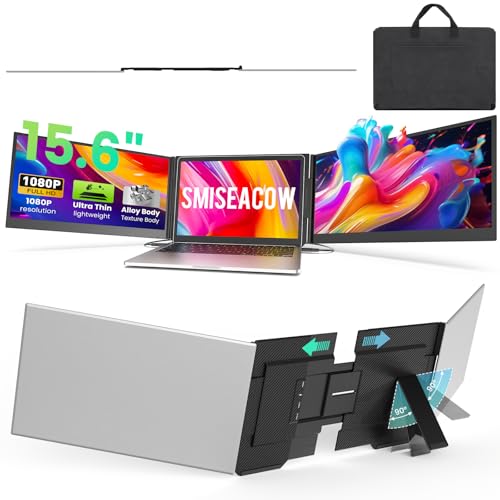

Key Specifications
| Specification | Detail |
|---|---|
| Screen Configuration | Dual 14-inch panels |
| Resolution (per screen) | 1920 x 1080 (Full HD) |
| Panel Type | LCD (Amazon specs) / IPS (picture enhancement + bullets) |
| Refresh Rate | 60Hz |
| Response Time | 2.5ms |
| Color Gamut | Not specified |
| Contrast Ratio | 1000:1 |
| Brightness | 300 nits |
| Viewing Angle | 178° |
| Aspect Ratio | 16:9 |
| Screen Finish | Glossy |
| Adaptive Sync | FreeSync |
| Speakers | Built-in |
| Screen Rotation | 180° forward per screen |
| Stand | Adjustable, included |
| Display Modes | Mirror, extend |
| Connectivity | USB-C (full-featured), HDMI |
| Laptop Width Fit | Up to 405mm (15.9 inches) |
| Mac M1/M2 | NOT compatible for dual screen (single screen only) |
| OS Compatibility | Windows, Mac OS, Linux |
| Weight | 3.57 lbs |
| Dimensions | 13.88″ D x 8.13″ W x 1.51″ H |
| Brand | SMISEACOW (sold as Kwumsy) |
| Warranty | Not specified in Amazon data |


Display Performance
Each panel delivers 1920 x 1080 at approximately 157 PPI. 300 nits provides standard indoor visibility. 1000:1 contrast is the standard baseline. 178° viewing angles maintain color consistency across both panels. The 2.5ms response time provides clean motion at 60Hz. FreeSync reduces tearing. Built-in speakers handle calls and media. Each screen rotates 180° forward for sharing and customized viewing angles. Independent brightness and contrast adjustments per screen.
The Amazon specs list LCD for both display type and technology. “IPS Full View” is listed in the picture quality enhancement field and in the bullets. Color gamut is not specified. The glossy finish enhances vibrancy but reflects light across both panels. For another Kwumsy model, see the Kwumsy Triple Laptop Screen Extender review.
Mac M1/M2 Limitation
The product bullets explicitly state the Kwumsy S2 is “not compatible with 2020 M1 and 2022 M2 chip for dual-screen functionality.” On these Mac chips, only one extended screen is supported due to single video signal output. The listing does not mention M3 compatibility. The laptop must support dual video signal output for both screens to function. For USB-C requirements, see our USB-C portable monitor guide.

Connectivity
| Connection | Function |
|---|---|
| USB-C to USB-C | Video + power |
| USB-C to USB-A | Power/data |
| USB-C to HDMI | Video signal |
Plug & Play with no drivers. Multiple cable types included. Laptop must support dual video signal output for both screens.
Drawbacks
| Consideration | Detail |
|---|---|
| Mac M1/M2 Excluded for Dual | Only single screen on M1/M2 chips. |
| Color Gamut Not Specified | Color range unknown. |
| Glossy Finish | Two glossy panels amplify reflections. |
| Panel Type Unclear | LCD in specs, IPS in bullets. |
| Warranty Not Specified | Not listed in Amazon data. |
| Dual Video Output Required | Laptop must have 2 video-capable ports. |

Is This Extender Right For You?
If you want a compact dual-panel extender with 178° viewing, FreeSync, and speakers for Windows/Linux: 300 nits, 2.5ms, 178° IPS-level viewing angles, FreeSync, built-in speakers, and 180° rotation per screen at 3.57 lbs with carry bag. Adjustable stand and multiple cable options included. For a related S2 model review, see the Kwumsy S2 review.
If you use Mac M1/M2 or need verified color gamut: Dual screen not supported on M1/M2. Color gamut missing. For Mac-compatible dual extenders, our comparison pages cover alternatives.
Final Verdict
The Kwumsy S2 (SMISEACOW) provides a dual 14-inch 1080P extender with 300 nits, 2.5ms, 178° viewing angles, FreeSync, built-in speakers, 180° rotation, adjustable stand, and Plug & Play connectivity at 3.57 lbs with carry bag. The 178° viewing angles and FreeSync are solid specs for the dual-panel category.
Mac M1/M2 users get only single-screen support. Color gamut is not specified. Glossy finish amplifies reflections on two panels. Warranty is not listed. For Windows and Linux users whose laptops support dual video output, the Kwumsy S2 delivers a functional dual-panel setup with good baseline specs. For Mac M-series dual-screen or verified color gamut needs, alternatives are available.
Frequently Asked Questions
Can I use both screens with a MacBook M1?
No. The product bullets state M1 and M2 chips support only single video signal output. Only one extended screen will function on these chips.
Does my laptop need special ports?
Yes. Your laptop must support dual video signal output. This means two full-featured USB-C ports or one USB-C + one HDMI configuration. Laptops with only one video-capable port will drive only one of the two screens.
Who is SMISEACOW?
SMISEACOW is the brand name listed in the Amazon manufacturer field. The product is sold under the Kwumsy brand name. The S2 model is manufactured by SMISEACOW.
Disclosure: As an Amazon Associate, I earn from qualifying purchases.
End of editorial review · Interactive tools below
FIELD TOOLSFIELD TOOLS
These six tools address the critical decisions every laptop screen extender buyer faces — physical fit, hinge safety, OS display limits, setup complexity, form factor selection, and travel readiness. Each tool is category-level: they work for any extender, not just the one reviewed above. Full buying guide →