
S2 Laptop Screen Extender Review
Maxfree 14" Triple Screen Extender Analysis: Dual 1080p FHD IPS displays feature a foldable mounting frame and driverless USB-C plug-and-play setup, expanding 13.3–17" Windows, Mac, Surface, Android, and Switch devices into a triple-screen workstation.
The Maxfree S2 is a dual-panel 14-inch triple screen extender from Shenzhen Baijiayoupu Technology Co., Ltd. This is the same manufacturer behind Teamgee, KEFEYA, Cenerius, Kakuka, and Laptomo, and also the same company that makes the Maxfree F1 (the aluminum stand model we reviewed separately). The S2 takes a different approach than the F1: where the F1 integrates a laptop stand with the monitor, the S2 is a traditional clip-on triple extender with a built-in kickstand and rubber mat for desk stability.
The spec sheet is solid for the category: 1080P IPS-grade panels, 1000:1 contrast, 300 nits, 180° viewing angles, 1ms response time, FreeSync, glossy finish, blue light protection, and built-in speakers at 60Hz. Connects via Thunderbolt/Type-C or Mini-HDMI. Fits 13.3-17 inch laptops. 3.5 lbs with a 45° adjustable kickstand. The after-sales detail that matters: if your laptop shows “No Signal” after connection, Maxfree sends a free H5-T cable to resolve it. 1-year warranty plus 30-day hassle-free return.
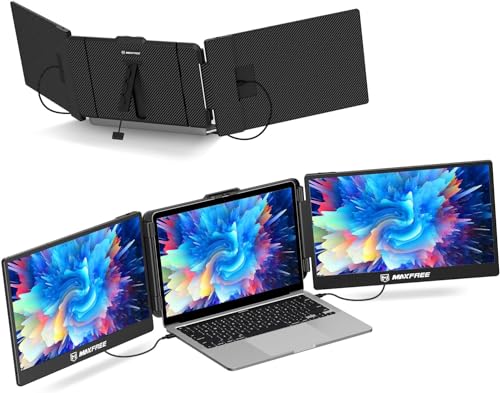
Maxfree Triple Laptop Screen Extender, 14" 1080P HD Portable Dual Monitor for 13.3-17″ Laptops, Plug & Play Monitor Extender Compatible with Windows/Mac/Surface/Android/Switch


Key Specifications
| Specification | Detail |
|---|---|
| Screen Configuration | Dual 14-inch panels (triple with laptop) |
| Resolution (per screen) | 1920 x 1080 (Full HD) |
| Panel Type | LCD (Amazon specs) / IPS (bullets + picture enhancement) |
| Refresh Rate | 60Hz |
| Response Time | 1ms |
| Color Gamut | Not specified in Amazon data |
| Contrast Ratio | 1000:1 |
| Brightness | 300 (Amazon, no unit specified) |
| Viewing Angle | 180° |
| Aspect Ratio | 16:9 |
| Screen Finish | Glossy |
| Adaptive Sync | FreeSync |
| Eye Care | Blue light protection |
| Display Colors | 16.7M |
| Speakers | Built-in (implied by compatible devices listing including speakers) |
| Stand | Built-in kickstand, 45° max adjustable angle, rubber mat |
| Display Modes | Extended, mirror, single 2nd screen, PRE mode |
| Ports | 2x Thunderbolt/Type-C, 1x Mini-HDMI |
| OS Compatibility | Windows, Mac, Android, PS5, Switch |
| Laptop Fit | 13.3″ to 17″ |
| Weight | 3.5 lbs |
| Power | 9.2W |
| Manufacturer | Shenzhen Baijiayoupu Technology Co., Ltd. |
| Warranty | 1 year + 30-day hassle-free return |

1ms Response and FreeSync on a Triple Extender
1ms response time on a triple extender is uncommon. Most competing triples list 5-25ms. At 1ms, pixel transitions happen fast enough to handle smooth scrolling, video playback, and casual gaming without visible ghosting or motion blur. FreeSync synchronizes the refresh rate with the connected device’s frame output to eliminate tearing. At 60Hz, FreeSync is most beneficial during variable frame rate scenarios like video and light gaming where frames fluctuate.

The combination of 1ms + FreeSync means the S2 handles motion content better than most triple extenders on this site. For static productivity (documents, spreadsheets, email), the difference between 1ms and 16ms is not perceptible. But for video conferences with moving elements, scrolling through long documents or code, and any visual content with motion, 1ms provides a noticeably cleaner image than the 16-25ms panels common in this category. For USB-C and Thunderbolt requirements, see our USB-C portable monitor guide.
The Free H5-T Cable Promise
This is the most unusual after-sales detail in the triple extender category. The bullets explicitly state: “If your laptop does not have a fully functional Type-C port, or if it displays ‘No Signal’ after connection, please contact us and we will send you a dedicated H5-T cable for free.” This means Maxfree anticipated the most common triple extender problem (video signal not reaching the screens) and built a free solution into their support process rather than leaving the customer to troubleshoot alone.
The “No Signal” issue typically occurs when a laptop’s USB-C port does not support video output (charging-only USB-C) or when the HDMI connection does not provide sufficient signal. The H5-T cable presumably handles the signal conversion that standard cables cannot. Whether this cable is a DisplayLink-style adapter or a specialized wiring configuration is not specified, but the fact that it is free and proactively offered removes a significant friction point from the purchase decision. Most competing brands simply tell you to check your ports before buying. Maxfree offers to fix it after you buy.
Baijiayoupu Family Context
The Maxfree brand is manufactured by Shenzhen Baijiayoupu Technology Co., Ltd. This is the largest portable monitor manufacturer family we track on this site, producing products under at least six brand names: Maxfree, Teamgee, KEFEYA, Cenerius, Kakuka, and Laptomo. The S2 shares the same manufacturer as the Maxfree F1 (aluminum stand model), but the two products serve different purposes.
The F1 integrates a laptop stand with the monitor, creating a combined ergonomic system at 8.11 lbs total. The S2 is a traditional triple extender at 3.5 lbs with a kickstand and rubber mat. If you want a stand system that also elevates your laptop, the F1 is the option. If you want a portable triple that clips on and travels light, the S2 is the option. Both come from the same factory, so manufacturing quality and component sourcing should be consistent between the two. For the Maxfree F1 review, see the Maxfree F1 Laptop Screen Extender review.

Display Quality
The bullets describe the panel as “1080P FHD IPS” with 16.7M colors, 300 nit brightness, and 1:1000 contrast ratio. The Amazon display technology field says LCD, not IPS. The picture quality enhancement field confirms “FHD IPS panel.” 180° viewing angles maintain consistency across both extended panels. Blue light protection reduces eye strain during extended use. Glossy finish enhances perceived color vibrancy but reflects ambient light across two panels.
Color gamut is not specified in the Amazon data. This is a notable gap. Without knowing the NTSC or sRGB coverage, it is not possible to compare the S2’s color accuracy against competitors like the Oiiwak OK16 (100% sRGB) or the Laptomo P5 (120% sRGB). Brightness shows as “300” without a unit in the Amazon data. The bullets state “300 nit.” For users who need verified color coverage, contact Maxfree or consider alternatives with specified gamut.
Kickstand and Stability System
The built-in kickstand provides up to 45° of angle adjustment. The rubber mat sits between the extender and the laptop, reducing the risk of the setup sliding on smooth desk surfaces. At 3.5 lbs across two screens, the S2 adds meaningful weight to the laptop lid. The kickstand and rubber mat work together to distribute that weight and prevent tipping. For desk use this is stable. For lap use or uneven surfaces, the 45° maximum angle may limit positioning options. The bullets describe the S2 as “one of the lightest triple screen monitors on the market” at 3.5 lbs, which is accurate for the 14-inch triple class.
Connection and Compatibility
Two Thunderbolt/Type-C ports handle full-function single-cable connections for both screens. If the laptop does not have two Type-C ports, the Mini-HDMI port covers the second screen with an HDMI to mini-HDMI cable. The bullets state no driver installation is needed. Compatible with Windows, Mac, Android, PS5, and Switch. The compatible devices field in Amazon also lists tablets, desktops, gaming consoles, speakers, and cameras. Fits 13.3-17 inch laptops.
The listing does not explicitly exclude Mac M-series chips, which is unusual for a Baijiayoupu product. Other Baijiayoupu brands (KEFEYA, Cenerius, Kakuka) typically exclude base M1/M2/M3. The free H5-T cable offer may be how Maxfree addresses M-series compatibility issues post-purchase rather than excluding those users upfront. Contact Maxfree to clarify your specific Mac model if applicable.
What’s in the Box
| Item | Detail |
|---|---|
| Triple Screen Extender (S2) | 1 |
| Type-C to Type-C Cable (Thunderbolt) | 2 |
| HDMI to Mini-HDMI Cable | Included |
| H5-T Cable | Free upon request if “No Signal” issue occurs |

Drawbacks
| Consideration | Detail |
|---|---|
| Color Gamut Not Specified | No NTSC or sRGB percentage in Amazon data. |
| Brightness Unit Missing | “300” without nits specified in Amazon field. |
| Glossy Finish | Two glossy panels amplify reflections. |
| 45° Maximum Kickstand | Less adjustable than competitors with 90° or 180° stands. |
| Mac M-Series Not Clarified | No explicit exclusion, but Baijiayoupu typically excludes base M1/M2/M3. |
| Panel Type Unclear | LCD in Amazon specs, IPS in bullets. |
Who This Extender Is For
Users who want fast response and FreeSync in a triple extender with proactive support: 1ms response and FreeSync are the display performance differentiators. The free H5-T cable offer for “No Signal” issues removes the biggest purchase-decision fear in the triple extender category. 3.5 lbs is competitive for a 14-inch triple. Four display modes (extended, mirror, single 2nd screen, PRE mode) provide setup flexibility. The Baijiayoupu manufacturing scale provides production consistency. For a different Baijiayoupu triple model, see the KEFEYA 14 inch 360° Rotation review.
Users who need verified color gamut or wide-angle kickstand: Color gamut is unspecified. The 45° kickstand is less flexible than alternatives with 90° or 180° stands. For extenders with verified color data or more adjustable stands, our comparison pages cover options.
Final Verdict
The Maxfree S2 combines 1ms response time, FreeSync, and the best after-sales commitment in the triple extender category. The free H5-T cable for “No Signal” issues is a support approach that no other brand on this site offers. It converts the most common triple extender failure (incompatible ports) from a return-and-refund scenario into a free cable shipment. That detail alone reduces the risk of buying a triple extender for the first time.
The IPS-grade panels with 1000:1 contrast, 300 nits, 16.7M colors, blue light protection, and 180° viewing angles deliver standard productivity-grade display quality. 3.5 lbs, rubber mat stability, and Plug & Play via Thunderbolt or HDMI cover the practical setup needs. Color gamut and brightness unit are not specified in the Amazon data. Glossy finish and 45° max kickstand are the physical trade-offs. For users who want a triple extender with the fastest response in the category and the confidence that connectivity issues have a free solution, the Maxfree S2 provides both. For users who need verified color accuracy or more adjustable positioning, alternatives with specified gamut and wider-angle stands are available.
Frequently Asked Questions
What is the H5-T cable and how do I get it?
The H5-T cable is a dedicated signal cable that Maxfree sends for free if your laptop shows “No Signal” after connecting the S2. Contact Maxfree through the product listing or user manual contact information. The cable resolves connectivity issues caused by non-full-function USB-C ports or incompatible HDMI signal output.
Is the S2 the same as the Maxfree F1?
No. Both are Maxfree brand from Baijiayoupu, but they are different products. The F1 is a single-panel monitor with an integrated aluminum laptop stand (8.11 lbs total system). The S2 is a traditional dual-panel triple extender with a kickstand (3.5 lbs). Choose the F1 for an ergonomic desk system. Choose the S2 for a portable triple setup.
Does it work with MacBook M2?
The listing does not explicitly exclude M-series MacBooks, which is unusual for a Baijiayoupu product. The free H5-T cable may address M-series compatibility. Contact Maxfree to confirm before purchasing.
Why is the kickstand limited to 45°?
The 45° maximum angle prioritizes stability over range. A wider angle would require a longer kickstand arm, which adds bulk and reduces folded compactness. For users who need steeper viewing angles, competitors with 90° or 180° stands offer that range at the cost of additional weight or bulk.
Disclosure: As an Amazon Associate, I earn from qualifying purchases.
End of editorial review · Interactive tools below
FIELD TOOLSFIELD TOOLS
These six tools address the critical decisions every laptop screen extender buyer faces — physical fit, hinge safety, OS display limits, setup complexity, form factor selection, and travel readiness. Each tool is category-level: they work for any extender, not just the one reviewed above. Full buying guide →