
Portable Monitor Kwumsy S2 Review
**Kwumsy S2 Portable Monitor Analysis:** Dual 1080p FHD IPS displays feature an adjustable fold-out design and universal USB-C/HDMI compatibility, transforming 13–17" laptops into a portable triple-screen workstation.
SMISEACOW, the company behind the Kwumsy extenders, has moved this page’s product from a dual-panel clip-on to a single one: a 15.6-inch 1920×1200 IPS screen in a 16:10 shape that hangs off the side of a laptop lid on a retractable aluminium bracket and gives the laptop one extra display. The panel is 0.18 inches thick and the whole thing weighs 1.78 lb by SMISEACOW’s figure, with a matte finish, 300 nits, 100% sRGB, 1000:1 contrast and a 178-degree viewing angle at 60Hz. It runs from one full-function USB-C port, or from HDMI plus a USB port for power, with no driver on Windows, macOS, ChromeOS or Linux, and it clips to laptops from 14 to 17.3 inches. Amazon lists it as the 15.3″-D option beside a 15.3″-T triple version at a higher price, and it replaces the Kwumsy S2 dual 14-inch extender this page used to cover, which Amazon now lists as unavailable.
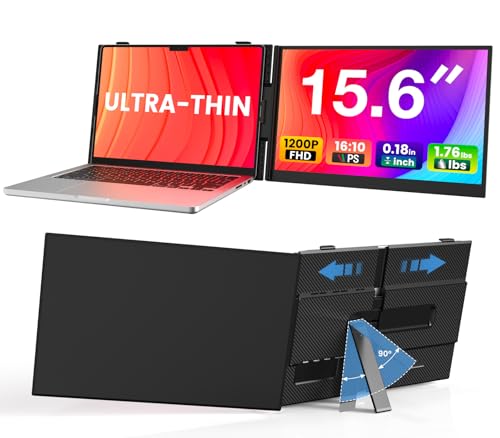
Laptop Screen Extender, Ultra-Thin 15.6" FHD 1200P 16:10 Portable Monitor for Laptop, Lightweight Dual Monitor Extender Plug & Play for 14.2"-17.3" Laptops, Compatible with Wins/Mac/Chrome/Linux
Key Specifications
| Specification | Detail |
|---|---|
| Screen Configuration | Single 15.6-inch panel, clips to the laptop lid |
| Resolution | 1920 x 1200, 16:10, about 145 ppi |
| Panel Type | IPS per SMISEACOW; LCD in Amazon’s fields |
| Refresh Rate | 60Hz |
| Response Time | Not stated |
| Brightness | 300 nits |
| Color Gamut | 100% sRGB |
| Contrast Ratio | 1000:1 |
| Viewing Angle | 178 degrees |
| Screen Finish | Matte |
| Screen Movement | Swings 180 degrees on the bracket; portrait and landscape modes |
| Display Modes | Extend, mirror, duplicate, portrait, landscape |
| Speakers | Not listed |
| Connection | One full-function USB-C port, or HDMI plus a USB port for power |
| Monitor Ports | Amazon counts one USB port; HDMI input type not stated |
| Driver | None |
| Laptop Fit | 14 to 17.3 inches (14.2 in the title); some 14 and 17.3-inch lids fit poorly, per SMISEACOW |
| Mac | Works on M1, M2 and M3 MacBooks as a single extra screen |
| Materials | Aluminium alloy back cover, bracket and stand |
| Panel Thickness | 0.18 inches |
| Weight | 1.78 lb per SMISEACOW; 4.38 lb in Amazon’s field (boxed) |
| Dimensions | 13.86 x 9.34 x 0.62 inches (Amazon’s field, with bracket) |
| Power | From the laptop; a 5V/3A or stronger supply if the screen flickers; adapter in the box not stated |
| In the Box | Not stated |
| Brand | SMISEACOW (the Kwumsy maker) |
| Warranty | Not stated |

Display Performance
1920×1200 on 15.6 inches is about 145 pixels per inch, the density of a standard laptop screen, so a window dragged across from the laptop keeps its size. The extra 120 rows over a 1080P panel of the same width are the reason to want 16:10 on a side screen: a longer page of a document, more spreadsheet rows, more lines of code before you scroll. SMISEACOW calls the panel IPS and gives 178 degrees, which is the figure that matters on a screen that sits at an angle beside the laptop; Amazon’s display fields say LCD, which describes the family rather than contradicting it. 300 nits is enough for an office and a window seat, 100% sRGB is full coverage of the web colour space, and the matte finish keeps the side screen from reflecting whatever is behind you. No response time is given anywhere, and no speakers are listed, so sound stays with the laptop.

The screen swings 180 degrees on its bracket, so it can face you, face the person across the table for sharing, or fold flat against the lid for transport. It also works in portrait, which on a 16:10 panel gives a tall page for reading or a long thread of code. For the older dual-panel approach from the same maker, see the Kwumsy Triple Laptop Screen Extender review.
Bracket, Build and Fit
The back cover, the bracket and the stand are aluminium alloy, which SMISEACOW credits for heat dissipation and scratch resistance and which is the main reason a 15.6-inch panel this thin does not flex. The bracket clips to the laptop lid and retracts to fit different lid heights; SMISEACOW says it puts no pressure on the laptop screen. The fit range is where the listing disagrees with itself: the title says 14.2 to 17.3 inches, the bullets say 14 to 17.3, and the same bullet admits that some 14-inch and 17.3-inch lids do not fit particularly well. Anything from 15 to 16 inches is safe; at either end of the range, ask the seller with your laptop model before ordering. The 0.62-inch depth in Amazon’s field is the panel plus bracket; the panel itself is 0.18 inches.

Connectivity
| Connection | Function |
|---|---|
| USB-C to USB-C | Picture and power from a full-function port (Thunderbolt 3/4, DisplayPort Alt Mode, or a port marked for video output) |
| HDMI plus USB-A | Picture over HDMI, power from a standard USB port |
One cable does it on a laptop whose USB-C port carries video, and because this is a single screen, a base M1, M2 or M3 MacBook drives it in extended mode, which the old dual-panel Kwumsy could not manage on those chips. On a laptop without USB-C video, HDMI carries the picture and any USB port supplies the power, so almost any laptop from the last decade qualifies. Amazon’s port count for the monitor is a single USB port, and the listing does not say what the HDMI input looks like or which cables are in the box, so an HDMI user should confirm both. If the screen flickers or the brightness control stops responding, SMISEACOW says the laptop is not supplying enough power and asks for a 5V/3A or stronger supply on the second port; no adapter is listed. The first bullet also says the extender “can even charge your laptop in reverse”, a claim the listing never explains and one to ask SMISEACOW about rather than plan on. For what a USB-C port has to support, see our USB-C portable monitor guide.
Drawbacks
| Consideration | Detail |
|---|---|
| One Screen, Not Two | This is the D option; the T option on the same listing is the triple. |
| Box Contents Not Stated | Cables, adapter and any case are unknowns. |
| Fit Range Muddled | 14.2 to 17.3 in the title, 14 to 17.3 in the bullets, with a warning about both ends. |
| Response Time Not Stated | No figure from SMISEACOW or Amazon. |
| No Speakers Listed | Sound stays on the laptop. |
| Reverse Charging Unexplained | Claimed in one bullet, described nowhere. |
| Power Supply May Be Needed | Flicker means a 5V/3A supply on the second port, which is not in the listing. |
| Warranty Not Stated | No term anywhere in the listing. |
| Picker Says 15.3″ | The screen is 15.6 inches in every field. |
| Shared Reviews | 524 ratings at 4.2 stars cover both the D and T options. |

Is This Extender Right For You?
If you want one good extra screen that travels attached to the laptop: a 16:10 1200P IPS panel at 300 nits and 100% sRGB, matte, on an aluminium bracket, at 1.78 lb with the panel 0.18 inches thick. It clips on, swings to face a colleague, folds flat, and runs from one cable on any laptop with USB-C video, MacBooks included.
If you have a base M1, M2 or M3 MacBook: this is the kind of extender those chips can use, one screen in extended mode, where the dual-panel Kwumsy S2 gave them only one of its two screens.
If you need two extra screens, a stated warranty or everything listed in the box: the T option on the same listing is the triple, and our comparison pages cover 16:10 extenders whose listings spell out the cables, the adapter and the warranty.
Final Verdict
As a single clip-on screen, this SMISEACOW gets the important things right: a 1920×1200 16:10 panel with a proper spec sheet, 300 nits, 100% sRGB, 1000:1 and 178 degrees, a matte finish, an aluminium bracket that swings 180 degrees and folds flat, and 1.78 lb on the lid. It works on more laptops than the dual-panel Kwumsy did, base M-series Macs included, and one USB-C cable is the whole setup.
The listing is thinner than the product. Nothing in the box is named, the fit range is stated two ways with a caveat at both ends, no warranty or response time is given, and a reverse-charging claim floats unexplained. Ask SMISEACOW about the box and the fit for your laptop, and this is a well-specified 16:10 side screen from a maker that has been in the extender business for a while. For Mac users in particular it is the better choice of the two Kwumsy-family designs this page has covered.
Frequently Asked Questions
Does it work with a MacBook M1, M2 or M3?
Yes, as one extra screen in extended mode. SMISEACOW names those chips directly. The limit on base M-series chips is one external display, and this extender is one display, so it fits within it.
Does my laptop need a special port?
One full-function USB-C port, meaning Thunderbolt 3 or 4, DisplayPort Alt Mode, or a port the maker marks for video output, carries picture and power in one cable. Without one, HDMI carries the picture and any USB port supplies power.
Will it fit my laptop?
SMISEACOW says 14 to 17.3 inches, and in the same sentence that some 14 and 17.3-inch models fit poorly; the title narrows the low end to 14.2. Laptops from 15 to 16 inches are the safe middle. At either end, ask the seller with your model number.
What is in the box?
The listing does not say. Assume the USB-C cable and check with SMISEACOW for the HDMI cable, a power adapter and a case before ordering.
Who is SMISEACOW?
The company that makes and sells the Kwumsy extenders. This screen is sold under the SMISEACOW name on Amazon, alongside the triple version as the T option.
Disclosure: As an Amazon Associate, I earn from qualifying purchases.
End of editorial review · Interactive tools below
FIELD TOOLSFIELD TOOLS
These six tools address the critical decisions every laptop screen extender buyer faces — physical fit, hinge safety, OS display limits, setup complexity, form factor selection, and travel readiness. Each tool is category-level: they work for any extender, not just the one reviewed above. Full buying guide →