
ZSCMALLS 4K Portable Monitor Review
Discover the ZSCMALLS 4K Portable Monitor—your whimsical tech sidekick. With stunning visuals and portable charm, it's like a screen-centric spa day!
4K on a 15.6-inch portable monitor means 3840 x 2160 pixels, which is approximately 282 PPI. That is double the pixel density of a 1080P panel at the same size (141 PPI). Text is sharper. Images have more detail. UI elements are crisper. For graphic design, photo editing, and video production, the difference between 1080P and 4K on a 15.6-inch screen is visible and meaningful. The ZSCMALLS delivers this at 1500:1 contrast, 350 nits, 100% sRGB, 1ms response, 178° viewing angles, and 1.1 lbs with a 2-year warranty and lifetime technical support.
The practical question with 4K on a portable is whether your device can output 4K and whether the extra resolution is worth the GPU load. For productivity and creative work, the answer is usually yes. For casual browsing, the difference from 1080P is less dramatic.

ZSCMALLS 4K Portable Monitor, 15.6" 3840 * 2160 Laptop Extended Monitor, 1500:1 100% sRGB USB-C HDMI Portable Gaming Monitor HDR Travel Monitor with Speakers & Smart for Laptop PS5/4 Xbox Switch
Key Specifications
| Specification | Detail |
|---|---|
| Screen Size | 15.6 inches |
| Resolution | 3840 x 2160 (4K UHD) |
| Panel Type | LCD (display type) / LED (display technology) / IPS (bullets) |
| Refresh Rate | 60Hz |
| Response Time | 1ms |
| Color Gamut | 100% sRGB, 16.7M colors |
| Contrast Ratio | 1500:1 |
| Brightness | 350 nits (bullets) / 350 lm (Amazon) |
| Viewing Angle | 178° |
| Aspect Ratio | 16:9 |
| Screen Finish | Glossy |
| HDR | Yes (per bullets) |
| Eye Care | Blue light filter |
| Speakers | Built-in |
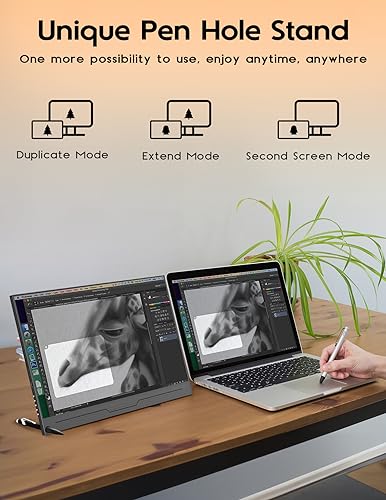
| Stand | Pen hole design (insert pen as stand) |
| Cover | Smart cover case included |
| Design | Frameless, wall mountable |
| Ports | 2x USB-C 3.1 (full-function), 1x Mini-HDMI, 3.5mm headphone jack |
| Compatible Devices | Laptop, PC, PS4/PS5, Xbox, Switch, Mac, camera, phone |
| Weight | 1.1 lbs |
| Dimensions | 14.17″ D x 8.94″ W x 0.41″ H |
| Warranty | 2 years + lifetime technical support |

4K at 282 PPI
3840 x 2160 on 15.6 inches produces approximately 282 PPI. For comparison, the same screen size at 1080P produces 141 PPI. The density difference is visible in text rendering (smoother edges, finer detail), image work (more actual pixels to work with at native resolution), and UI clarity. For graphic designers and video editors who need to see fine detail on a portable screen, 4K provides workspace that 1080P cannot match at this size.

The trade-off: 4K at 60Hz requires more GPU power than 1080P. Your laptop must support 4K output through its USB-C or HDMI port. Older or lower-spec laptops may default to a lower resolution. For USB-C requirements, see our USB-C portable monitor guide.
Above-Standard Display Specs
1500:1 contrast is 50% above the 1000:1 baseline, providing deeper blacks and more visual separation. 350 nits is above the 300-nit standard, offering better visibility in bright environments. 100% sRGB with 16.7M colors covers the full standard color space. 1ms response time provides clean motion at 60Hz. 178° viewing angles maintain accuracy from off-center positions. Blue light filter reduces strain during long editing sessions.
The Amazon display type says LCD and display technology says LED. The bullets describe the panel as “4K IPS.” The glossy finish enhances color vibrancy but reflects ambient light. For a ZSCMALLS model at a different resolution, see the ZSCMALLS Portable Monitor review.

Pen Hole Stand
The bottom of the monitor has a hole designed to accept a pen, which props the screen up at an angle. It is a simple, tool-free solution that works anywhere without carrying a separate stand. The included smart cover case provides an alternative stand option and screen protection during transport. Wall mounting is listed in the additional features for permanent installations.
What’s in the Box
| Item | Included |
|---|---|
| 15.6″ 4K Portable Monitor | 1 |
| Type-C to Type-C Cable (power + video) | 1 |
| Mini-HDMI to HDMI Cable (video only) | 1 |
| Power Charger | 1 |
| Smart Cover Case | 1 |
Drawbacks
| Consideration | Detail |
|---|---|
| 4K Requires GPU Power | Older or lower-spec laptops may not output 4K. |
| Glossy Finish | Reflects ambient light despite 350-nit brightness. |
| Panel Type Unclear | LCD/LED in specs, IPS in bullets. |
| Brightness Unit | “350 lm” (Amazon) vs “350 nits” (bullets). |
| White Power Cord Required | Bullets recommend using the included white power cord for optimal performance. |
Who This Monitor Is For
Creative professionals who need 4K detail on a portable screen: 282 PPI, 100% sRGB, 1500:1 contrast, 350 nits, 1ms, and 1.1 lbs. This combination serves graphic designers, photo editors, and video producers who work away from their primary monitors and cannot afford to lose resolution. The 2-year warranty with lifetime tech support adds confidence. For a 4K alternative, see the 4K Portable Monitor review.
Users who only need 1080P or want matte finish: If your work does not benefit from 4K density, a 1080P portable at lower cost and lower GPU demand may serve better. The glossy finish is a limitation for bright environments despite the 350 nits. Our comparison pages cover matte and 1080P alternatives.
Final Verdict
The ZSCMALLS 4K portable monitor puts 3840 x 2160 resolution on a 15.6-inch screen at 1.1 lbs. The combination of 4K, 1500:1 contrast, 350 nits, 100% sRGB, 1ms response, pen hole stand, smart cover, built-in speakers, and 2-year warranty with lifetime support creates a premium portable package for creative professionals. The resolution is confirmed cleanly across all Amazon fields with no conflicts.
4K requires a capable GPU. The glossy finish competes with the 350-nit brightness in bright rooms. The white power cord recommendation suggests the monitor is power-sensitive. For users whose work demands the detail that only 4K provides on a portable, the ZSCMALLS occupies that space at a remarkably light weight. For users whose work lives comfortably at 1080P, the 4K premium is unnecessary.
Frequently Asked Questions
Is 4K noticeable on a 15.6-inch screen?
Yes. At 282 PPI (vs 141 PPI for 1080P), text rendering, image detail, and UI elements are visibly sharper. The difference is most apparent in graphic design, photo editing, and any work where fine detail matters.
What is the pen hole stand?
A hole at the bottom of the monitor that accepts a standard pen. Insert the pen, lean the monitor against it, and you have an instant stand without carrying additional accessories.
Does my laptop need to support 4K?
Yes. Your laptop must output 4K through USB-C (USB 3.1 or Thunderbolt) or HDMI. If your laptop does not support 4K output, the monitor may display at a lower resolution.
Disclosure: As an Amazon Associate, I earn from qualifying purchases.
End of editorial review · Interactive tools below
FIELD TOOLSFIELD TOOLS
These six tools address the critical decisions every laptop screen extender buyer faces — physical fit, hinge safety, OS display limits, setup complexity, form factor selection, and travel readiness. Each tool is category-level: they work for any extender, not just the one reviewed above. Full buying guide →