
KEFEYA 14″ Laptop Screen Extender, Upgraded 360° Rotation Dual Monitor Review
Explore the 14'' Triple Laptop Monitor Extender—a multitasking marvel. With a sleek design and easy setup, expand your workspace effortlessly. Plug, play, and flourish!
KEFEYA’s F3 is a dual-panel 14-inch triple screen extender with an all-aluminum alloy base that holds the laptop without clamping to the lid. Each IPS panel delivers 1080P at 300 nits, 72% NTSC, 1000:1 contrast, 5ms response time, 60Hz, matte finish with anti-glare and blue light filter, and built-in speakers. The screens rotate 360° and detach for independent use at 1.2 lbs each. The aluminum base stretches to fit 12-17.3 inch laptops and provides heat dissipation. Mac M1/M2/M3 is NOT directly compatible and requires a separate HDMI adapter with MST (sold separately). Total weight 7.9 lbs. Same manufacturer as Teamgee, Cenerius, and Kakuka (Shenzhen Baijiayoupu). 90-day warranty.

KEFEYA 14'' Triple Laptop Monitor Extender with Metal Base, 360° Rotation 1080P Portable Laptop Screen Extender for 12-17.3'' Laptops-Compatibility for Windows, Surface, MacBook, Switch, Plug & Play


Key Specifications at a Glance
| Specification | Detail |
|---|---|
| Screen Configuration | Dual 14-inch panels (detachable) + aluminum base |
| Resolution (per screen) | 1920 x 1080 (Full HD) |
| Panel Type | IPS (confirmed in display technology) |
| Refresh Rate | 60Hz |
| Response Time | 5ms |
| Color Gamut | 72% NTSC (~100% sRGB), 16.7M colors |
| Contrast Ratio | 1000:1 |
| Brightness | 300 nits |
| Viewing Angle | Not specified in Amazon data |
| Aspect Ratio | 16:9 |
| Screen Finish | Matte, anti-glare |
| Eye Care | Blue light filter |
| Speakers | Built-in |
| Rotation | 360° (horizontal and vertical) |
| Screen Thickness | 9mm per panel |
| Screen Weight | 1.2 lbs per panel |
| Base Material | All-aluminum alloy, stretchable |
| Base Feature | Heat dissipation, adjustable for 12-17.3″ laptops, doubles as storage |
| Display Modes | Extension, mirroring, portrait, landscape |
| Memory Function | Yes (retains brightness/contrast/RGB settings) |
| Connectivity | USB-C (full-featured), HDMI, Mini-HDMI, USB-A |
| Mac M1/M2/M3 | NOT directly compatible. Requires separate HDMI adapter with MST. |
| OS Compatibility | Windows, Mac (with adapter), Linux, Android, Surface, Switch, Xbox, PS4/5 |
| Total Weight | 7.9 lbs (stand 5.2 lbs + screens) |
| Manufacturer | Shenzhen Baijiayoupu Technology Co., Ltd. |
| Warranty | 90 days |
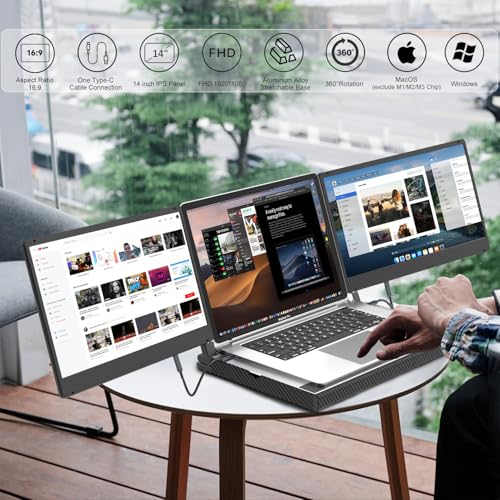
Aluminum Base Design
The all-aluminum base replaces lid clamping. The laptop sits on the stretchable base, which adjusts to fit 12-17.3 inch laptops including Surface and MacBook. The aluminum provides heat dissipation to help maintain laptop performance. The base doubles as storage for the detachable screens when not in use. Each screen weighs 1.2 lbs at 9mm thickness and comes with a leather carry case for individual travel. For a KEFEYA model without the metal base, see the KEFEYA 14″ 360° Rotation review.
Display and Settings Memory
IPS is confirmed in the Amazon display technology field. 72% NTSC (~100% sRGB) covers the standard web color space. 300 nits handles indoor and mixed-light environments. Matte finish with anti-glare reduces reflections. Blue light filter protects eyes. Built-in speakers handle calls and media. The memory function retains brightness, contrast, and RGB settings between sessions, eliminating re-adjustment on each connection. For USB-C requirements, see our USB-C portable monitor guide.

Mac M1/M2/M3 Limitation
The product bullets explicitly state the F3 is “Not for M1/M2/M3 Chip MacBook Pro/Air directly.” To connect both screens on these Mac models, a separate HDMI adapter with MST (Multi-Stream Transport) is required. KEFEYA references their “H6 video signal conversion hub” as a compatible solution (sold separately). This adds cost and complexity for Mac M-series users. For KEFEYA products from the same manufacturer with different Mac compatibility, see the KEFEYA 14″ FHD IPS review.
What’s in the Box
| Item | Quantity |
|---|---|
| 14″ FHD Portable Monitor | 2 |
| Stretchable Metal Base | 1 |
| USB-C to USB-C Cable | 2 |
| USB-A to USB-C Cable | 2 |
| HDMI to Mini-HDMI Cable | 1 |
| Single-Screen Travel Bag | 1 |
| Single-Screen Stand | 1 |
| User Manual + Quick Guide | 1 |
Potential Drawbacks to Consider
| Consideration | Detail |
|---|---|
| 90-Day Warranty | Well below the 1-year standard. Shortest warranty in the category. |
| Mac M1/M2/M3 Not Direct | Requires separate MST adapter (additional purchase). |
| 7.9 lbs Total | Heavy desk setup. Stand alone is 5.2 lbs. |
| 5ms Response Time | Adequate but slower than 1-2ms competitors. |
| Viewing Angle Not Specified | Not listed in Amazon data. |

Who This Monitor Is Best For
Windows users who want a no-clamp triple setup with aluminum cooling base: IPS confirmed, 72% NTSC, 300 nits, matte anti-glare, settings memory, and 360° rotation across two detachable screens on an aluminum base. Five cables and a travel bag included. The base stretches for 12-17.3″ laptops.

Mac M-series users: NOT directly compatible. Requires additional MST adapter purchase. Factor the adapter cost and complexity into the decision.
Final Verdict
KEFEYA’s F3 provides a dual 14-inch IPS triple screen extender on an all-aluminum base with 300 nits, 72% NTSC, matte anti-glare, blue light filter, 360° rotation, detachable 1.2 lb screens, settings memory, and built-in speakers. The aluminum base adds heat dissipation and doubles as monitor storage. Five cables, a standalone stand, and a leather carry case are included. Same manufacturer family as Teamgee, Cenerius, and Kakuka.
The 90-day warranty is the shortest in the category and a significant concern. Mac M1/M2/M3 requires a separate adapter. The 7.9 lb total weight makes this a desk setup. For Windows users who want a no-clamp aluminum base triple setup with confirmed IPS and matte finish, the F3 delivers those features. For users who need longer warranty coverage, direct Mac M-series support, or lighter weight, alternatives are available across our comparison pages.
Frequently Asked Questions
Does it work with MacBook M1/M2/M3?
Not directly. The product bullets state it requires a separate HDMI adapter with MST (Multi-Stream Transport) for dual-screen functionality on M1/M2/M3 MacBooks. KEFEYA sells a compatible “H6” adapter separately.
Why is the warranty only 90 days?
The Amazon data lists “90 Days Manufacturer Warranty.” This is the shortest warranty in the extender category, where 1-2 years is standard. Factor this into the purchase decision.
Can I take just one screen on a trip?
Yes. Each screen detaches at 1.2 lbs and 9mm thickness. A single-screen standalone stand and leather carry case are included for individual travel.
Disclosure: As an Amazon Associate, I earn from qualifying purchases.
End of editorial review · Interactive tools below
FIELD TOOLSFIELD TOOLS
These six tools address the critical decisions every laptop screen extender buyer faces — physical fit, hinge safety, OS display limits, setup complexity, form factor selection, and travel readiness. Each tool is category-level: they work for any extender, not just the one reviewed above. Full buying guide →