
ROYY Laptop Screen Extender Review
Double your screen space with the ROYY Laptop Screen Extender. Perfect for multitaskers, it offers vibrant visuals and easy setup. Boost productivity effortlessly!
ROYY’s S8 is a single 14-inch 1080P IPS portable monitor built to sit beside a laptop as a second screen. It is 0.19 inches thick and 1.3 lb, with a matte finish, 300 nits, a 1000:1 contrast ratio, a 178-degree viewing angle, a 60Hz refresh rate and a 3ms response time. It runs from one USB-C cable on a laptop with a full-function port, or from HDMI plus a USB-A power lead on anything else, with no driver on Windows, Mac, Android, Linux, PlayStation 4, Xbox or Switch. A reinforced damping stand holds it at any angle and rotates it 90 degrees for portrait work. It is sized for 13 to 17.3-inch laptops, it is FreeSync and G-Sync Compatible, and ROYY backs it with a 1-year warranty.

ROYY Laptop Screen Extender, 14" 1080P FHD IPS Portable Monitor | Plug & play, 0.19" Ultra-Thin Laptop Monitor, Fits 13-17.3" laptops
Key Specifications at a Glance
| Specification | Detail |
|---|---|
| Screen Configuration | Single 14-inch panel |
| Resolution | 1920 x 1080 (Full HD) |
| Panel Type | IPS, LED backlight |
| Refresh Rate | 60Hz |
| Response Time | 3ms |
| Color Gamut | 72% NTSC (Amazon’s spec field says 70) |
| Contrast Ratio | 1000:1 |
| Brightness | 300 nits |
| Viewing Angle | 178° |
| Aspect Ratio | 16:9 |
| Screen Finish | Matte |
| Adaptive Sync | FreeSync, G-Sync Compatible |
| Stand | Reinforced damping hinge, 90° rotation for landscape or portrait |
| Display Modes | Extension, mirror, second screen |
| Ports | 1 x USB-C (full-function), 1 x HDMI, 1 x USB-C for USB-A power |
| Cables Included | USB-C to USB-C, HDMI, USB-C to USB-A |
| Laptop Fit | 13″ to 17.3″ |
| OS Compatibility | Windows, Mac, Android, Linux, PS4, Xbox, Switch |
| Thickness | 0.19″ |
| Weight | 1.3 lb (Amazon’s 3.92 lb figure is the boxed weight) |
| Dimensions | Not given for the panel; 8 x 7 x 1.6 inches is the box |
| Speakers | Not stated |
| Model | S8 |
| Warranty | 1 year |

Display Performance
A 14-inch 1080P panel puts about 157 pixels in every inch, a little denser than a 15.6-inch laptop screen, so text stays crisp at 100 percent scaling and a spreadsheet fits comfortably. IPS gives the 178-degree viewing angle, which matters on a side screen that is always turned a few degrees toward you. 300 nits is enough for offices, kitchen tables and cafes, and the matte finish keeps window glare off it. The 1000:1 contrast ratio is the ordinary IPS figure and looks like one.

Colour is where the S8 is an office panel rather than a creative one. ROYY quotes 72% NTSC, roughly the sRGB space, which is the standard coverage for a budget portable: fine for documents, browsing and video, not aimed at colour-critical editing. The 60Hz refresh and 3ms response are the numbers that make motion comfortable, and the panel is FreeSync and G-Sync Compatible, which smooths frame pacing when a console or a gaming laptop is plugged in. For a ROYY with two screens, see the ROYY Triple Monitor Extender review.
Damping Stand and Design
The S8 does not clip to the laptop. It stands on its own beside it, on a hinge that ROYY calls a damping stand: a reinforced joint with enough friction to hold the screen at whatever angle you set without drifting or wobbling. The stand rotates the panel through 90 degrees, so it can stand in portrait for a long document, a code file or a stock ticker, and back to landscape for everything else. The 13 to 17.3-inch range ROYY quotes is about matching laptop sizes; there is no clip or mount.
The panel is 0.19 inches thick and 1.3 lb. If you see 3.92 lb and 8 by 7 by 1.6 inches quoted for it, that is the box; a 14-inch panel cannot be 8 inches wide.
Connectivity
| Connection | Cables Needed |
|---|---|
| USB-C (full-function) | 1x USB-C to USB-C (video + power) |
| HDMI + USB-A | 1x HDMI (video) + 1x USB-C to USB-A (power) |
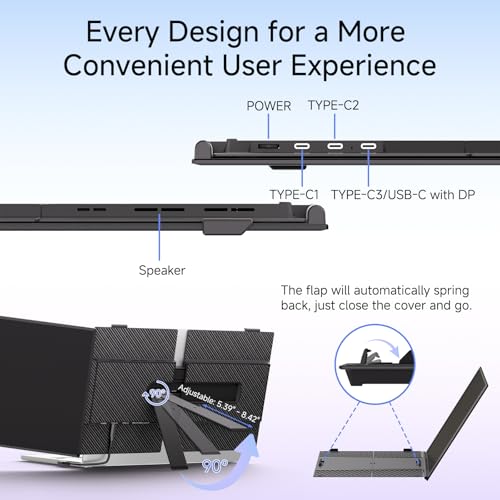
Plug and play with no driver. All three cables come in the box. The USB-C route needs a laptop port that carries video, which ROYY calls full-function; on a laptop or console without one, the HDMI cable carries the picture and the USB-A lead carries the power. The cables have to go into the right sockets on the back of the monitor, and some older machines, Surface models among them, lack the ports this needs. Supported sources are Windows, Mac, Android, Linux, PS4, Xbox and Switch. ROYY does not say whether the HDMI socket is full-size or mini, so use the supplied cable or check before buying your own.

Potential Drawbacks to Consider
| Consideration | Detail |
|---|---|
| One Screen | A single second display, not a dual or triple extender. |
| Standard Color Gamut | 72% NTSC. Not for colour-critical work. |
| No Speakers Mentioned | Assume none. |
| HDMI Socket Type Unclear | ROYY does not say full-size or mini. |
| 1-Year Warranty | Shorter than ROYY’s earlier 3-year cover. |
| 1000:1 Contrast | Standard baseline. |
Who This Monitor Is Best For
Anyone who wants one light, thin second screen for a laptop: At 0.19 inches and 1.3 lb it disappears into a laptop sleeve, sets up with a single USB-C cable, and stands on its own hinge at any angle. Documents on the laptop, reference or chat on the ROYY.
Portrait workers: Coders, writers and anyone who watches a long feed get a 90-degree rotation on a stand that holds the position.
Console and gaming laptop owners: HDMI, FreeSync and G-Sync Compatible, 3ms, and ROYY names PS4, Xbox and Switch.
Who Should Look Elsewhere
Users who need two extra screens or wide colour: The S8 is a single 14-inch panel with standard gamut. For dual or triple extenders and monitors with wider colour, our comparison pages cover the options.
Pros and Cons
| Pros | Cons |
|---|---|
| 0.19″ thin and 1.3 lb | Single screen only |
| 1080P IPS, 300 nits, 178° viewing angles | Standard 72% NTSC gamut |
| Matte finish | No speakers mentioned |
| 60Hz, 3ms, FreeSync and G-Sync Compatible | HDMI socket type unclear |
| Damping stand with 90° rotation | Single-cable use needs a full-function USB-C port |
| One-cable USB-C or HDMI plus USB-A, all cables included | 1-year warranty |
| Windows, Mac, Android, Linux, PS4, Xbox, Switch | Older devices such as some Surface models lack the ports |
Final Verdict
ROYY’s S8 is a plain, well-judged second screen. The 14-inch 1080P IPS panel, matte finish, 300 nits and 178-degree viewing angle are exactly what a document-and-browser side screen needs, and the damping stand with its 90-degree rotation is a more useful piece of hardware than the clips on many extenders, because it holds an angle and turns to portrait. One USB-C cable or HDMI plus USB-A, no driver, and cables for both in the box.
Its limits are ordinary ones. It is one screen, the colour gamut is standard, ROYY’s earlier 3-year warranty has become a 1-year one, and ROYY says nothing about speakers or the HDMI socket type. For a light, thin, driver-free 14-inch second screen that stands on its own, the S8 does the job; for two extra screens or wide colour, look at the alternatives.
Frequently Asked Questions
Does it attach to the laptop?
No. The S8 stands on its own damping hinge next to the laptop. The 13 to 17.3-inch range is about matching laptop sizes, not a clip or mount.
Can it run from one cable?
Yes, on a laptop whose USB-C port carries video and power. On other devices use the HDMI cable for video and the USB-C to USB-A cable for power; both are included.
What does 72% NTSC mean?
It is roughly the sRGB colour space, the standard for web and office content. Colours look normal rather than extra-saturated, and it is not the coverage to choose for print or colour-graded video work.
Does it work with a games console?
Yes. PS4, Xbox and Switch connect over HDMI with the USB-A power lead, and the panel is FreeSync and G-Sync Compatible at 60Hz.
Disclosure: As an Amazon Associate, I earn from qualifying purchases.
End of editorial review · Interactive tools below
FIELD TOOLSFIELD TOOLS
These six tools address the critical decisions every laptop screen extender buyer faces — physical fit, hinge safety, OS display limits, setup complexity, form factor selection, and travel readiness. Each tool is category-level: they work for any extender, not just the one reviewed above. Full buying guide →